5 Managing Patients and Equipment
128
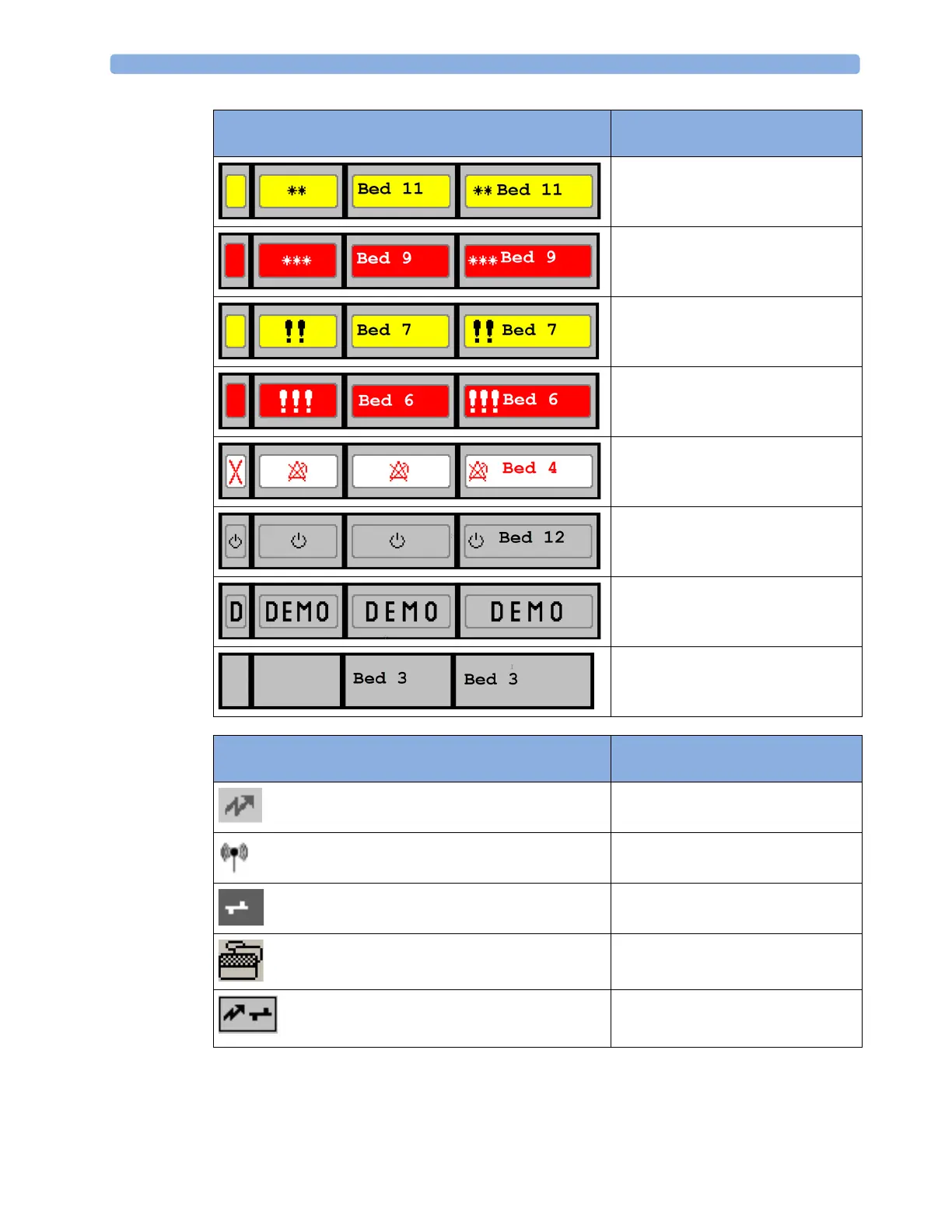
The highest priority alarm from this bed is a
yellow alarm
The highest priority alarm from this bed is a
red alarm
The highest priority alarm from this bed is a
yellow INOP
The highest priority alarm from this bed is a
red INOP
The alarms at this bed are suspended. The
same symbols in yellow indicate that yellow
alarms are suspended (PIIC iX only).
Equipment at this bed is in standby mode
Equipment at this bed is in Demonstration
mode
The current bed
Connection Symbols (used in the Alarm Status overview bar and
the My Patients window)
This is a telemetry bed.
This bed is on a wireless network.
This bed is on a wired network.
PIIC iX only: Patient has multiple devices
assigned.
PIIC only: This is a "paired" bed, with a
bedside monitor and a telemetry transmitter
assigned.
Alarm Status Symbols (four alternative display possibilities
depending on space available)



 To Next Page