1Introduction
18
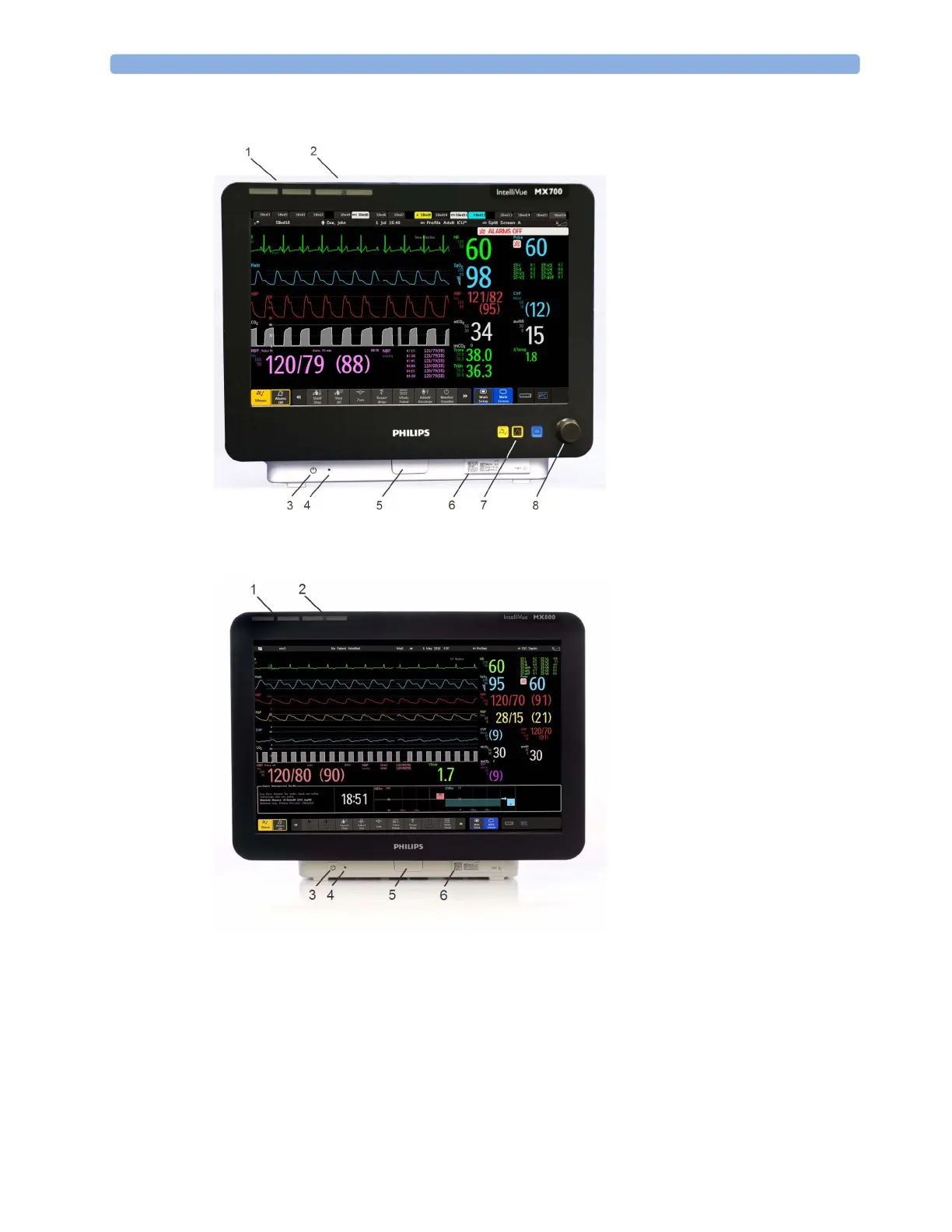
MX600/700
MX800
Devices for Acquiring Measurements
The patient monitor acquires patient measurements using the devices described in this section. You
can also extend the measurement capabilities of your monitor with such devices. Of these
measurement devices, only the X2 has its own power on/standby switch, and can be powered from an
external power supply or a rechargeable battery when not directly connected to the monitor (refer to
the IntelliVue X2 Instructions for Use for details). All the rest take their power exclusively from the
1 Color coded alarm lamps
2 Alarms Off lamp
3 Power on/Standby switch with
integrated LED: Green - On/
Standby, Red - Error
4 AC power LED
5 Mounting quick-release lever
(when this is pressed the
monitor is not fixed on the
mounting)
6 Part number and serial number
7 Hardkeys (Silence, Alarms Off,
Main Screen)
8 Navigation knob
1 Color coded alarm lamps
2 Alarms Off lamp
3 Power on/Standby switch with
integrated LED: Green - On/
Standby, Red - Error
4 AC power LED
5 Mounting quick-release lever
(when this is pressed the
monitor is not fixed on the
mounting)
6 Part number and serial number



 To Next Page