1Introduction
34
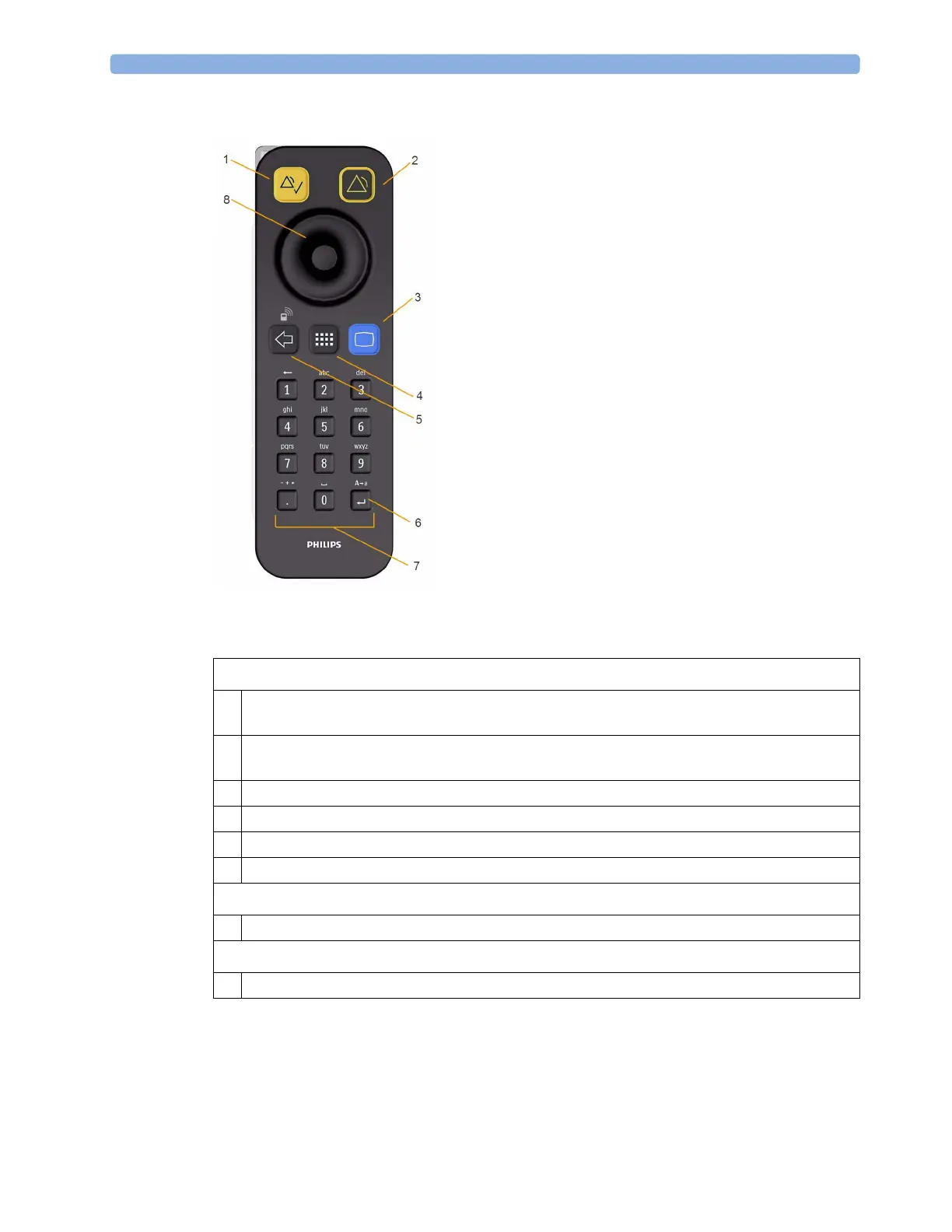
Using the Remote Control
The remote control provides you with direct access to five hard keys, a navigation knob and a numeric
keypad:
The remote control can be used with a USB cable connection to the monitor or without a cable using
short range radio. When used without a cable, the remote control must be assigned to the monitor.
The assignment is made in Configuration or Service mode.
Hardkeys
1 Silence - acknowledges all active alarms by switching off audible alarm indicators and lamps.
Behavior follows the Silence permanent key configuration.
2 Alarms Off/Pause Alarms - pauses alarm indicators. Behavior follows the Pause Alarms
permanent key configuration.
3 Main Screen - close all open menus and windows and return to the main screen.
4 SmartKeys - display a block of SmartKeys specially configured for remote tasks (see below)
5 Back - go back one step to the previous menu.
6 Enter - mark the end of data entry
Keypad
7 Type numeric data on the keypad and press the Enter key to enter the data on the monitor.
Navigation knob
8 Rotate the knob to highlight screen elements, then press to select the highlighted element.



 To Next Page