28 Recording
365
Recorder Status Messages
Electronic Recording
Electronic recording allows alarm-triggered reports to be captured electronically in the monitor
database. They can then be printed when a printer is available. The printer can be locally connected at
the USB interface, a central printer connected to the Information Center or the XDS Printing Service
that is part of the IntelliVue XDS Application. With an XDS print server, the reports can be printed to
a standard off-the-shelf printer and can also be stored as files (e.g. .jpg, .bmp or .pdf) on the associated
PC.
Capturing Alarm Events
The monitor can be set up to automatically capture alarm events, triggered by selected alarms.
When one of the selected alarms occurs, the monitor automatically captures the alarm and creates a
realtime report which is stored in the database.
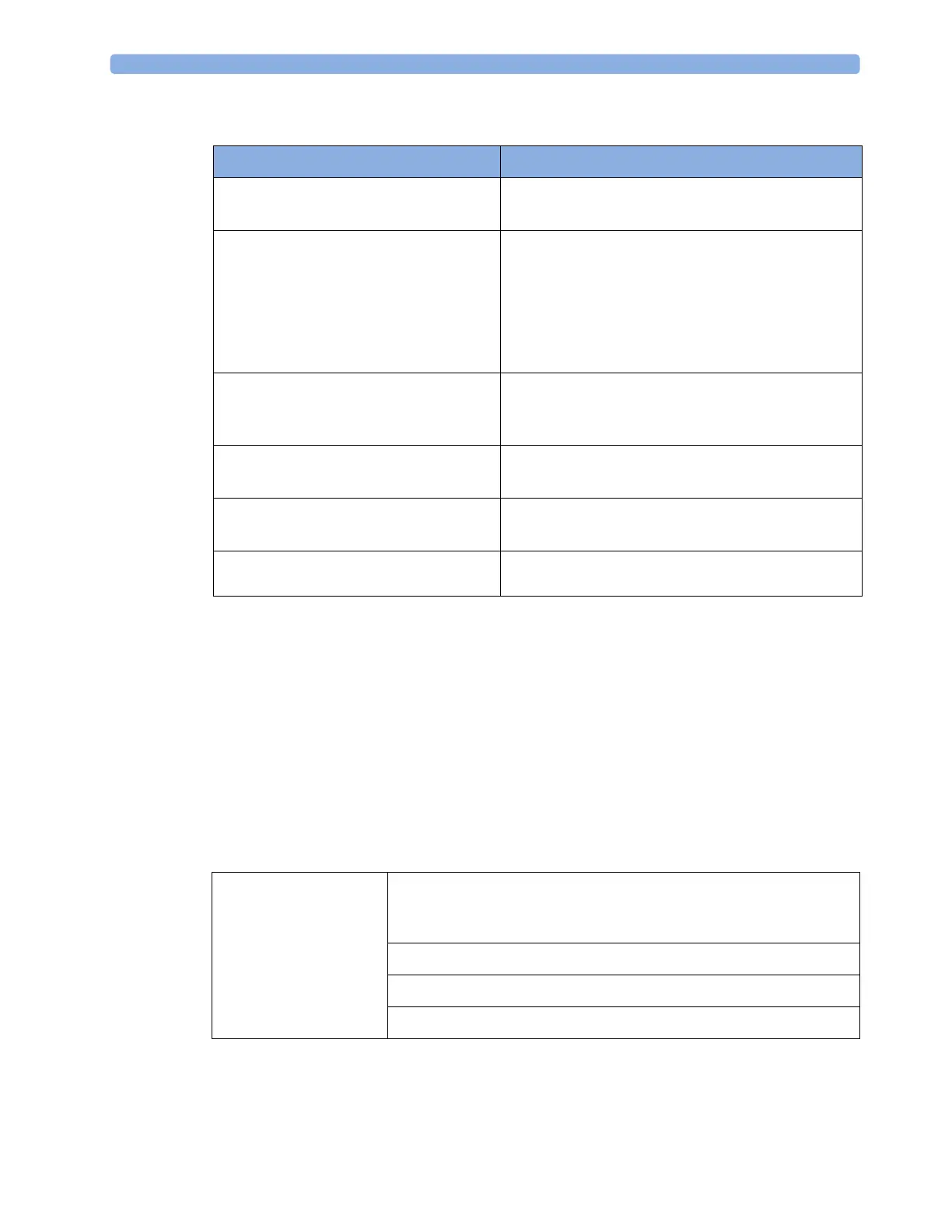
Recorder Status Messages Explanation
For example:
Local alarm recording running
The named recording is currently running.
No Central alarm recording available
No local alarm recording available
No alarm recording can be made on the selected
recorder. Try selecting another recorder. If a local
recorder was selected, the monitor will try to reroute the
recording to a central recorder. Recordings configured
to a central recorder cannot be rerouted to a local
recorder. Alarm recordings may be lost. Try configuring
Printer as the alarm recording destination.
No alarm recording available No recorder available. Alarm recordings will be lost.
Try configuring
Printer as the alarm recording
destination.
Central Recorder out of paper
Local Recorder out of paper
The named recorder is out of paper.
Central Recorder door open
Local Recorder door open
The door of the specified recorder is open.
<Recorder Type> not supported The M1116A recorder is not supported. Connect a
M1116B/C plug-in recorder.
All settings must be
made in Configuration
mode.
The output device for alarm recordings is set to "printer".
This automatically makes the alarm event documentation a realtime
report.
The target device for realtime reports is set to "database"
The alarms to trigger the report are set up.
The database is set to print automatically when a printer is available.



 To Next Page