24 Calculations
326
Viewing Calculations
• Select the Calcs SmartKey to open the Calculations window.
• Select the
Calc Type field and select the required calculation type for display.
Calculations Windows
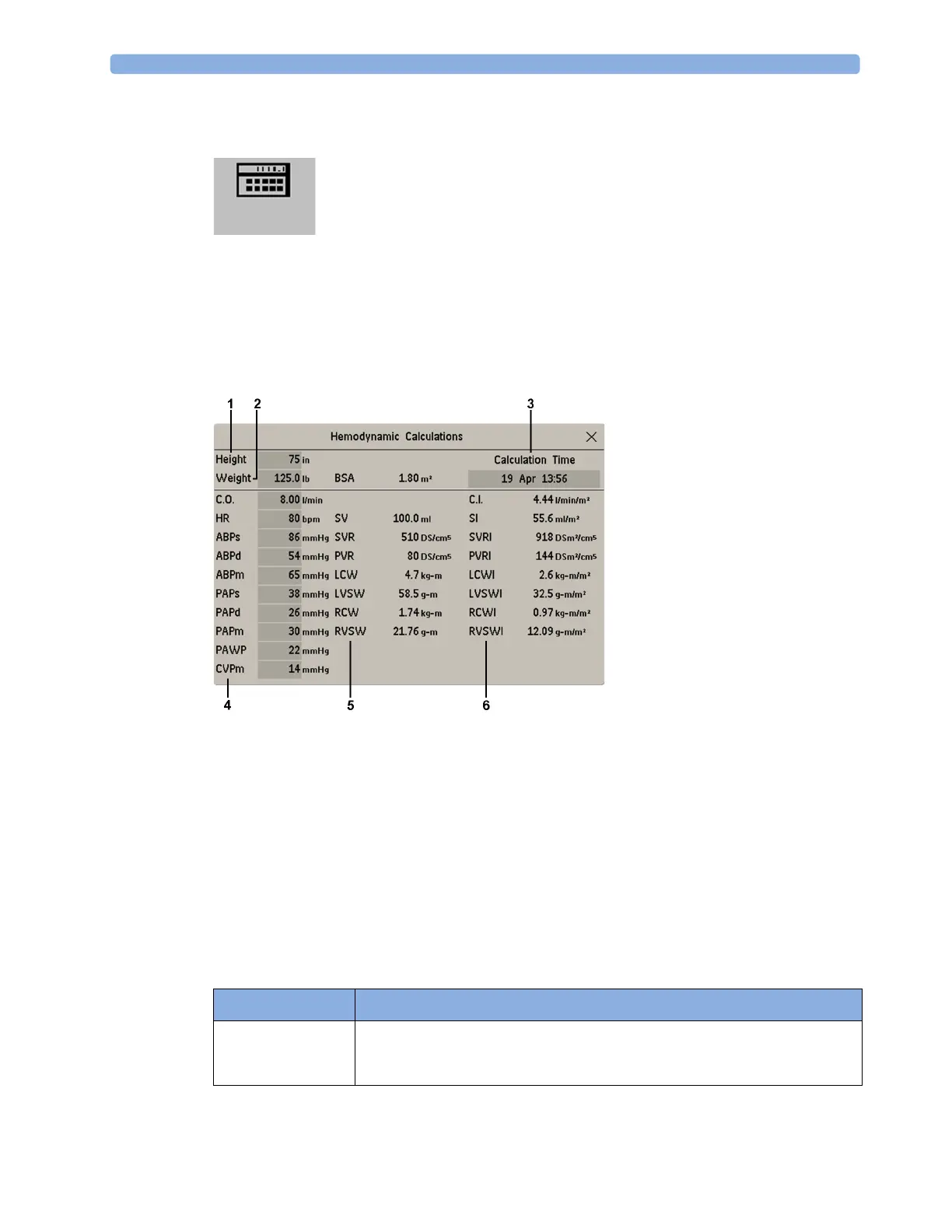
This example calculations window shows the Hemodynamic Calculations window. The ventilation
and oxygenation windows are similar.
1 Height used for the calculations
2 Weight used for the calculations
3 Calculation Time
4 Calculations input values
5 Output values
6 Indexed calculation values
Calculations Pop-Up Keys
Depending on the calculations group you choose, a selection of pop-up keys will appear to let you
navigate through the stored events and carry out calculations-related tasks.
Pop-Up Keys Selecting this pop-up key lets you....
Resample Vitals use the most recent monitored values. Resampling sets the calculation time to
the current time, and displays the corresponding values for the previous
second.



 To Next Page