1 Introduction
23
X2 Overview
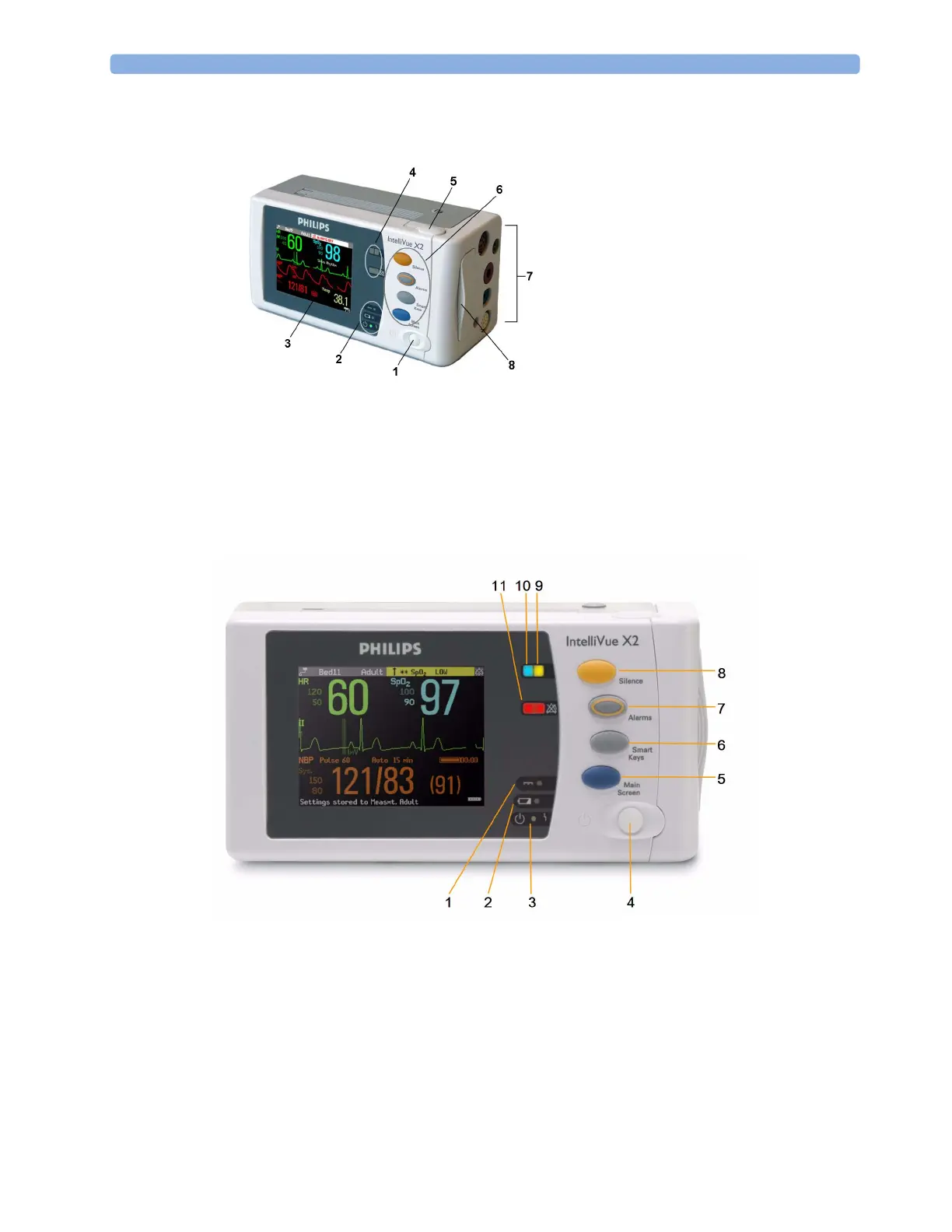
X2 Controls and Indicators
1 External power LED. Green when monitor is powered from an external power source.
2 Battery status LED. Yellow when charging. Flashing red when battery is empty.
3 On/Standby LED. Green when monitor is on. Red indicates an error.
4 On/Standby switch. Disabled when X2 is connected to a host monitor
5 Main Screen key: closes all open menus/windows and returns to the main screen.
6 SmartKeys key: brings up SmartKeys on the screen.
7 Alarms key: turns alarms On/Off, or pauses them.
1 On/Standby switch
2 Power and battery indicators (see “X2
Controls and Indicators” on page 23)
3 3.5-inch TFT LCD touchscreen QVGA
display
4 Alarm lamps (see “X2 Controls and
Indicators” on page 23)
5 Battery eject button
6 Hard keys (see “X2 Controls and
Indicators” on page 23)
7 Measurement connectors (see “X2 Patient
Connectors, Right Side” on page 24)
8 Battery compartment



 To Next Page