26 Event Surveillance
343
Documenting Event Review
1 In the Event Review window, select the pop-up key Print/ Record. This calls up the event
documentation pop-up keys.
2 For a graphic Event Review recording, select the Record Graphic pop-up key.
For a tabular Event Review recording, select the
Record Tabular pop-up key.
For a CAR review report, select the
Print CAR pop-up key
To print an Event Report, select the
Print Review pop-up key.
Documenting an Event Episode
1 In the Event Episode window, select the pop-up key Print/ Record. This calls up the event
documentation pop-up keys.
2 To make an Event Episode recording, select the Record pop-up key.
To print an Event Episode, select the
Print Episode pop-up key.
Event Recordings
Event recordings can be sent to a locally-connected M1116B/C recorder module.
Event Review Recordings
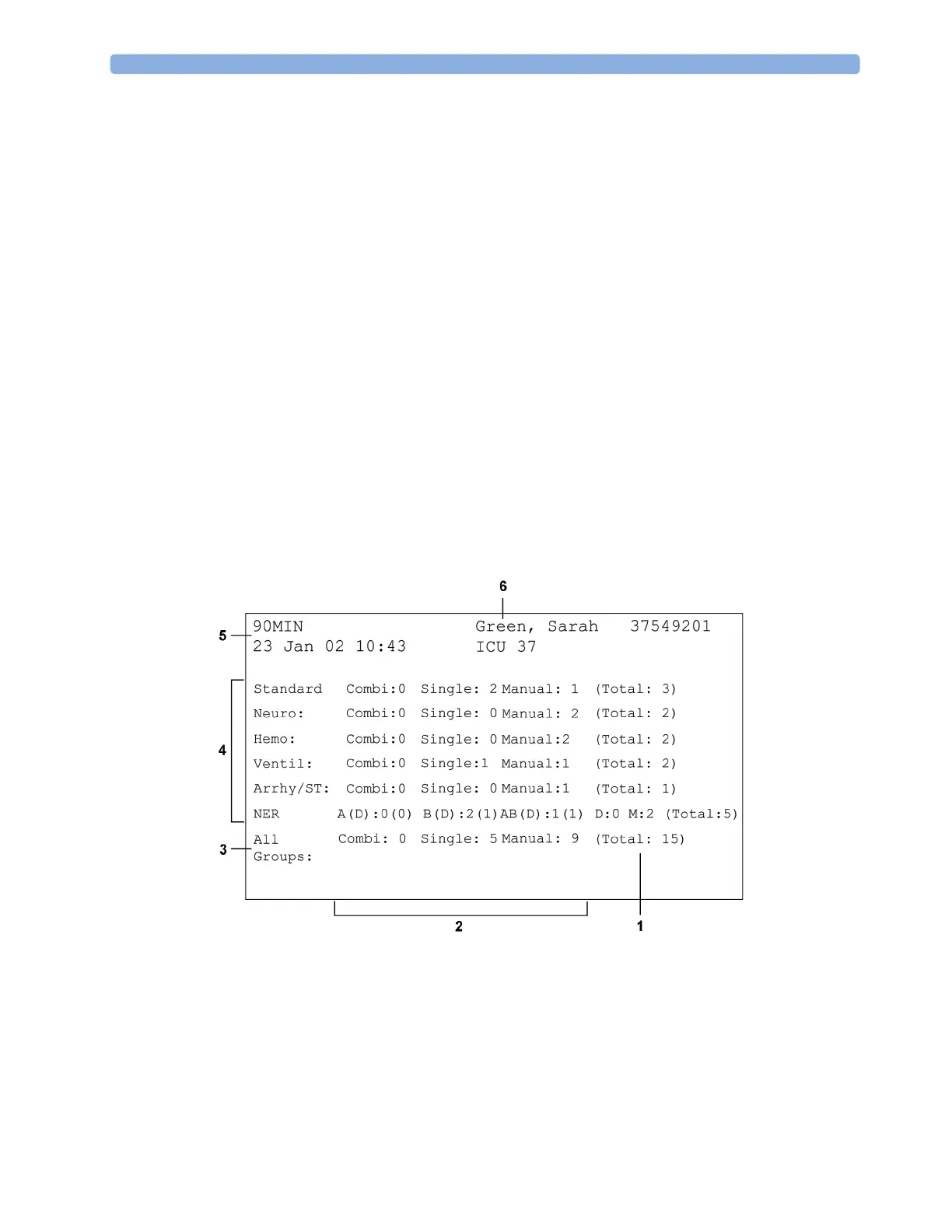
Each event review recording strip begins with a summary of the events stored in the event database.
Recording strip annotation is explained in the Recording chapter.
1 Event total per event group
2 Event types
3 Total events in database
4 Event groups
5 Recording strip code
6 Patient information and medical record no.



 To Next Page