30 Using the Drug Calculator
383
Performing Calculations for a Non-Specific Drug
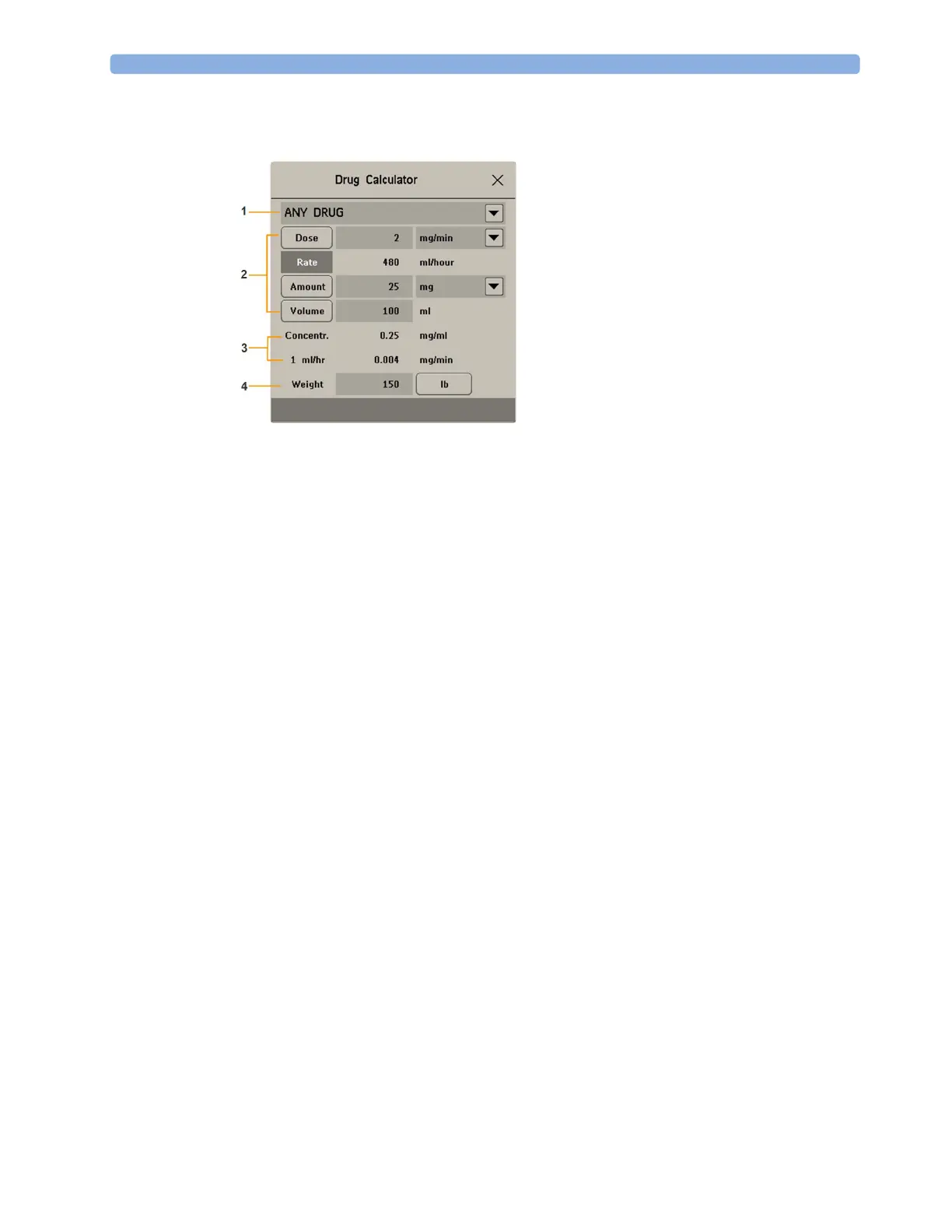
If a list of drugs has not been configured for your monitor, you can use the Drug Calculator to
calculate drug doses for a single, generic drug called
ANY DRUG. Selecting the arrow beside the drug
name in the
Drug Calculator window shows that are no other drugs configured.
1 Enter three of these four values: dose, amount, volume, rate of the infusion solution.
To enter values, select the correct unit, then select each value field and use the pop-up keypad to
enter the correct value.
2 If you have chosen a weight-dependent dose unit, you must enter the patient weight now or
choose a different unit.
If available, the patient weight from the
Patient Demographics window is entered automatically in
the
Drug Calculator window when the Drug Calculator is accessed. To change the patient weight,
select the
Weight key then use the on-screen keypad to enter the correct value. This will not
change the patient weight stored in the patient demographic information.
3 When you have entered three values, the Drug Calculator automatically calculates the unknown
fourth value and shows it in the highlighted field. Standardized rate and concentration are also
calculated.
1 ANY DRUG selection
2 Entry fields for Dose, Rate, Amount, and
Volume
3 Calculated standardized rate (1 ml/hr) and
concentration (
Concentr.)
4 Weight used for weight-dependent dose
units



 To Next Page