30 Using the Drug Calculator
385
Charting Infusion Progress
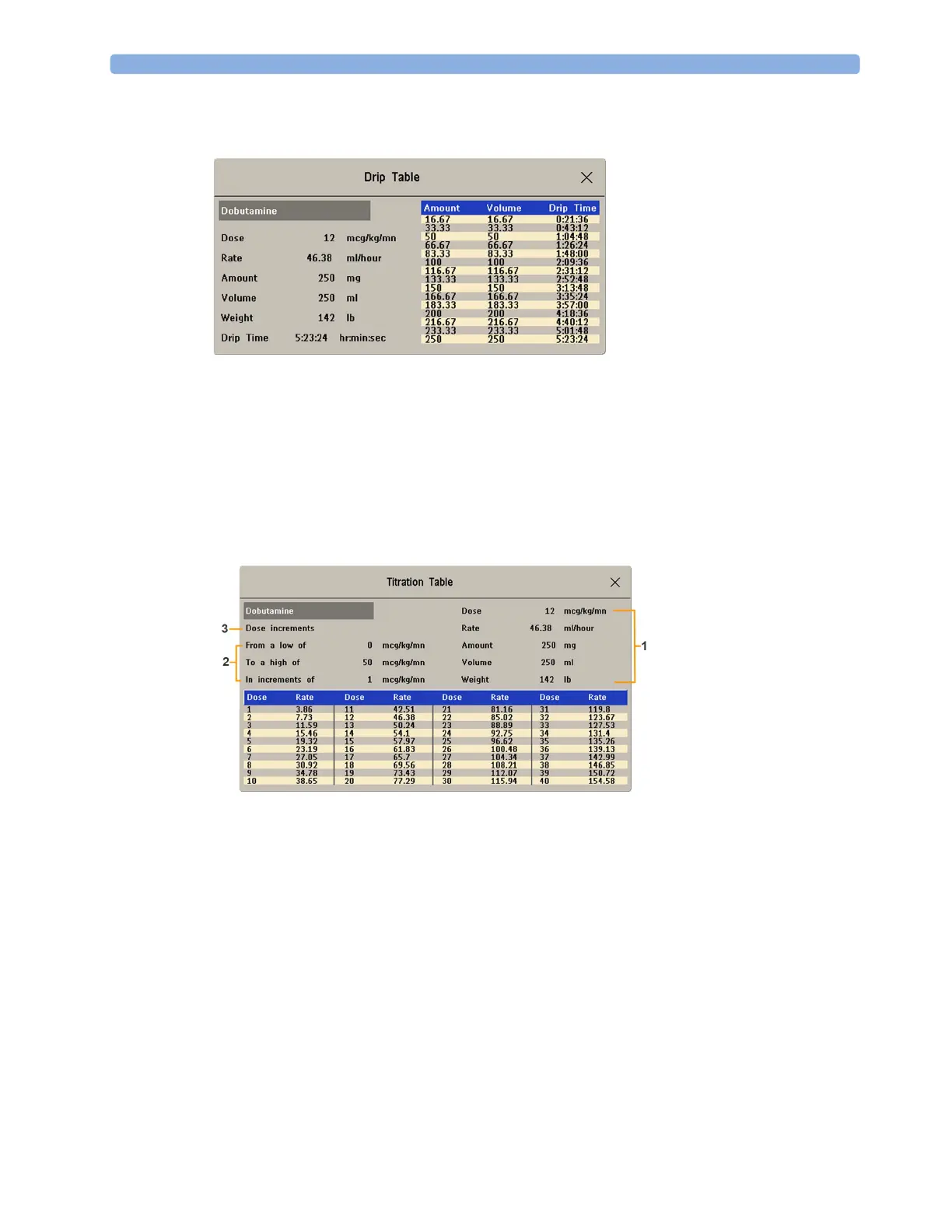
The Drip Table shows you at a glance how much of the infusion has been administered to your patient
and how much time is left.
• To see the
Drip Table, in the Drug Calculator window, select the Drip Table pop-up key.
If the Drip Time exceeds 24 hours, the Drip Time timestamp shows:
- - :- - : - - .
Using the Titration Table
Use the Titration Table to see at a glance what dose your patient would receive of a drug at different
infusion rates. By clicking on the blue title row of the table you can switch between the
Dose
increments
and Rate increments view.
Values outside of the recommended range are shown in red.
To see the
Titration Table,
•in the
Drug Calculator window, select the pop-up key Titr. Table.
The Titration Table is configured with the service Support Tool.
1 Currently set values for Dose, Rate, Amount, Volume, and Weight.
2 Minimum dose, maximum dose and increments used for the table.
3 Shows whether Dose increments or Rate increments are the basis of the table.



 To Next Page