6 ECG, Arrhythmia, ST and QT Monitoring
170
3
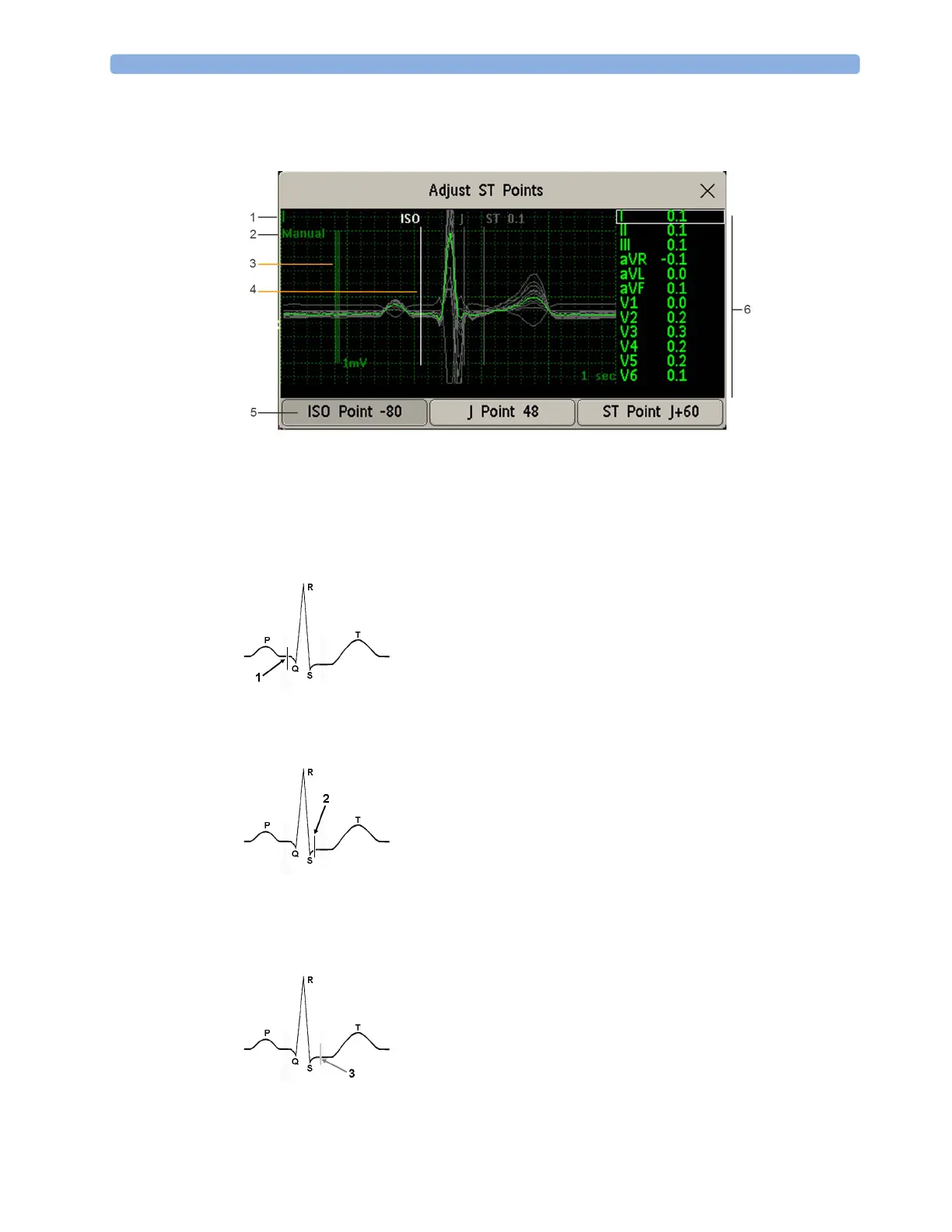
Use the Select Point pop-up key to scroll through the points and activate the point you need to
adjust, then use the left and right arrow keys to move the measurement point. Each point is
highlighted while active.
1 ST label
2 Current ISO/J-point detection mode
3 1 mV calibration bar
4 Cursor for adjusting ISO points
5 Highlighted ISO point
6 All available ST numerics for current snippet
The ISO-point cursor (1) positions the isoelectric point relative to the R-wave peak. The relation is
shown beside the ISO-point in milliseconds. Position the ISO-point in the middle of the flattest
part of the baseline (between the P and Q waves or in front of the P wave).
The J-point cursor (2) positions the J-point relative to the R-wave peak. It helps you to correctly
position the ST-point. Position the J-point at the end of the QRS complex and the beginning of
the ST segment.
The J-point cursor is not available if your monitor is configured to let you set the ST point directly.



 To Next Page