13 Monitoring Cardiac Output
227
To open the procedure window,
•Select
Cardiac Output in the Setup C.O. or Setup CCO menu, or
• Select the
Cardiac Output SmartKey on the Screen, if configured, or
• Press the START hardkey on the front of the C.O. plug-in module, if available, or
• Press a remote start switch, if you are using one.
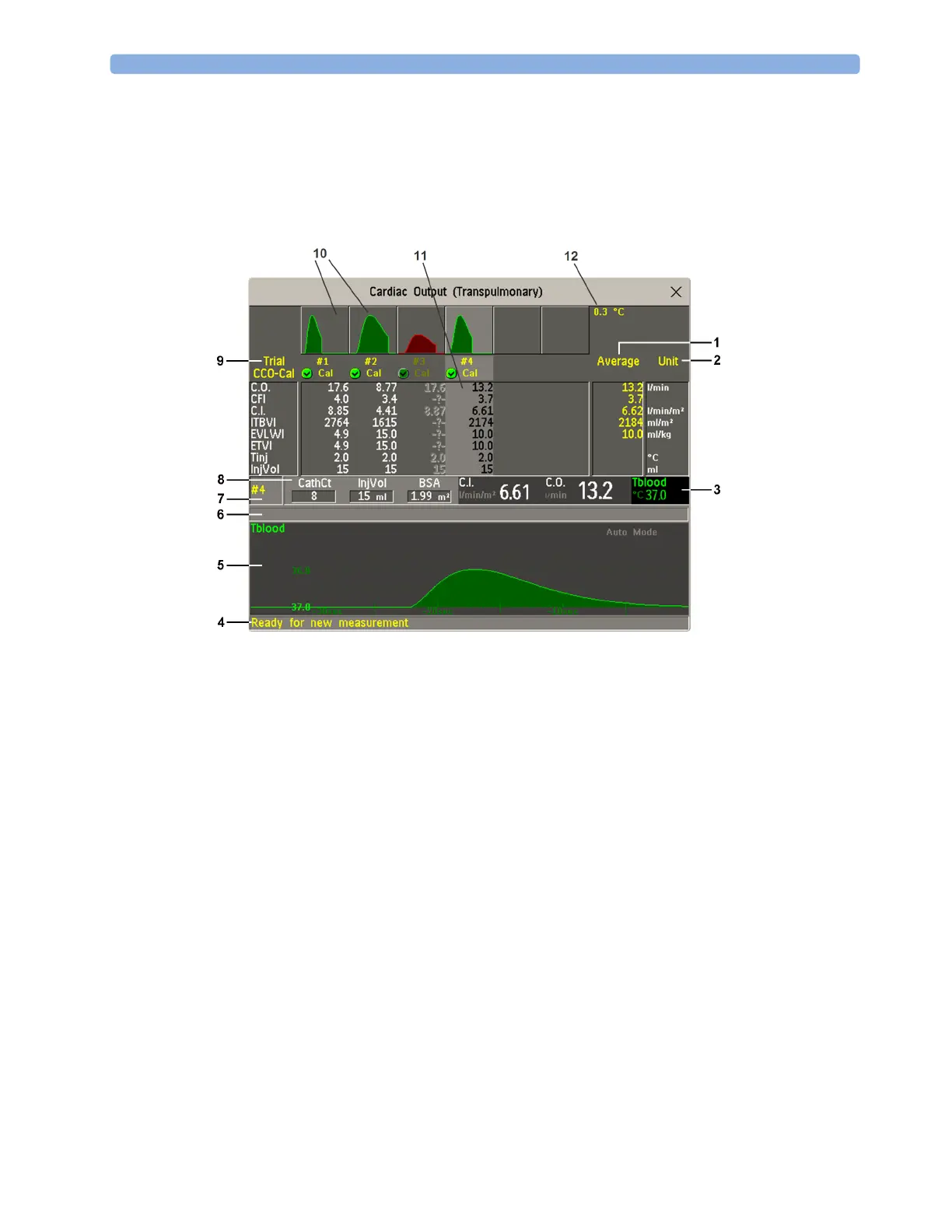
1 Average - column of averaged values
2 Unit column
3 Continuously measured numeric
4 Prompt message field
5 Thermodilution curve of current trial
6 Curve alert message field
7 Current trial number
8 Setup information
9 Trial numbers for the trial curves
10 Trial curves
11 Results table of current trial
12 Trial curve scale
• To change the measurement parameters shown in the results table of the procedure window, select
the
Table Contents pop-up key and choose from the list of available parameters.
• To view the currently-used temperature unit, see the "grayed-out" setting
Temperature Unit in the
Setup C.O. menu. This setting can only be changed in Configuration Mode.
• The Cardiac Output screen element may be configured to display permanently on a specially
designed Screen. Selecting the screen element opens the cardiac output pop-up keys.



 To Next Page