DMG 3200/3100/3000 – User Manual
Page 166 (306)
7.5.6 Service Priority Selection
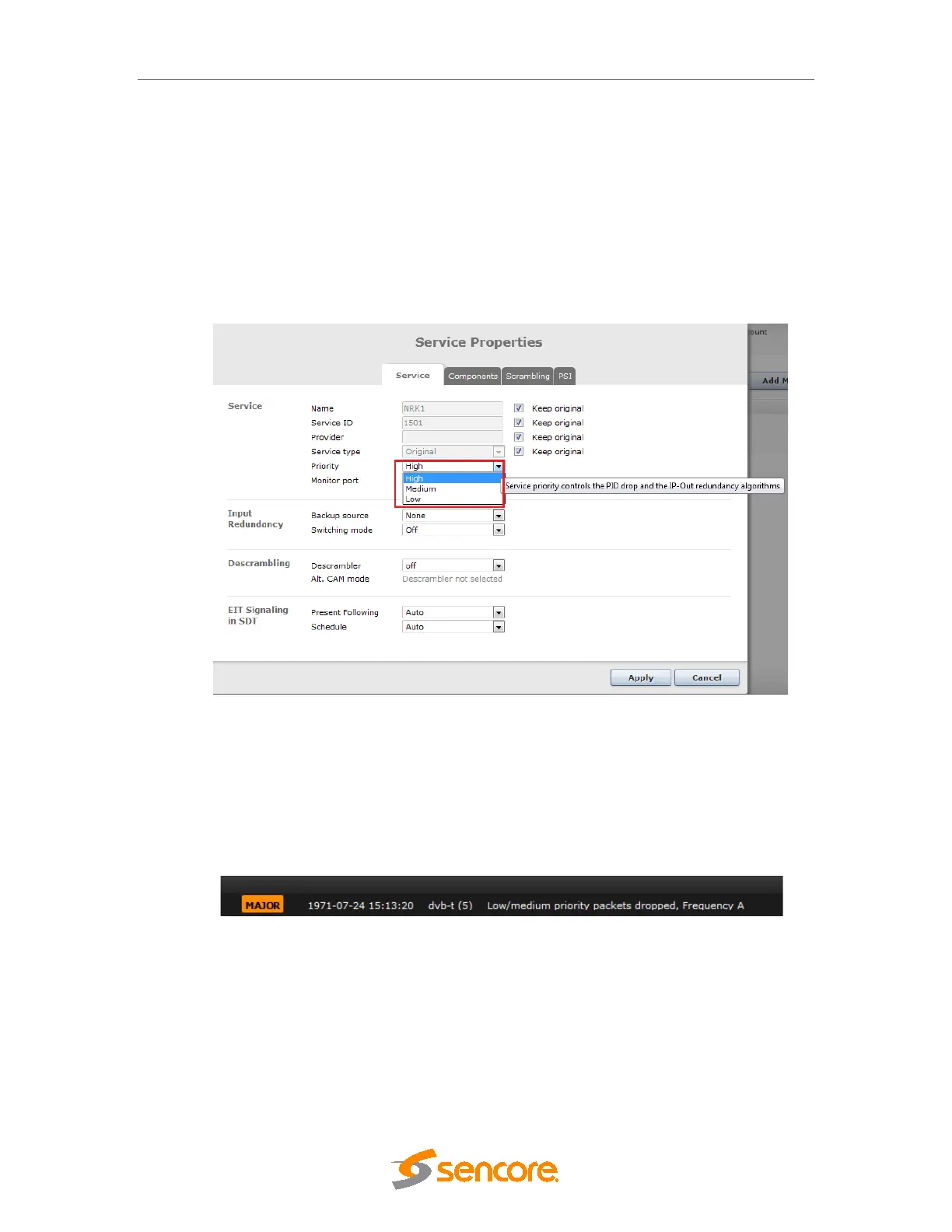
For each service on the output it is possible to set the service priority and this determines from
which services packets are dropped if the total rate exceeds the constant bit rate of the output
MPTS.
This is configured from the Service tab under Service Properties for each program under an
output MPTS.
Service priority is supported on all output cards. The default value for all services is high priority.
Figure 7.55– Service Priority Selection in service Properties.
If low or medium priority packets are discarded due to exceeding the band with limitations, the
major alarm “Low/medium priority packets dropped” is set.
If the link is so overloaded that discarding all low/medium priority packets is not enough, the
behaviour is to empty the output buffer.. If this happens, the critical alarm “Output buffer
overflow” is set. This alarm will mask the “Low/medium priority packets dropped” alarm.
Figure 7.56– Alarm with Low/ Medium Packets dropped.
Any packets dropped due to service priority will be counted, and the total number is displayed
per MPTS on the Output View.



 To Next Page