DMG 3200/3100/3000 – User Manual
Page 47 (306)
5.2.2 Input Service Filtering and Analysis
It is possible to apply filters on information displayed in the GUI. Clicking on view in the Service
column for a selected multicast, results in only services associated with this multicast being
displayed. Clicking on one of the listed services will display more detailed information about the
different PIDs like PMT, PCR, video, audio, etc.
Click on view in the PID column for ASI inputs will display only PIDs associated with the
selected input. Simply choose any PID to obtain more detailed information.
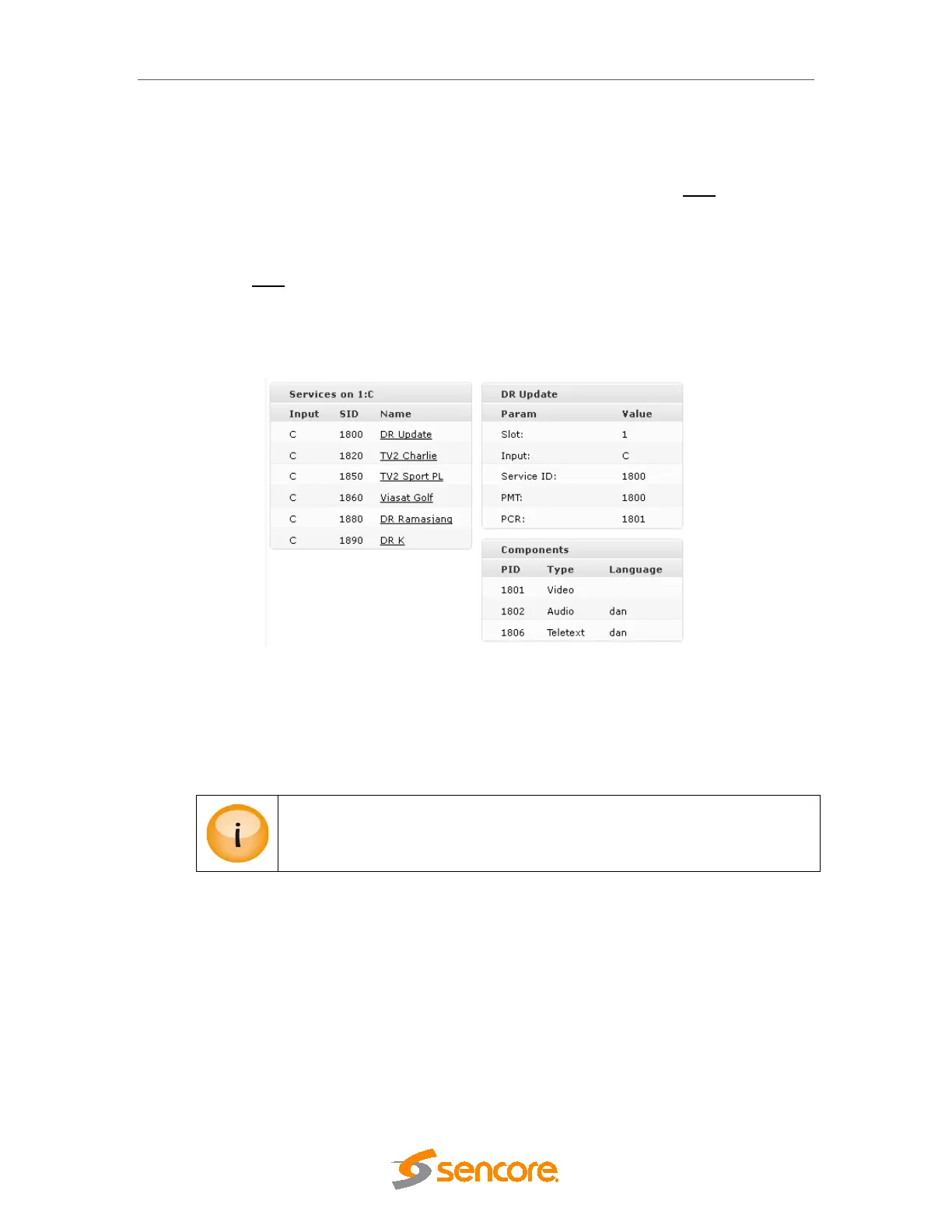
To access detailed PSI/SI analysis of the input services, click the respective service in the lower
pane. The detailed analysis result will appear next to it, on the right.
Figure 5.4 - Detailed PSI/SI Analysis of Input Services
The Audio language descriptor is decoded. In Figure 5.4, the audio is listed as dan, ie Danish.
However, if no language descriptor is present the unit will auto-generate a descriptor for internal
usage and they will be named A01, A02, etc.
Details of the PSI/SI analysis are not 100% DVB compliant, but it does include
the most commonly used tables and descriptors.



 To Next Page