DMG 3200/3100/3000 – User Manual
Page 230 (306)
Container
ADTS or LATM
In the current software it is not possible to pass through any audio components and only
encoded audio is possible to output.
8.6.3 Profile Parameters
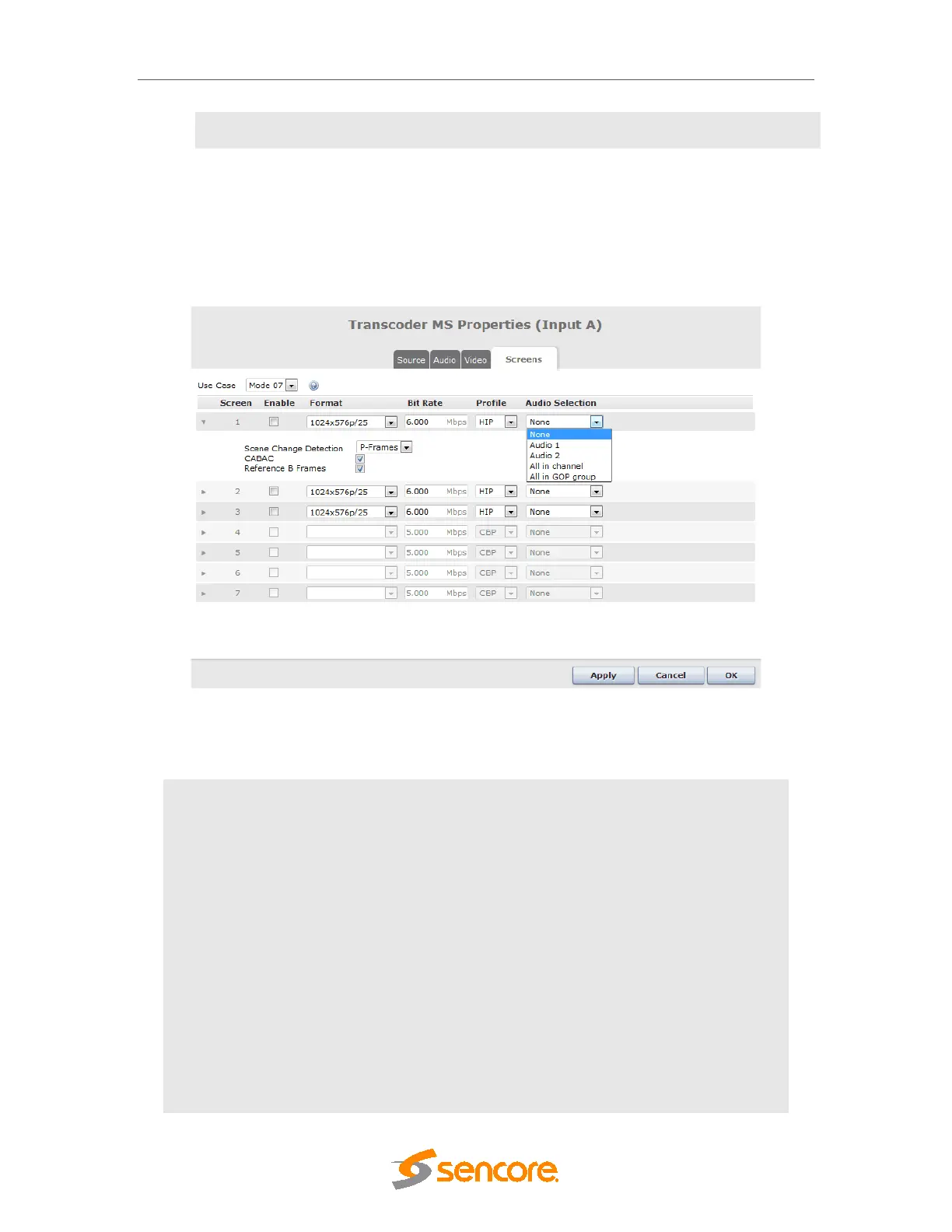
This page is used to configure the multiscreen profiles.
Figure 8.43 –
Universal Transcoder- Multiscreen profiles configuration
The following parameters are available for profile configuration:
Use Case
Select among 16 modes for the desired use case. See below for
detailed explanation of this setting.
Available entries depend on the selected use case.
Enable or disable each screen individually.
Format
Select resolution and frame rate of each screen. Range of resolution
and frame rate depends on selected use case.
Bit Rate
Configure bit rate for each screen. Legal bit rate range depends on
Profile
Configure H264 Profile (encoding complexity) for the respective
screen. The choices are Main Profile (MP), Constrained Baseline
Profile (CBP) and High Profile (HP). The H264 Level is
calculated based on bitrate, resolution and frame rate.
Audio Selection
The "Audio Selection" parameter available for each profile and
controls which of the transcoded audio tracks are associated with a
profile



 To Next Page