DMG 3200/3100/3000 – User Manual
Page 170 (306)
7.6.1 Editing the PSI Network configuration
To access this information, select Outputs
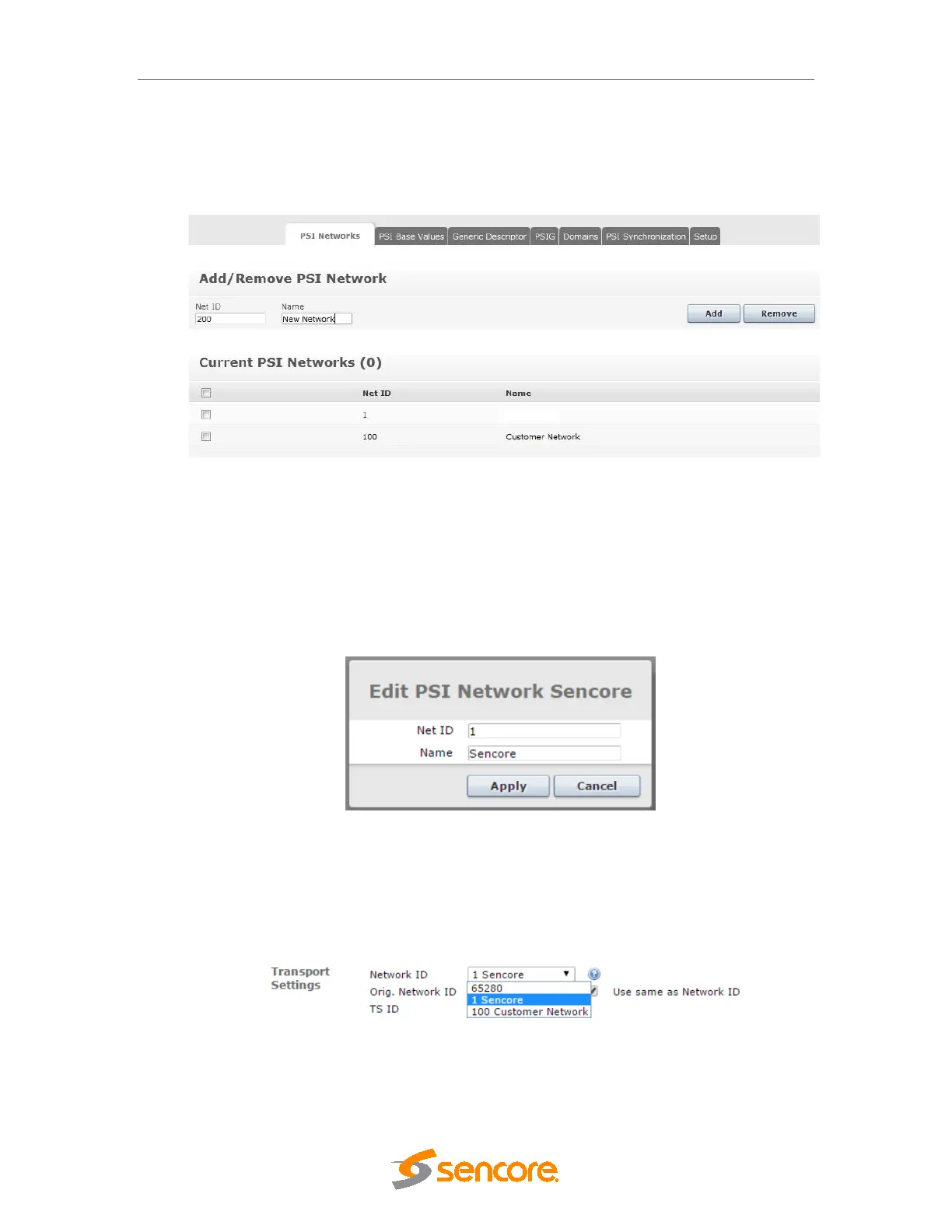
PSI and select the PSI Networks tab. PSI
Networks can be added and removed via this dialog shown in the figure below. To add a new
PSI Network, fill in the Net ID (Name field is optional) and click Add:
Figure 7.58– PSI Networks
This feature allows the operator to edit the network name that is signalled in the PSI via the
network_name_descriptor in the DVB Network Information Table (NIT). The name is
configurable per DVB network and is typically used by IRDs when displaying tuning results.
To edit the network name, go to the PSI Networks tab of the PSI settings (accessed via
Outputs->PSI node in the navigation bar). There is an entry for every PSI network defined in
the system which can be clicked to access an edit dialog:
Figure 7.59 – Edit PSI Networks
In order to remove a PSI Network, select the desired network checkbox and click Remove.
When associating transport streams with PSI networks, the operator is offered a drop down box
with the available selections:
Figure 7.60– Associate transport stream with PSI network
If no PSI networks are defined, it is still possible to easily create SPTS outputs via a simple drag
and drop – the system will automatically associate these with a PSI network within the default



 To Next Page