DMG 3200/3100/3000 – User Manual
Page 173 (306)
empty if the service is added manually by clicking on the button.
Channel Number
This number is the actual number assigned to a channel for the
viewer.
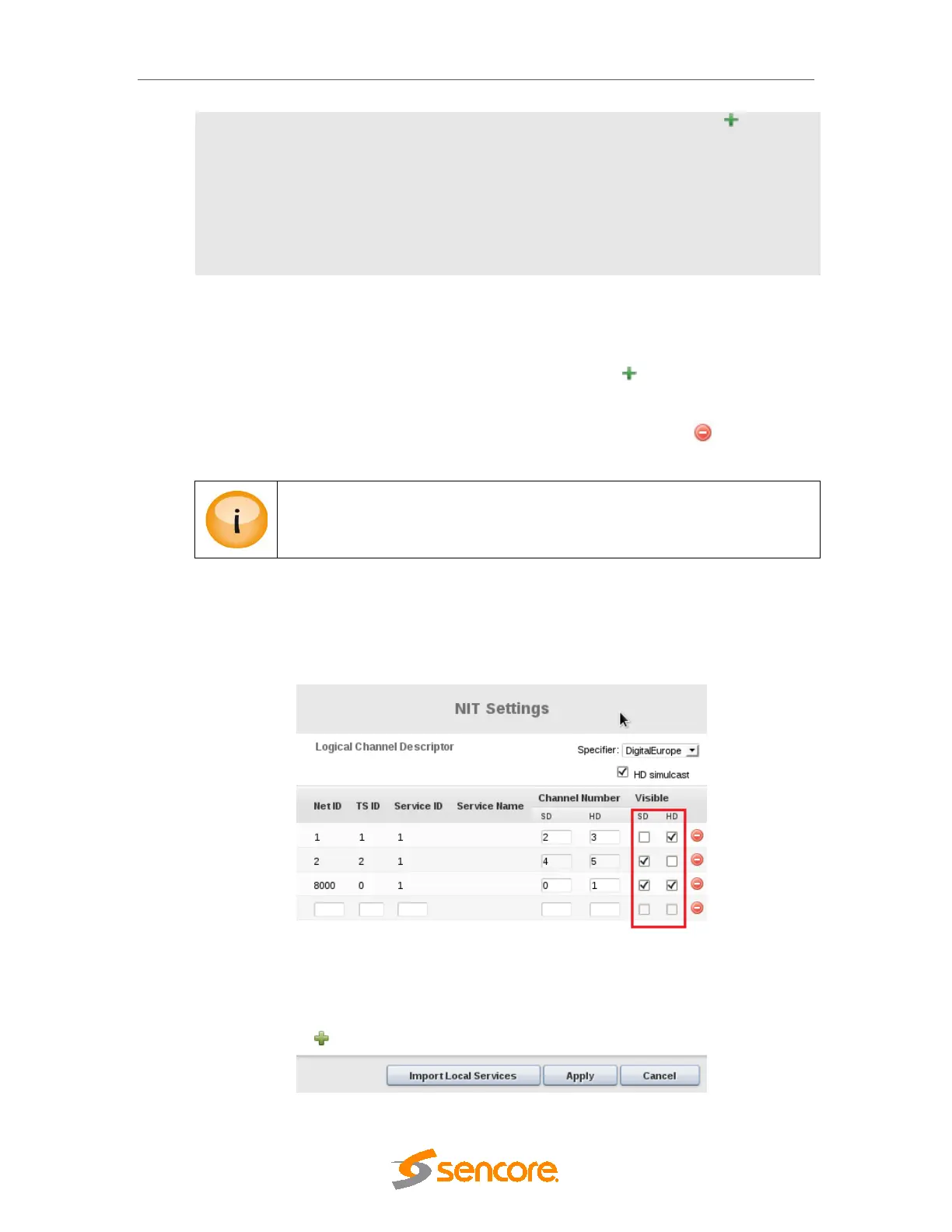
Visible
Each logical channel has a checkbox associated with it, which
represents the visibility state of the channel.
The default value of this flag is visible.
Select the specifier to be used from the selection box. To add channel already configured on
the output, select Import Local Services. Then all the services currently configured on output
will be listed and it is possible to edit the channel numbers directly. For services not handled by
this unit or pre-configure a service that will be added later, click on and manually insert all
data required for each service.
To modify an existing setup, simply change the channel number or click to remove an
existing channel number entry.
If the service re-multiplexing layout changes, this configuration needs to be
updated manually (e.g. if a service is added or removed).
When selecting Digital Europe, this will enable support for HD Simulcast descriptor by clicking
on Check box before HD Simulcast seen in figure below.
It is possible to add all configured output services to this list be clicking on the Import Local
Service and it will import all data as shown in below.



 To Next Page