DMG 3200/3100/3000 – User Manual
Page 176 (306)
PSI Synchronization allows the operator to synchronize NIT and/or SDT tables between units
that are part of the same DVB network(s) – enabling generation of a complete NIT and/or SDT
table. If two or more units perform PSI synchronization with each other, they will both signal all
transport streams in shared DVB networks.
Important points to note when using this functionality:
The management interface on the MMI card is used to establish TCP/IP connections between
units to be synchronized; hence the required network connectivity is a prerequisite.
All synchronization is initiated manually by the operator. Changes do not take effect until either
Retrieve Now or Remove (explained below) is clicked. This also means that if PSI is updated on
an external unit (e.g. a new transport stream is added/removed, remap SDT parameters, etc.)
the operator must manually perform another synchronization to retrieve these updates.
The version number of NIT may be different between units, but the table content is the same.
This may cause a small delay for a STB when zapping between transport streams provided by
different units as it would appear to the STB that a NIT update has occurred.
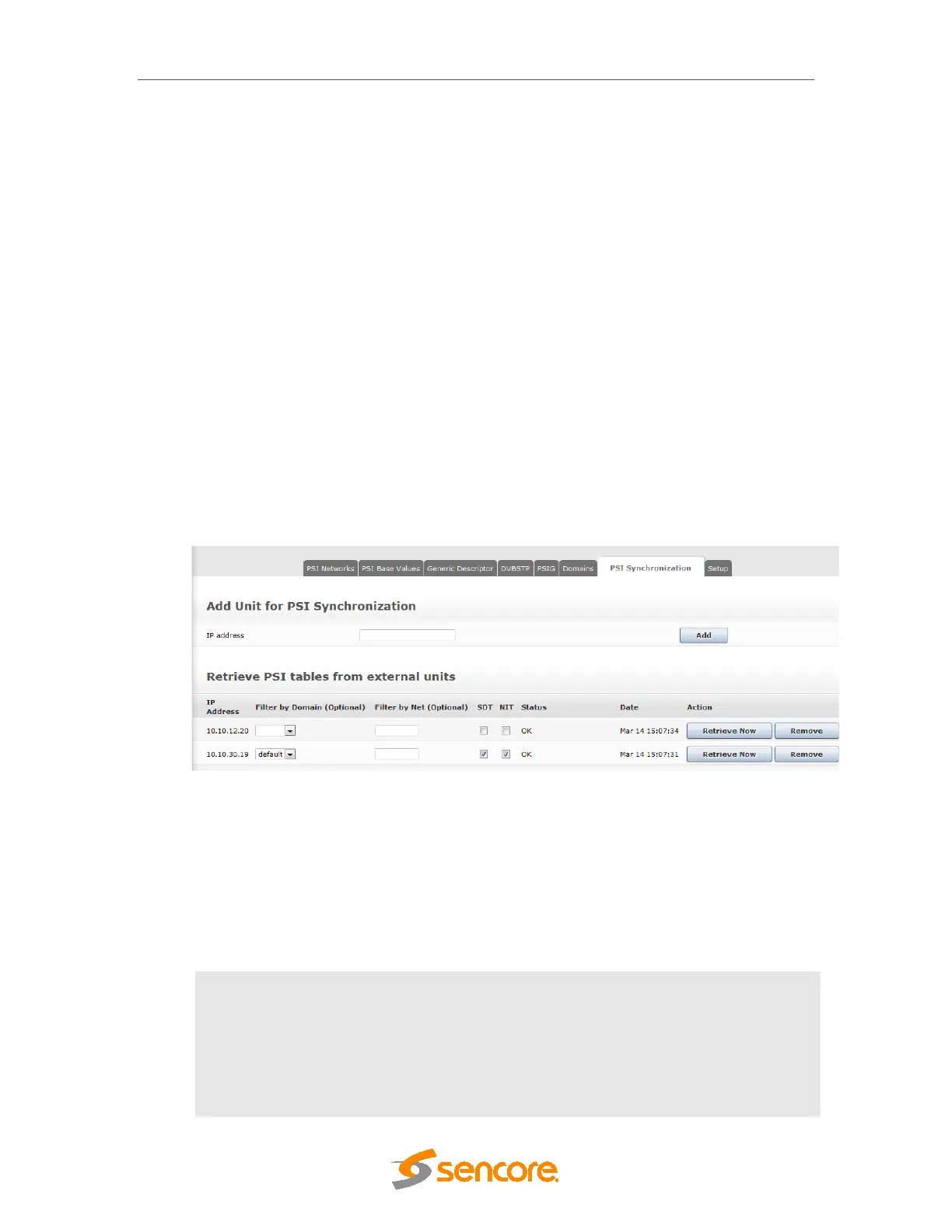
The PSI Synchronization functionality is accessible from the PSI dialog by clicking on the
respective tab:
Figure 7.66- PSI Synchronization Tab
To add a unit for PSI synchronization, enter in the MMI IP address of the external unit (in dotted
quad format) and click Add.
Now a table entry will be visible in the Retrieve PSI tables from external units section of the
dialog, identifiable by the IP address.
The following parameters are displayed:
IP Address
IP address of the external unit MMI management interface
Filter by Domain
(Optional)
Optionally select the PSI to synchronize from a specific domain
from the remote unit
Filter by Net
(Optional)
DVB network ID – if specified, only download external sections
from this network. Otherwise, all sections are downloaded



 To Next Page