DMG 3200/3100/3000 – User Manual
Page 87 (306)
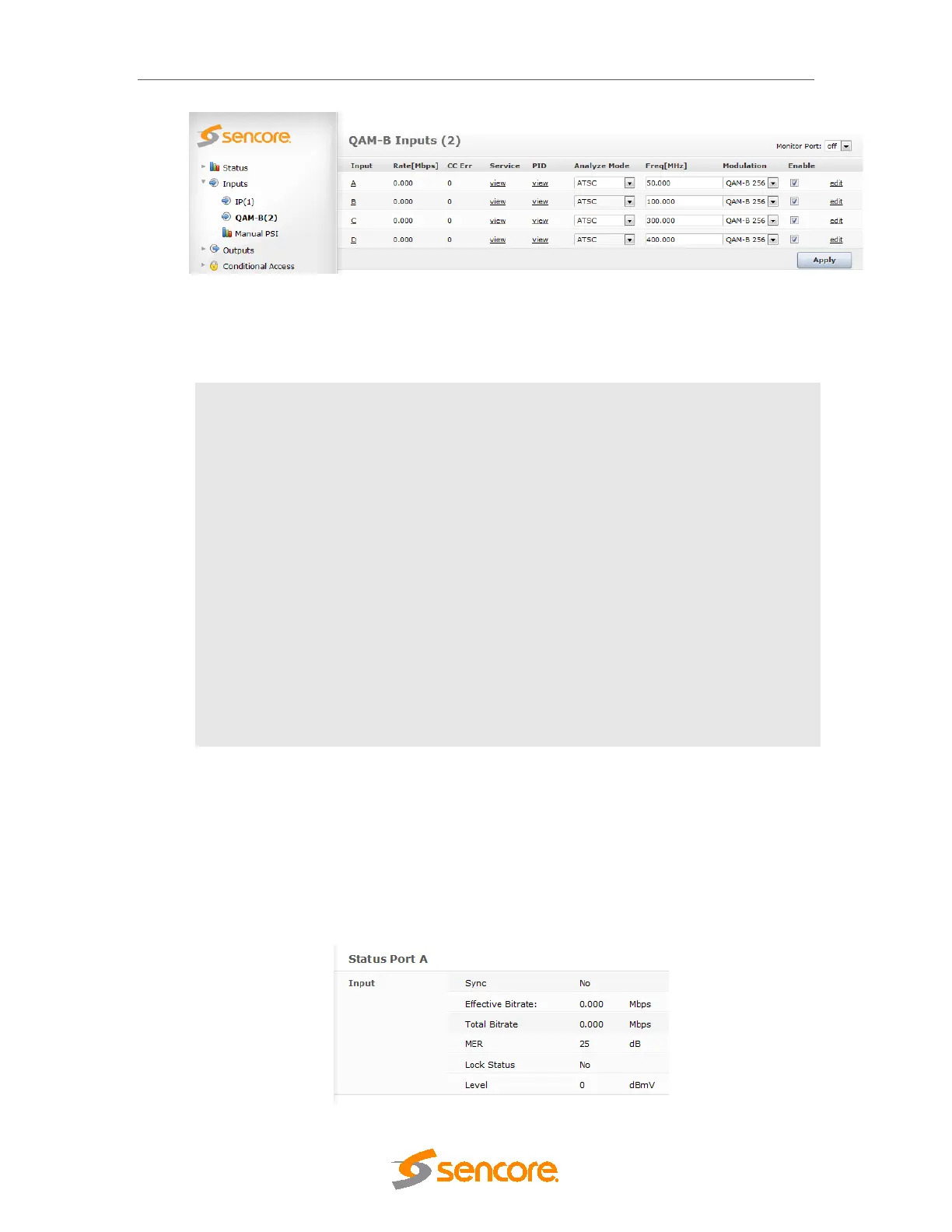
Figure 5.44 – QAM-B Input
The QAM-B input window shows all configurable settings as well as the current bitrate and
service information. The following parameters are available:
Input
Port on the QAM-B input module
Rate [Mbps]
Incoming data rate
CC Err
Continuity Counter Error – indicates that one or more packets are lost
Mode
Select one of the following modes:
o DVB
o ATSC
o MPEG
o No PSI analysis
The default mode is ATSC. If the incoming transport stream is not ATSC
compliant, use MPEG mode instead.
Freq[MHz]
Specify the currently tuned frequency in MHz, valid range is 47 –
861MHz.
Enable
Enable the corresponding input port
To monitor any of the demodulated QAM-B input signals, one of the QAM-B input ports can be
assigned to the output ASI monitor interface. The demodulated QAM-B input signal will then be
copied onto the monitor port for further analyzing or monitoring of the transport stream. Normal
operation will not be affected if the monitoring port is used.
The status parameters for the QAM-B module are shown in below. Click on the letter
representing in the input channel (A, B, C or D) to display the status parameters for the specific
input port.



 To Next Page