Navigation Tools ECDIS-E User Guide
5-12 65934012
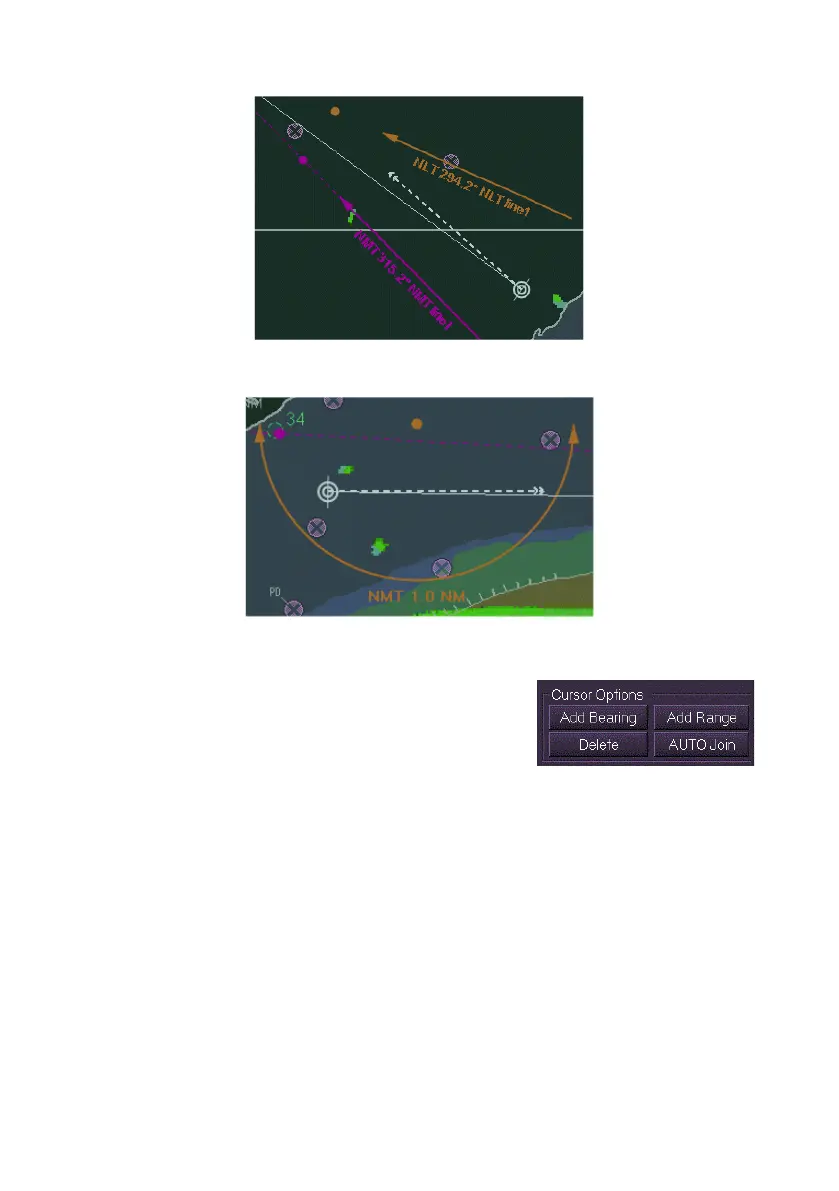
In the figure below the mariner would want to keep the ship's range to be
not more than 1.0 nautical miles to stay in safe water.
To create or edit clearing lines from the Clearing Lines menu, do the
following:
To create clearing lines, either click the Add
Bearing button or the Add Range button in the
Cursor Options area. The button of the selected
option is highlighted.
There are two ways to define the geographic origin of a clearing line:
1. Move the cursor to the required position on the display (the letters
ADD are shown below the cursor symbol) and left click. A dot is
drawn at the selected position. If a bearing line has been added a
dashed line is drawn to the edge of the chart display along the
defined bearing (which defaults to 315°) in addition to a solid line
terminating with an arrow near to the line origin point. If a range
line has been added a half circle radius of 1 nautical mile (NM) is
drawn with an arrow at each end of the line. Or:



 To Next Page