ECDIS-E User Guide Targets
65934012 9-15
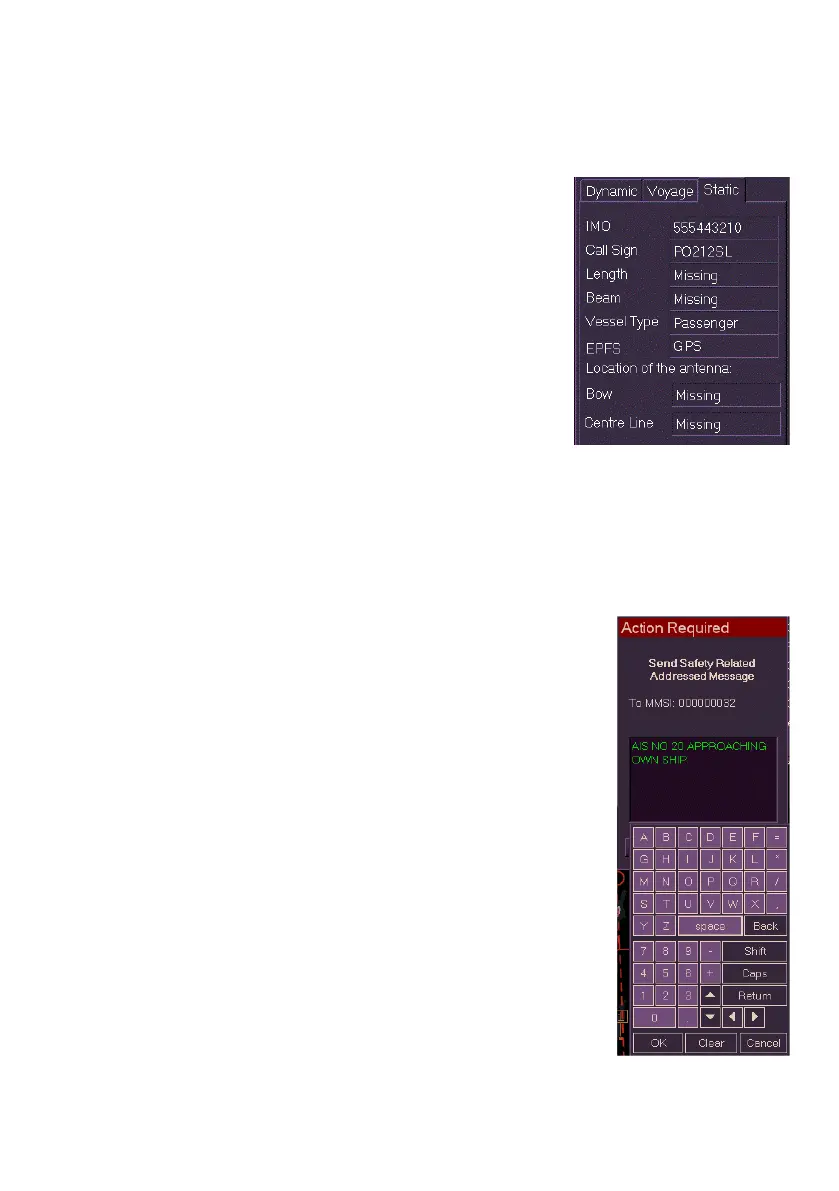
Static Data
The following static data is displayed (if no static data is available then
Missing or Unknown is displayed):
IMO number.
Call Sign - vessel identification name
(data not available for Class B targets).
Length (in metres)
Beam (in metres)
Vessel Type - e.g. Cargo or Tanker
EPFS (position sensor source, e.g. GPS)
Location of antenna: Bow - configured
offset distance from antenna to vessel
bow in metres.
Location of antenna: Centre Line - configured offset distance from
antenna to centre line of vessel in metres.
Static data may initially be missing as it is transmitted less frequently than
dynamic information.
AIS Safety Messages
The AIS Info tab includes the ability to send safety
related messages from own ship to a selected AIS
vessel.
Safety messages that have been sent from own ship are
stored in the Message Tx folder of Own Ship AIS.
To send a safety message do the following:
1. From the chart display select the AIS vessel
where you want the message sent to. Details of
the selected AIS appear in the AIS Info folder.
2. Click the Send Safety Message button at the
bottom of the tab folder. An Action Required
window appears with the vessel MMSI above
the message field.
3. Move the screen cursor into the message field
and left click, the AIS Minimum Keyboard &
Display (MKD) appears below the field.
4. Enter a message using the MKD, note that the
MKD only supports the input of uppercase
format messages.



 To Next Page