Appendix A STC Emulator User Guide
A: What kind of compiler/assembler should be used for STC MCU?
Q: Any old 8051 compiler/assembler can support it. Keil C51 is popular now
A: How to include header files in Keil environment
Q: After installing the driver and header files according to the steps shown below, select the STC corresponding
MCU model when creating a new project, and directly use "#include <stc8a8k64d4.h>" in the source file to complete
the inclusion of the header file. If you select Intel’s 8052/87C52/87C54/87C58 or Philips P87C52/P87C54/P87C58
compile, the header file contains <reg51.h>, but the new STC special function register needs to be declared by
the user.
1.Install Keil version of emulation driver.
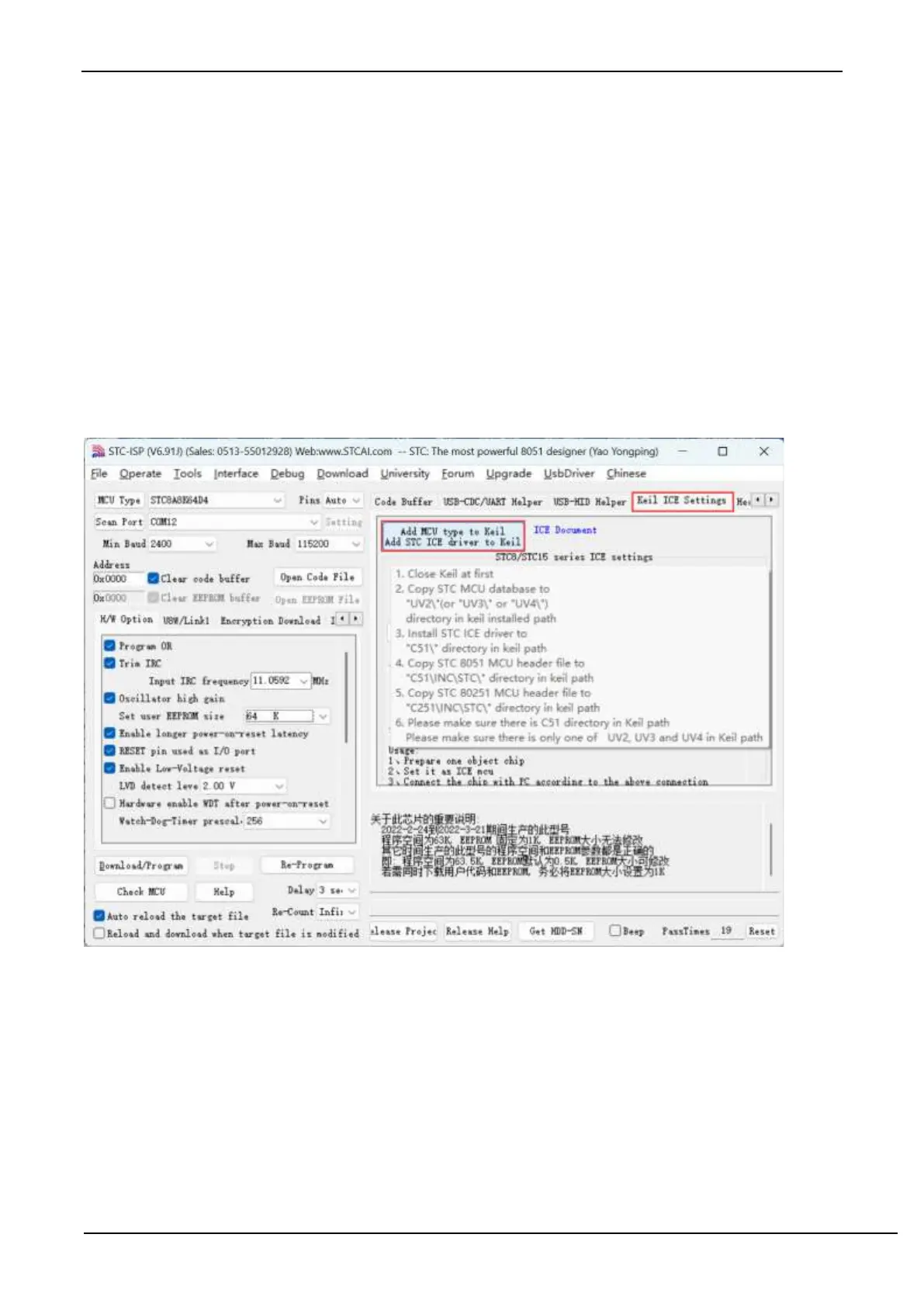
As shown above, select the "Keil Simulation Settings" page firstly, click "Add MCU model to Keil", and in the
following directory selection window that appears, navigate to the installation directory of Keil (usually "C: \ Keil \") ,
After press "OK" button, the prompt message shown on the right in the following figure appears, indicating that the
installation was successful. The STC Monitor51 emulation driver STCMON51.DLL will also be installed when adding
the header file. The installation directory of the driver and header file is shown above.



 To Next Page