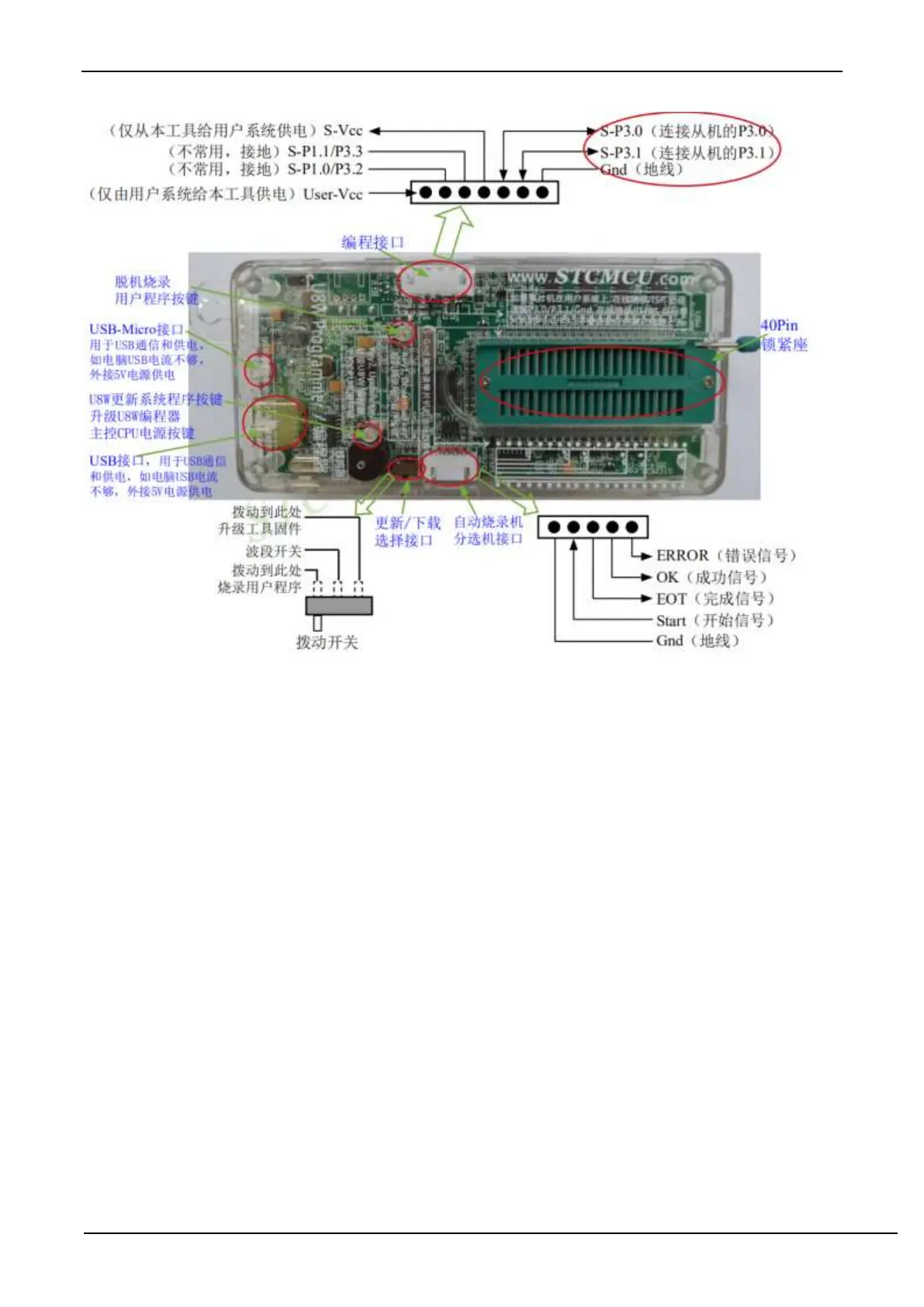
Programming interface: Use different download cables to connect the U8W download board and the user system
according to different power supply methods.
U8W update system program button: used to update U8W tools. When there is a new version of U8W firmware, you
need to press this button to update the U8W main control chip (note: you must first set the toggle switch on the
update/download selection interface Toggle to upgrade tool firmware).
Offline download user program button: Start offline download button. First, the PC downloads the offline code to the
U8W board, and then uses the download cable to connect the user system to the U8W, and then press this button to start
the offline download (the user code will also start to download every time the power is turned on).
Update/download selection interface: When you need to upgrade the underlying firmware of U8W, you need to switch
this toggle switch to the firmware upgrade tool. When you need to program the target chip through U8W, you need to
turn the toggle switch to Burn the user program.
(Please refer to the figure above for the connection of the toggle switch)
Automatic burner/sorter interface: It is a control interface used to control the automatic burner/sorter for automatic
production.
G.3.3 U8W online download instructions
The target chip is installed on the U8W locking base and connected to the computer by U8W for online download
First use the USB cable provided by STC to connect the U8W to the computer, and then install the target MCU on the
U8W in the direction shown in the figure below:



 To Next Page