141
4 Adjusting knitting machine
4.1 Basic settings
Yarn Carrier If this field is touched, the "Yarn carrier" window opens up.
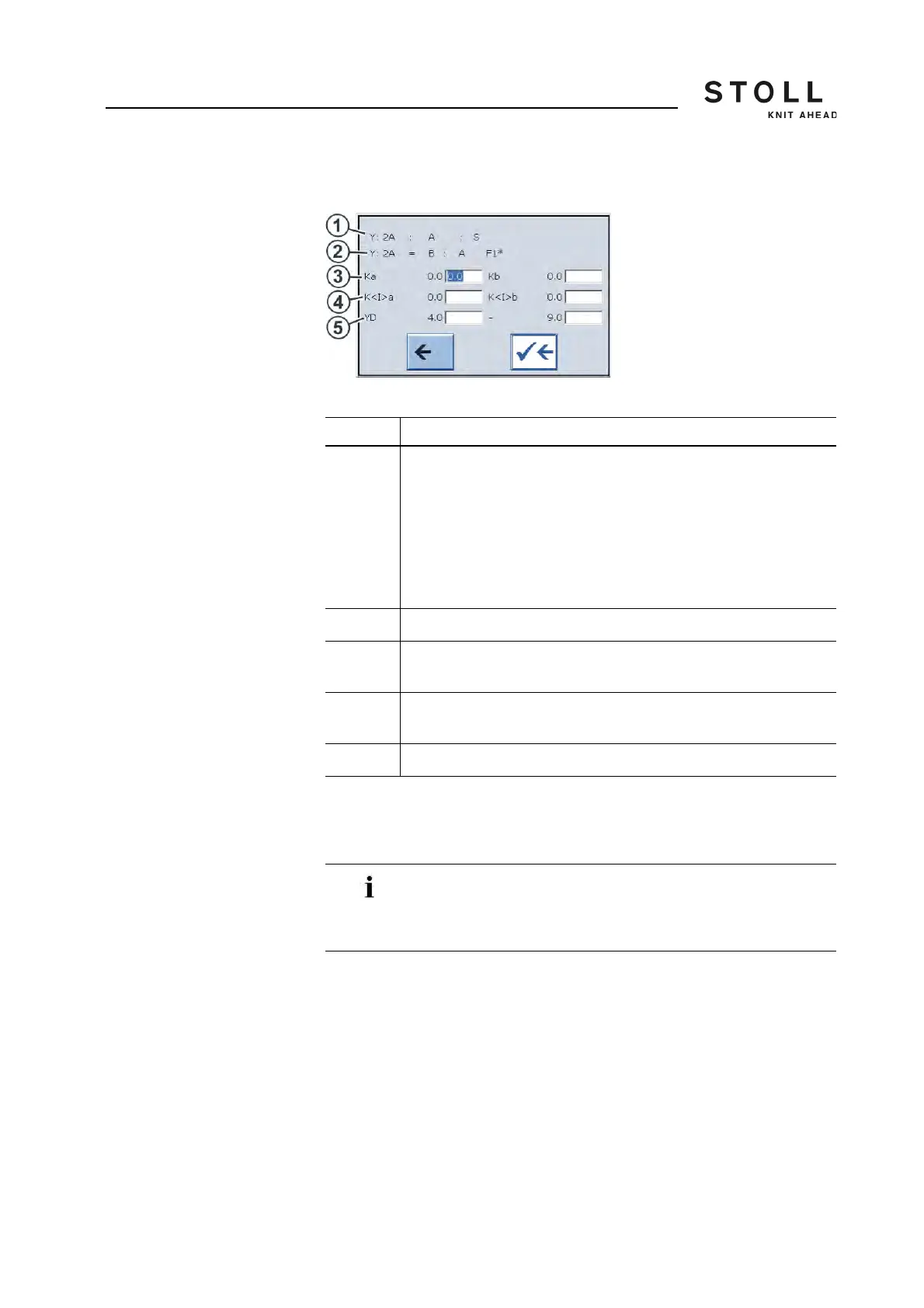
"Yarn carrier" window
Jacquard line If this field is touched, the "Sintral editor" window opens up. The cursor is
automatically positioned before the current jacquard line. The jacquard is
displayed by default as compressed.
Area Explanation
1 Display of the current yarn carrier specification.
After this specification (End character " : ") further information is
available about this yarn carrier:
A = Autarkic yarn carrier
S = Selected
H = Home
C = Yarn carrier is clamped and cut off
! = Yarn carrier is stopped outside the SEN area
2 Definition of the yarn carrier (display only)
3 Correction value for yarn carrier if the autarkic yarn carrier is
positioned outside its own color field (Ka=left, Kb=right).
4 Correction value for the yarn carrier if the autarkic yarn carrier is
positioned in its own color field (K<I>a=left, K<I>b=right).
5 Yarn carrier stopping position at the left or right fabric selvedge.
If the jacquard is unpacked, then depicted uncompressed
and the jacquard line exceeds 1,200 characters, it can no
longer be displayed. An error message indicates this
condition.



 To Next Page