239
5 Setup Data
5.4 Setup2 Editor
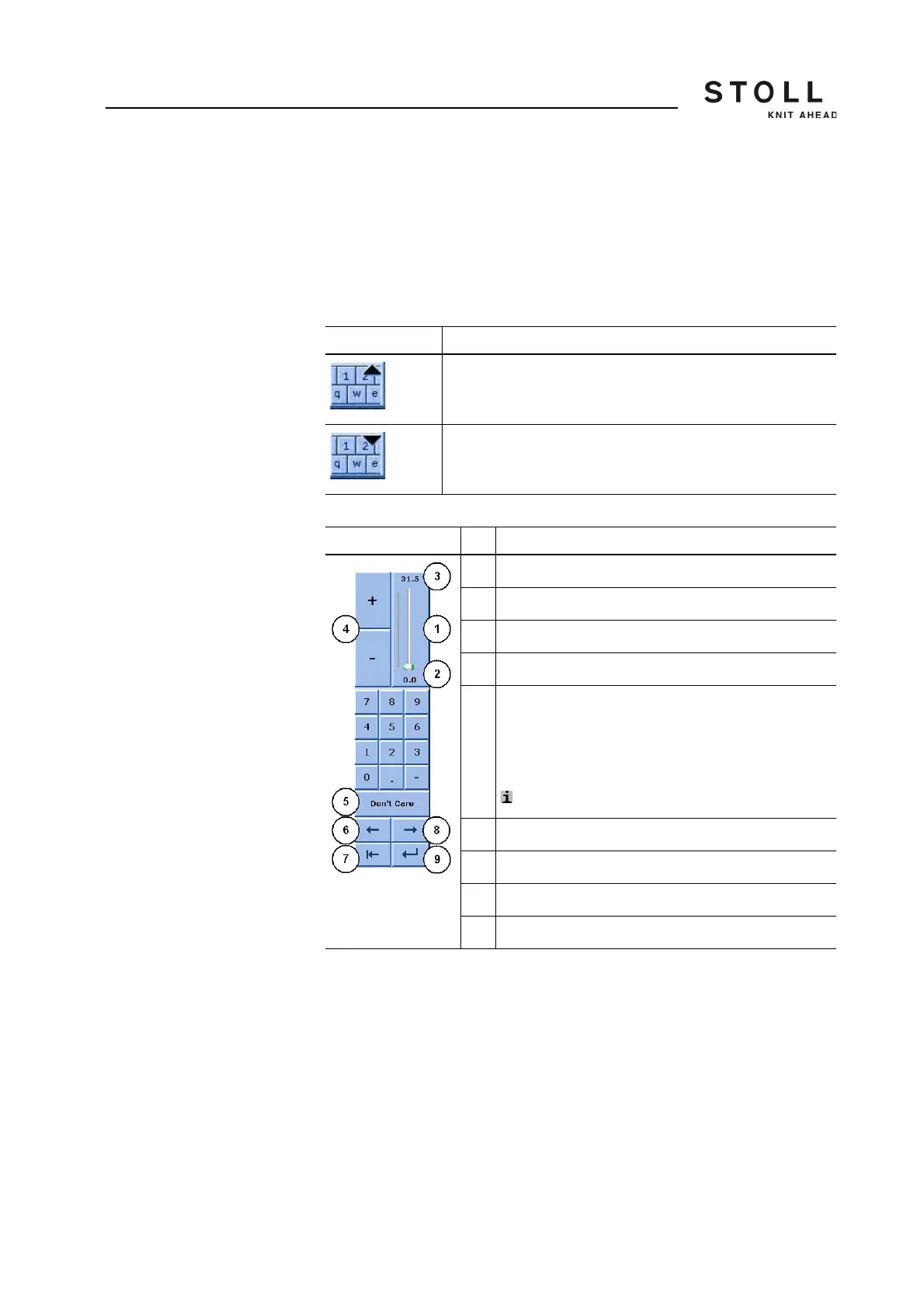
Helpers for Input Depending on the active input field appears:
the numeric keyboard
the alpha-numeric keyboard (for comments)
the input helper for list fields
The input helper for NP measure units
The numeric keyboard
Explanation
Switch on the virtual keyboard
Switch off virtual keyboard
Explanation
1 Slider
2 Shows the maximum value of the selected field
3 Shows the minimum value of the selected field
4 Increase or decrease the value by one step
5 Apply value from the previous row
The applied value will not be displayed.
An entry field without entry has the "Don't Care"
property.
An entry field with "Don't Care" is empty.
: "0" does not correspond to "Don't Care"
6 Move cursor: one field to the left
7 Delete the number to the left of the cursor
8 Move cursor: one field to the right
9 Confirm input. The cursor jumps to the next field.



 To Next Page