Software - Installation and basic settings 8
Installing the Stoll operating system 8.4
400
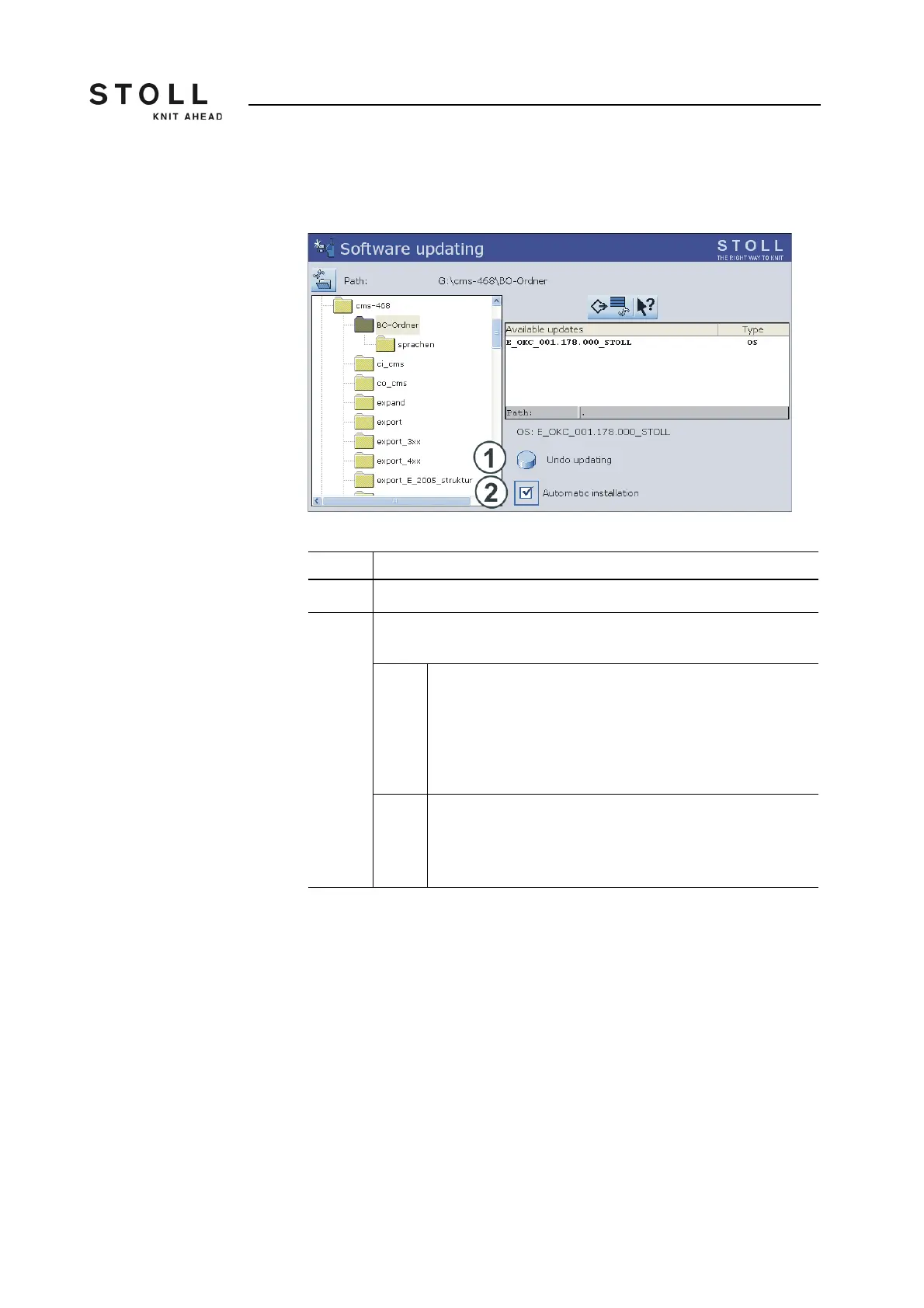
When the Stoll operating system is copied, two more program points are
displayed in the "Software update" window.
"Software updating" expanded window
Reset update:
➜ Tap on the key "Reset update" (1).
The data is deleted in a separate storage location on the hard disk of
the machine.
Key Function
1 The data in the separate memory area are deleted.
2 Selection of whether the installation should be executed automatically
or manually when the machine is switched on next.
On After a waiting time of 10 seconds the installation is
automatically carried out till the "Reference runs" window (like
in the case of "Installation"). Within the waiting time the
installation can be cancelled by tapping on "Cancel".
Select this setting if only the operating system should be
updated.
Off Installation like in the case of "Installation and Configuration".
Select this setting if machine data have been modified. For
example after a gauge conversion or if a special equipment
has been assembled.
Other functions in the "Software update" window



 To Next Page