142 VS1 Editor Configuration Application
PORT CONFIGURATIONS
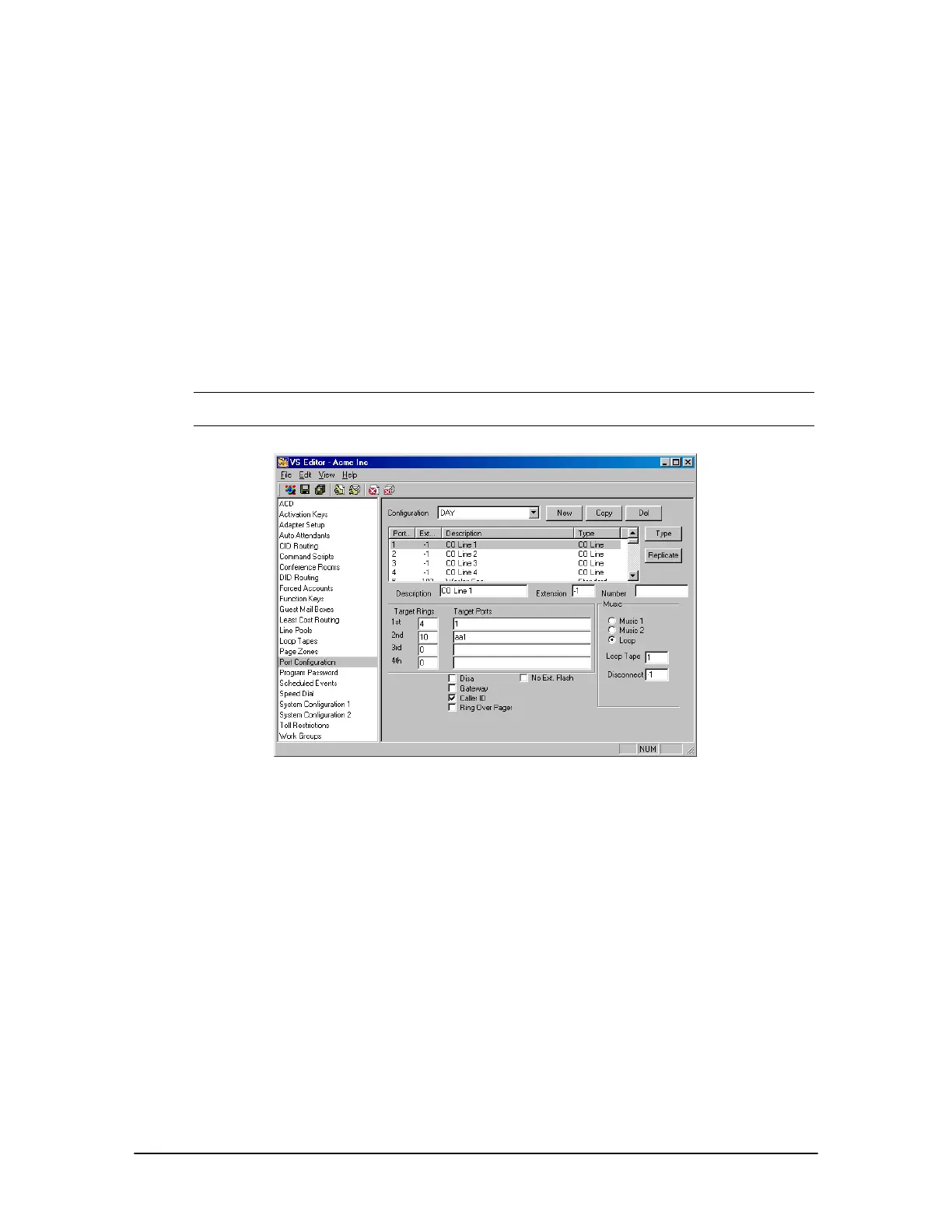
A Port Configuration allows CO Lines and Extensions to be set up for functioning on the VS1
System. Many other features of the VS1 Editor, such as such as Toll Restrictions, Line Pools, and
Least Cost Routing, are put into action through Port Configurations. A Port Configuration ties other
VS1 Editor panes and settings together to create an operational Configuration.
By default, the VS1 Telephone System only requires one Configuration to operate—the Day
Configuration. The Telecor Voice Server (TVS) loads the Day Configuration automatically every
time it starts—regardless of Scheduled Events or any other system features. The Day Configuration
determines which port type runs during business hours for each port. However, you are not limited
to only one Configuration. The VS1 System supports as many Configurations as you can create,
limited only by hard disk space. Configurations can be created for Night, Weekends, Break, and so
on.
Note A Day Configuration must be created for each new site. Without a Day configuration, the
TVS will not function properly.
Port Configuration
pane
Creating a New Configuration
1. Click Port Configurations in Tree Control Display.
• The Port Configuration pane appears.
2. Click New.
• The Configuration Name dialog box appears.
3. In the Enter Configuration Name text box, enter a name or description (e.g. Day) for the
configuration and click OK.
4. Assign each port a type by selecting the port you want, and then clicking Type.



 To Next Page