52 Tel-Site System Management Application
Tel-Site Windows
Tel-Site includes the following windows:
Connection Window – to connect or disconnect from a site
Configuration Window – to configure a customer site
Explorer Window – to perform discretionary file maintenance
Terminal Window – to provide a snapshot of the real-time dynamics of a site for troubleshooting
purposes.
The following pages include brief descriptions of each window. For further information, see the Tel-
Site Help file.
The Connection Window
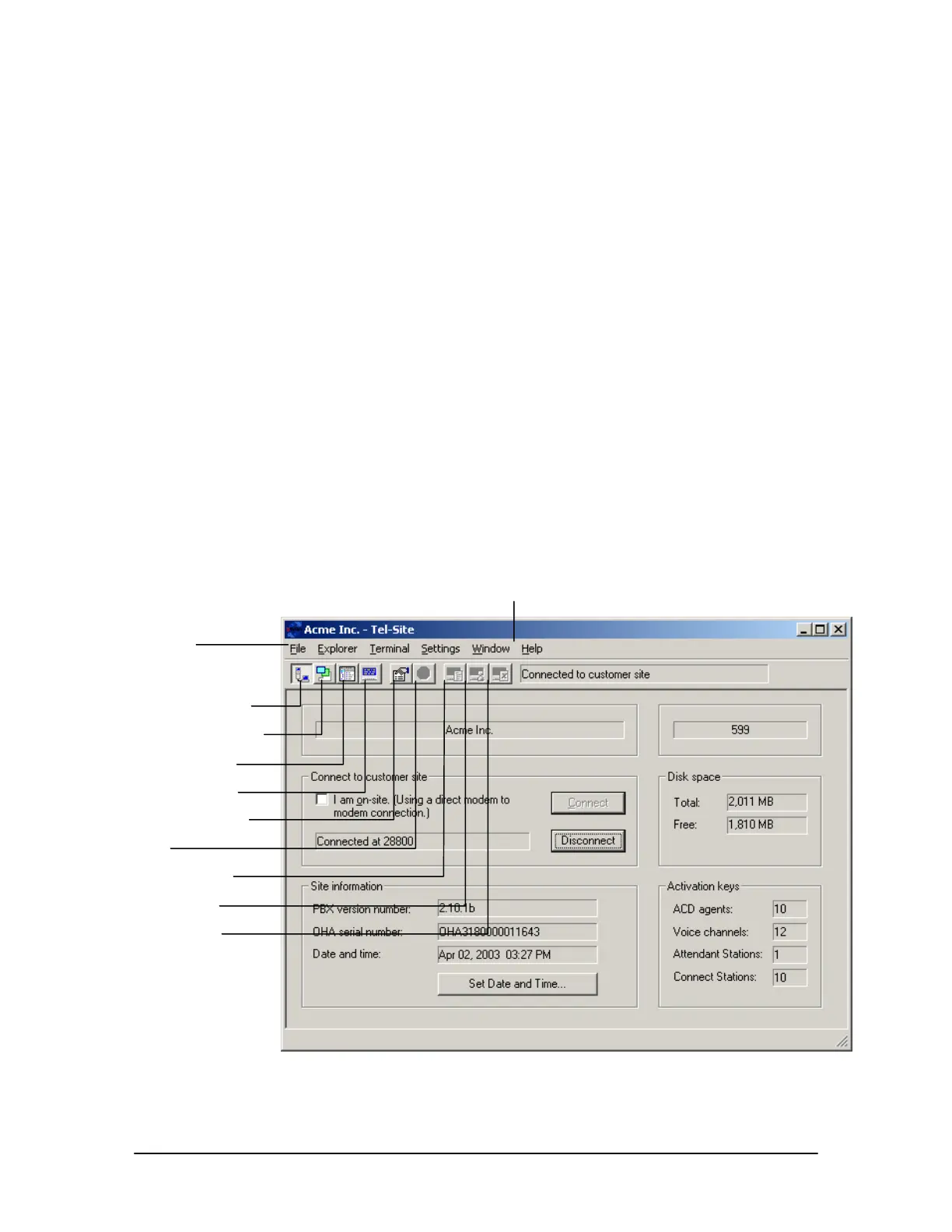
The Connection window for Tel-Site appears when the application is first started. After setting up a
customer site profile (see “Setting up a New Site,” page 56), the Connection window is where you
can connect or disconnect from a site. In the Connect to customer site group box there is a
Connect and Disconnect command button.
Once connected, information about the Telecor Voice Server at the site is displayed. This includes
site information, such as the version number of the Voice Server at the site, information about free
space on the hard disk, and activation keys. You can also change the date and time of the Voice
Server.
Menu bar
Connection window
Configuration window
Explorer window
Terminal window
Window Properties
Stop
Capture window
Time Capture
Clear Capture
Connection window
Help menu



 To Next Page