VS1 Installation, Configuration & Operating Guide 33
Connecting the Cut-Over Box
When installing a new system, Telecor recommends that the Cut-Over Box cable connections are
made after the system has been installed, the software configured, and all stations have been tested
and verified. This aids in determining which stations will be connected to the Cut-Over Box. To
connect the Cut-Over Box, complete the following steps:
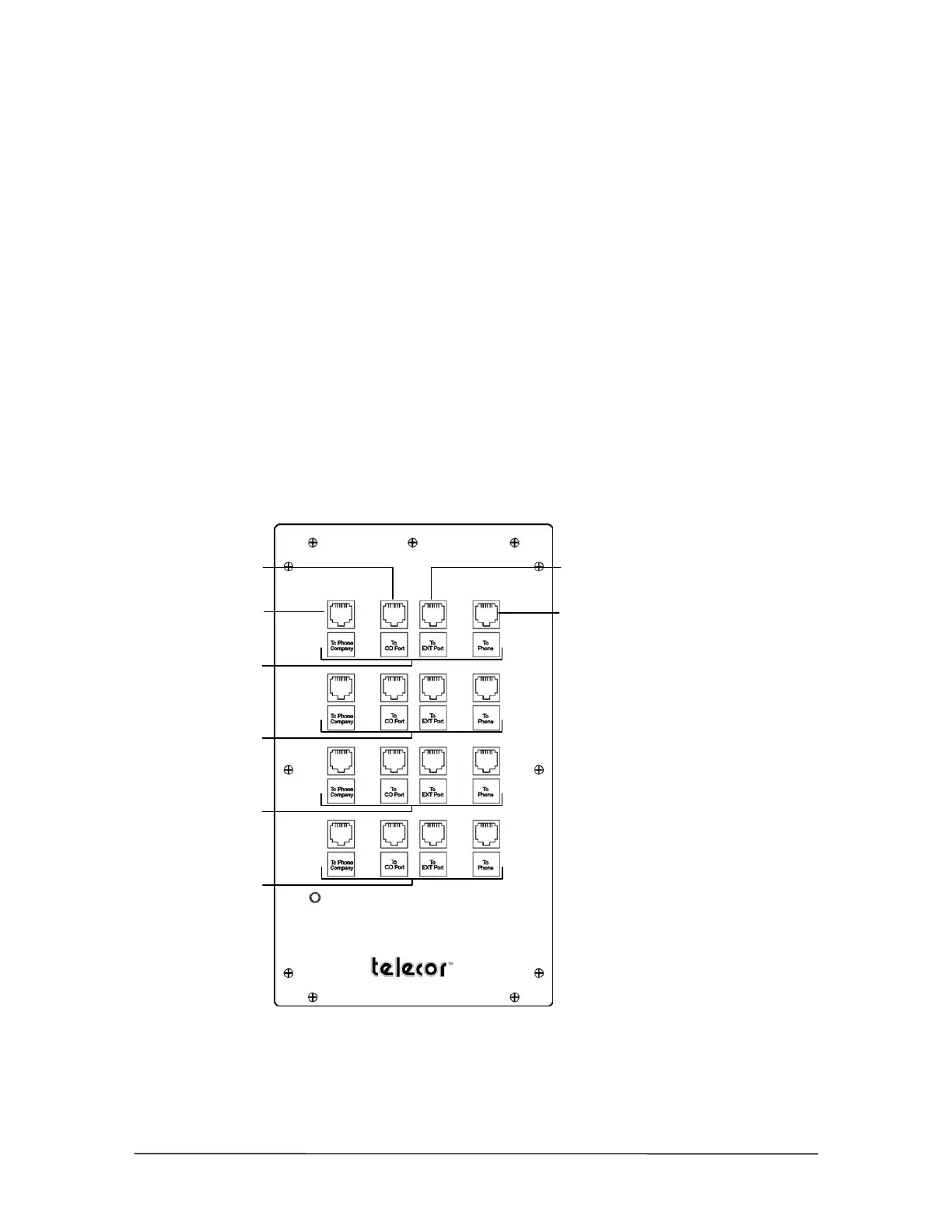
1. Disconnect the RJ-11 cable from the first CO port on the PEU, and then plug it into Port 1 (To
Phone Company) on the Cut-Over Box.
2. Use a second RJ-11 Cable to connect the first CO port on the PEU to Port 2 (To CO Port) on
the Cut-Over Box.
3. Disconnect the RJ-11 cable from the first Station port on the PEU, and then plug it in to Port 4
(To Phone) on the Cut-Over Box.
4. Use a third RJ-11 cable to connect the first Station port on the PEU to Port 3 (To Extension
Port) on the Cut-Over Box.
5. Repeat Steps 1-4 for each CO line by using each row on the Cut-Over Box.
Row 1
Row 2
Row 3
Row 4
Port 1 (CO line)
Port 2 (to CO port
on the PEU)
Port 3 (to Extension
port on the PEU)
Port 4 (To station)
Cut-Over Box
Front View



 To Next Page