216 Reference
LINE STATUS SYMBOLS
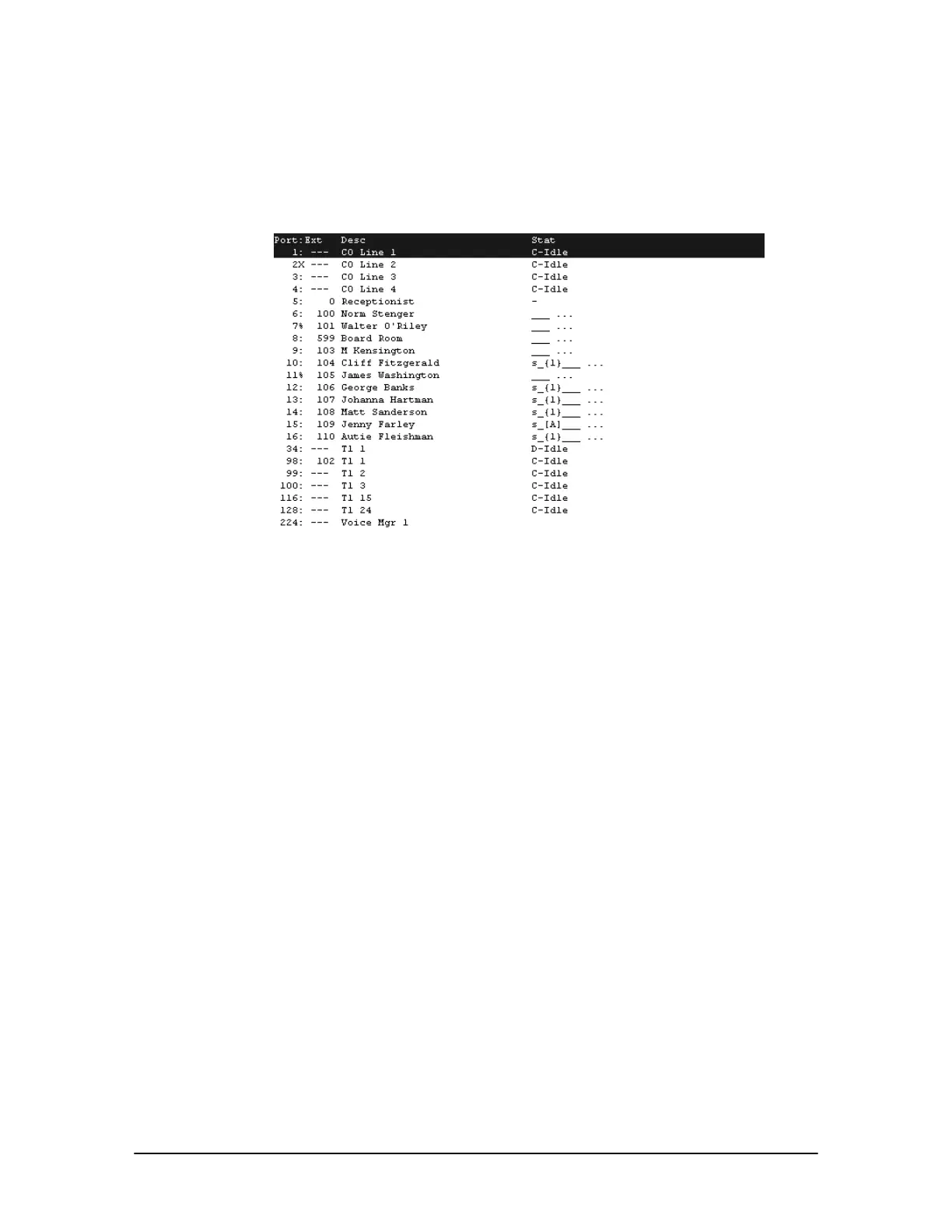
The following is a description of the symbols displayed when the ls command is entered at the
Telecor Voice Server (TVS) Command prompt. The ls command provides a display of the Line
Status of each port on the VS1 telephone system.
Line Status window
Port: column: Displays the port number on the Port Expansion Unit(s).
% - port is on Do Not Disturb
X - port is disabled
Ext column: Displays the Extension number assigned for current configuration period
--- - port is CO, T1 or Voice Mgr
Desc column: Displays the description entered for the port.
Stat column: Displays the status of the port, based on the type of port assigned. Where the
port type format includes an x and y, for example xy[z], the x refers to the speaker statuses and the y
refers to the ACD statuses.
Standard Phone-Type 1 (Format xy[z])
No status symbols
Telecor Display Phone-Type 7 (Format xy{#})
s - speaker off
S - speaker on (speakerphone or paging)
_ - not using ACD
a - ACD logged on and in wrap-up
A - ACD logged on
# - number indicates active line
Modem/Fax-Type 6
No status symbols



 To Next Page