VS1 Installation, Configuration & Operating Guide 249
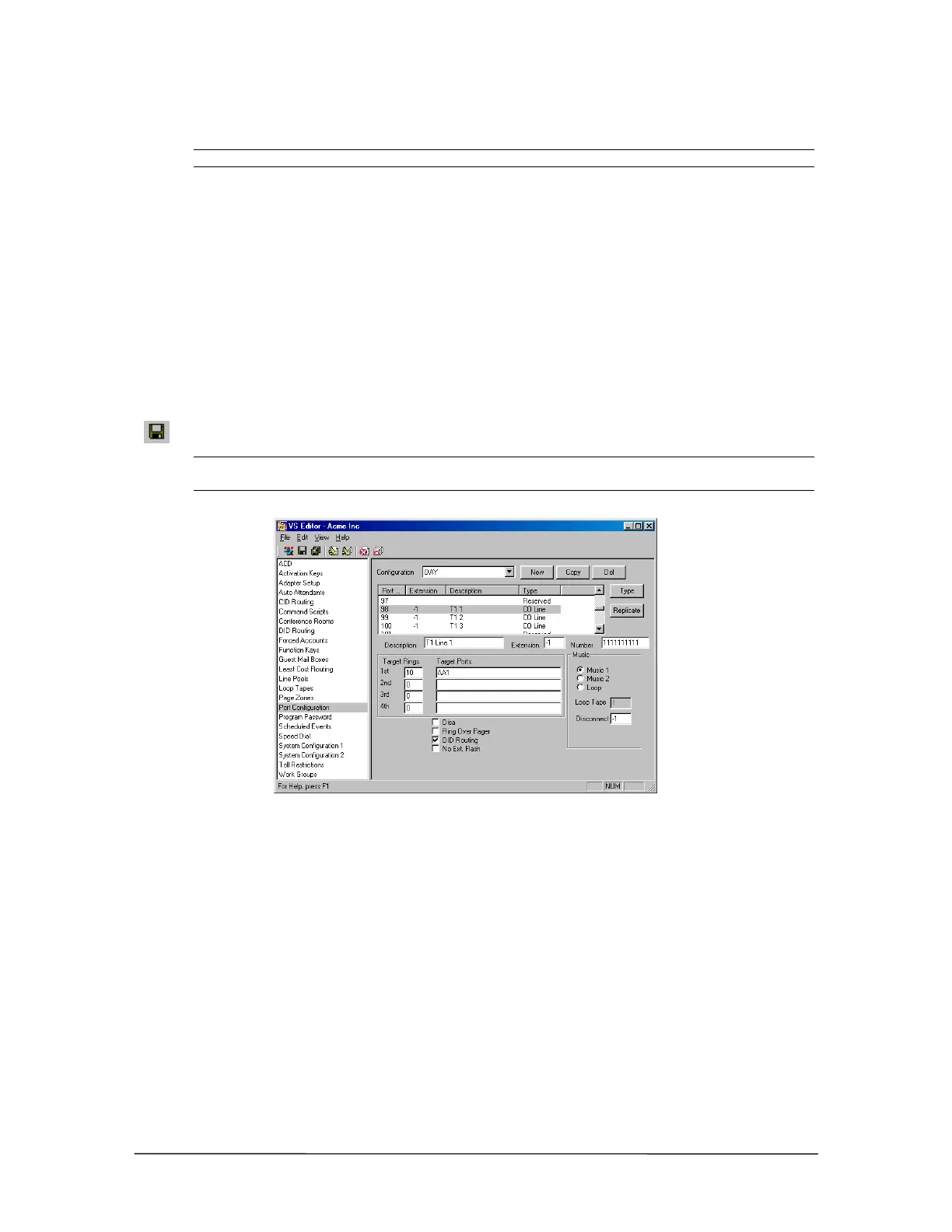
• Number: Enter the digit 1 ten times, which function as placeholders.
Note A CO port configured for T1 service cannot be set up for both DNIS and DID.
3. Set up a default first ring target. This is important because if a call cannot be routed using the
DID Routing table, it is routed based on the target rings and target port.
• Under Rings, set the CO port to ring the first target for 10 rings.
• Under Target Ports, set the CO port to ring the first Auto Attendant (AA1).
4. Check the DID Routing box.
5. To set up additional ports with DID or DNIS routing, repeat the above steps or use the
Replicate button and follow the on-screen instructions.
6. Set up additional configurations by following steps 1 through 5.
7. After all CO ports are configured, click the Save button in the toolbar to save your changes.
Note When using ANI (Automatic Number Identification) only on the T1 port, DID Routing must
remain unchecked.
TI Port configured for
DID or DNIS
Setting Up a DID or DNIS Routing Table
To assign a block of numbers for DID routing, complete the following steps.
1. Select DID Routing in the Tree Control display.
• The DID Routing pane appears.
2. Click Add.
3. In the DID Entry group box, enter the following information in the corresponding text boxes.
Description: Enter a description for the block of numbers. The description is a 16-character
message that is attached to the call. This message appears on all station equipment with a
display.



 To Next Page