VS1 Installation, Configuration & Operating Guide 165
WORK GROUPS
Work Groups on the VS1 Telephone System enable you to assign a virtual extension to a group of
stations. When the Work Group extension is called, all extensions in the Work Group ring
simultaneously. There is a maximum of 20 Work Groups.
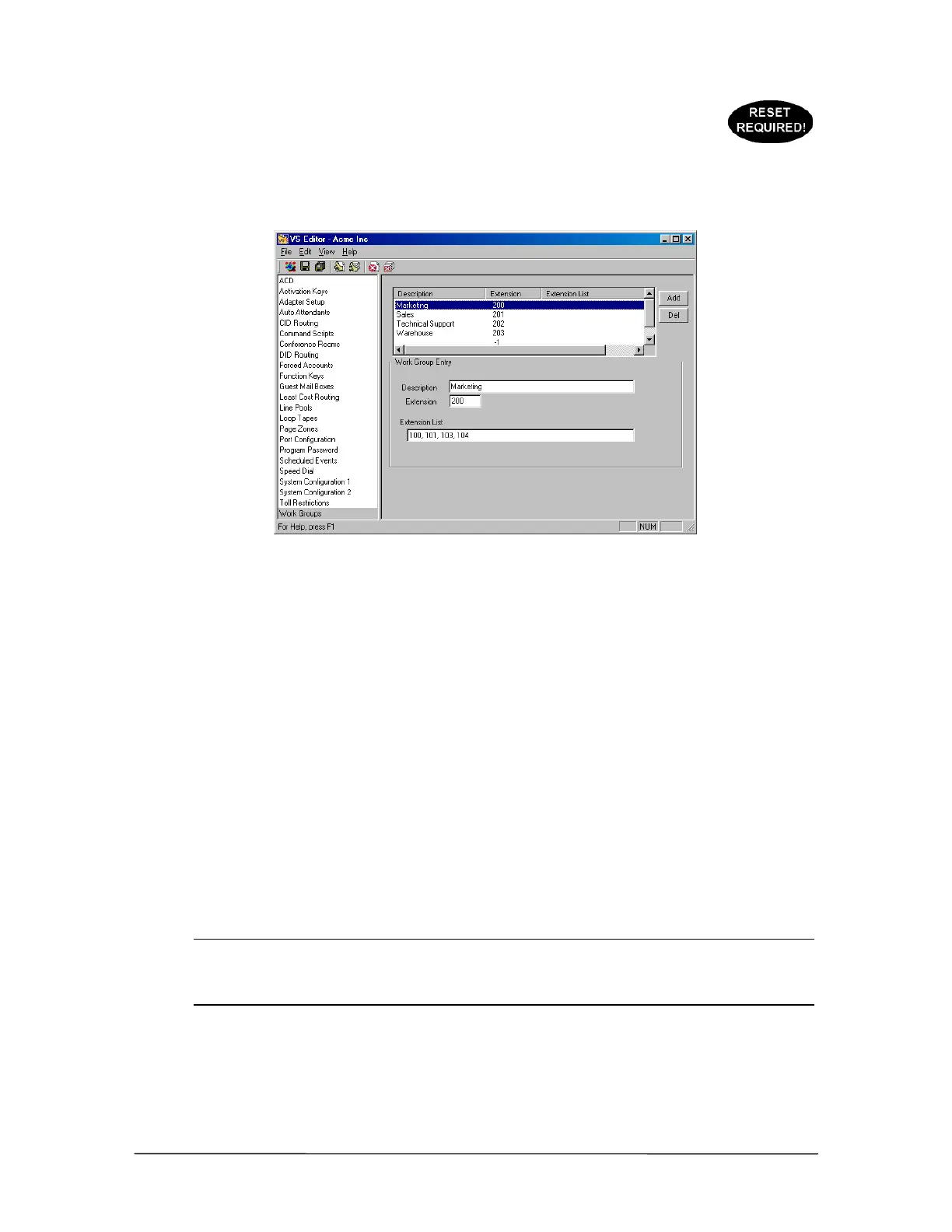
Work Group pane
To create a Work Group, complete the following steps:
1. Select Work Groups in the Tree Control Display.
• The Work Group pane appears.
2. Click ADD.
3. In the Work Group Routing Entry group box, enter the following in the corresponding text
boxes:
Description: Enter a name or description for the Work Group that will appear on DP200
display phones and CTI station options.
Extension: Enter an extension for the Work Group.
Extension List: Type the extensions you want included in the Work Group. This can also
includes Guest Mail Boxes. Up to 20 extensions can be listed in this text box. Use commas to
separate the extensions. Do not use spaces between the extensions. For example,
101,102,103,104,105.
Note The first valid station listed in the Extension List text box in the Work Groups window
controls the Rollover Port and the Rollover Time for that Work Group. If the first valid
station has a Rollover Port configured to Voice Mail, then unanswered calls to the Work
Group rollover to that extension’s Voice Mail.
4. Click the Save button in the toolbar.
• The Work Group entry is added to the list box above.



 To Next Page