34 Hardware
Final Cut-Over
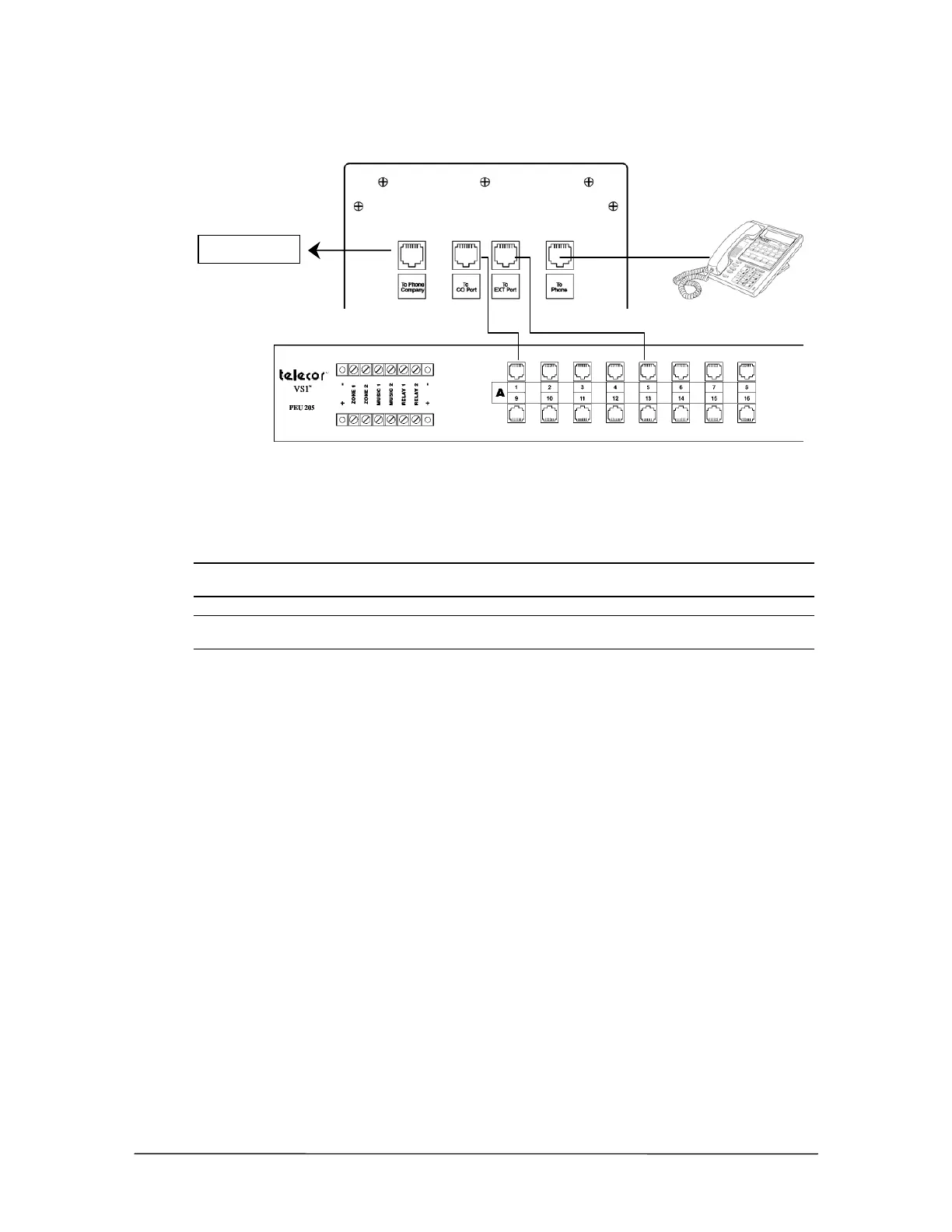
Box Connection
Testing the Cut-Over Box
After all connections are made, test the Cut-Over Box by turning the switch on the bottom of the
Cut-Over Box to the Off position. The power indicator turns off. When the Cut-Over Box is off,
calls coming in on a CO line route directly to the corresponding extension.
Note Turning off the Cut-Over Box terminates existing phone calls on the CO lines connected to
it. Other lines are not affected.
Note If a power outage occurs, the Cut-Over Box automatically switches the connected CO
lines to their dedicated extensions.
Cut-Over Box Checklist
Mount the Cut-Over Box in the rack or to the wall.
Disconnect the RJ-11 cable from the first CO port on the PEU, and then connect it to Port
1 on the Cut-Over Box.
Connect the first CO port on the PEU to Port 2 on the Cut-Over Box.
Disconnect the RJ-11 cable from the first station port on the PEU, and then plug it into
Port 4 on the Cut-Over Box.
Connect the first station port on the PEU to Port 3 on the Cut-Over Box.
Connect additional CO ports to the other rows on the Cut-Over Box.
Turn off the Cut-Over Box to test it
Telco Demarc



 To Next Page