24 Hardware
The TVS is located at the bottom portion of the rack and conveniently mounts into a PVS-RMK
Rack Mount Shelf. The TVS must be located no more than three feet away from the PEU-250 or
PEU 200.
Wall Mount Setup
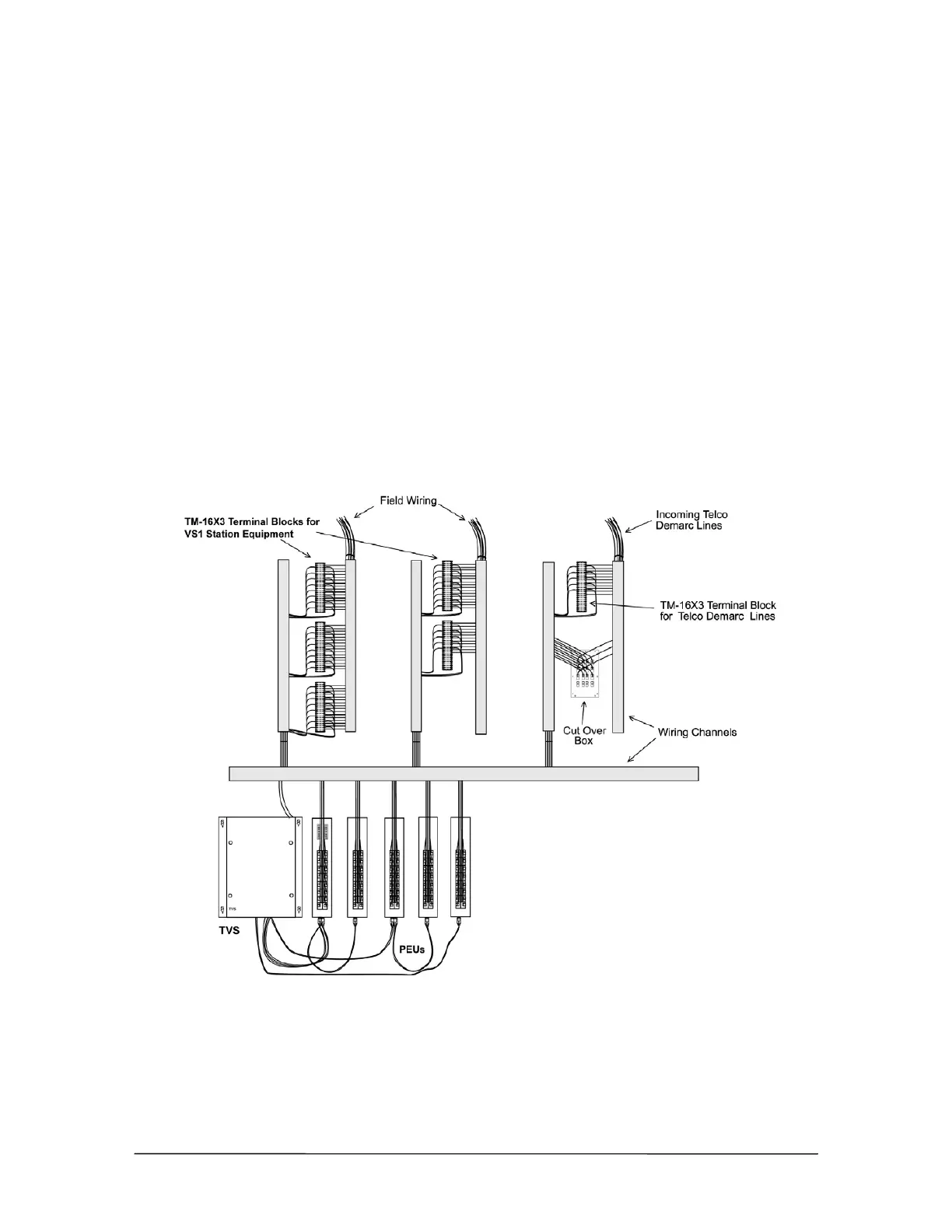
The Phone Cut-Over Boxes are located adjacent to the incoming Telco Demarc lines, which
terminate onto the Cut-Over Boxes. Connections are then made with modular patchcords from the
Cut-Over Box to the CO Ports on the PEU-250 or PEU 205 (see “Connecting the Cut Over Box,”
page 33). If your installation does not include Cut-Over Boxes, then simply connect the CO Lines to
the designated CO ports on the PEU-250 or PEU 205.
Station field wiring and Telco Demarc lines are terminated onto TM-16X3 or TM-8X3 terminal
blocks (see “Terminal Blocks,” page 25). Telecor recommends that the terminal blocks be arranged
in an orderly manner on a plywood sheet mounted onto the wall. DO NOT MOUNT ANY
EQUIPMENT DIRECTLY ON DRYWALL SURFACES. Wiring channels should be used to
neatly house all the field wiring.
The TVS must be located no more than three feet away from the PEU-250 or PEU-205.



 To Next Page