VS1 Installation, Configuration & Operating Guide 53
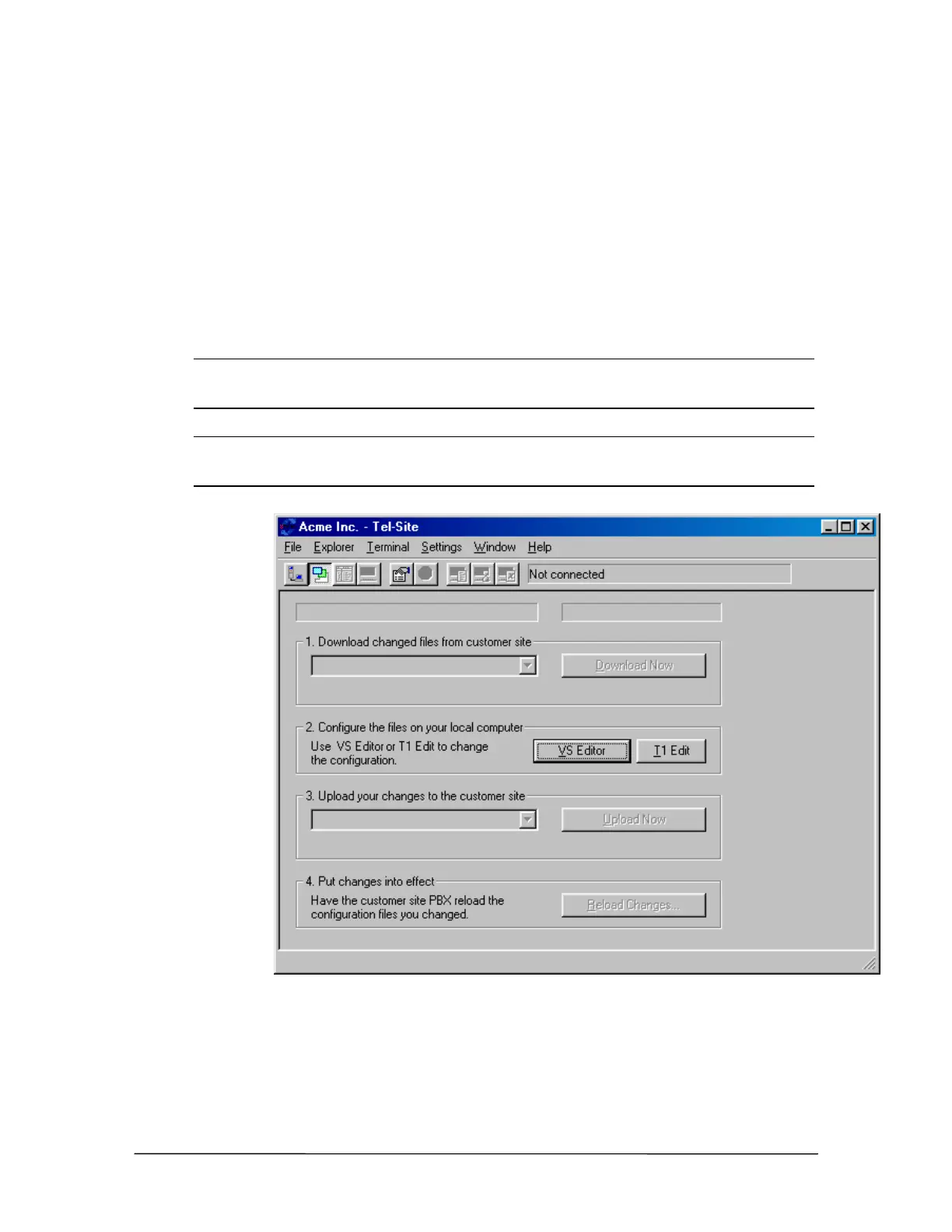
The Configuration Window
The Configuration window is used to perform remote configuration of a customer site. When
connected to a customer site and the Configuration window is opened, Tel-Site scans and displays
any TVS files that have changed since the last remote activity. It can then download any updated
files so that your local computer matches the latest customer site configuration. The VS1 Editor
configuration program is then used to configure the files on your local computer. Once configured,
the changes are uploaded to the customer TVS and put into effect.
The Configuration window is also used to configure a T1 Interface Card by clicking T1 Edit. See
“T1 Interface Card Parameter Setup Using Tel-Site” in the Reference section for more
information.
Note Typically, the Connection window is used to connect to a customer site, but the
Configuration window can be opened prior to connecting to a site to examine the last
downloaded configuration.
Note The first time you open the Configuration window after upgrading the TVS software, a
dialog box opens indicating an upgrade has occurred. You must download all of the
Configuration files so they correspond with the latest VS1 software version.
Configuration
window



 To Next Page