VS1 Installation, Configuration & Operating Guide 63
TVS Modem as an Extension Connection (off-site access)
The setup for this method is similar to the on-site modem to modem connection through two PEU
extension ports. The difference is that Tel-Site is calling in from a remote site and transferred (either
automatically by an Auto Attendant or manually by a receptionist) to the PEU extension port
connected to the TVS modem.
TVS Configuration
For a TVS Modem as an Extension Connection, the configuration tells the modem when to answer
an incoming call and ensures port 16 is defined as a Modem/Fax Port with extension 599.
1. With the site open through Tel-Site, click the Configuration window button in the toolbar.
2. Click the VS1 Editor button.
• The VS1 Editor configuration program opens.
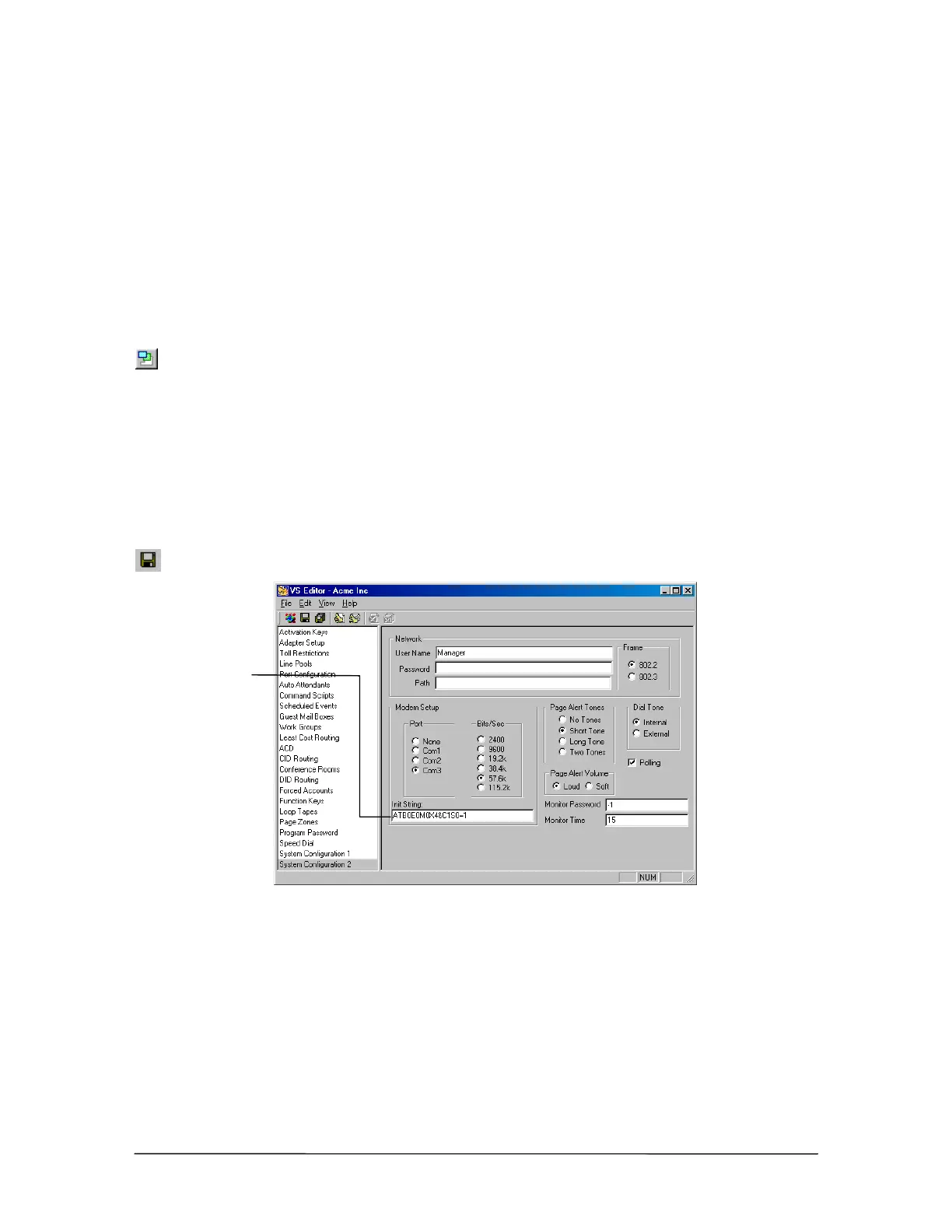
3. In the Tree Control display, click System Configuration 2.
4. In the Init String: text box, check that the end of the modem initialization string reads S0=1.
(S0=1 sets the modem to answer on the first ring.) By default, this setting is already in place.
5. Click the Save button in the toolbar.
Modem initialization
string for TVS
Modem as an
Extension
connection
6. In the Tree Control display, click Port Configurations.
7. In each configuration, make sure that the extension port connected to the TVS modem is
configured as a Modem/Fax port with the extension 599 (the extension number 599 is reserved
for a Modem/Fax port). By default, extension port 16 is configured in this manner.
Modem
initialization string



 To Next Page