156 VS1 Editor Configuration Application
SYSTEM SPEED DIAL
The VS1 System provides 99 system-wide Speed Dial numbers that can be dialed from any VS1
System station option. Phone numbers are assigned to Speed Dial codes (01 through 99), which are
entered by the station user to dial the phone number. After phone numbers are assigned to Speed
Dial codes, a directory must be created and distributed to appropriate personnel at the installation
site.
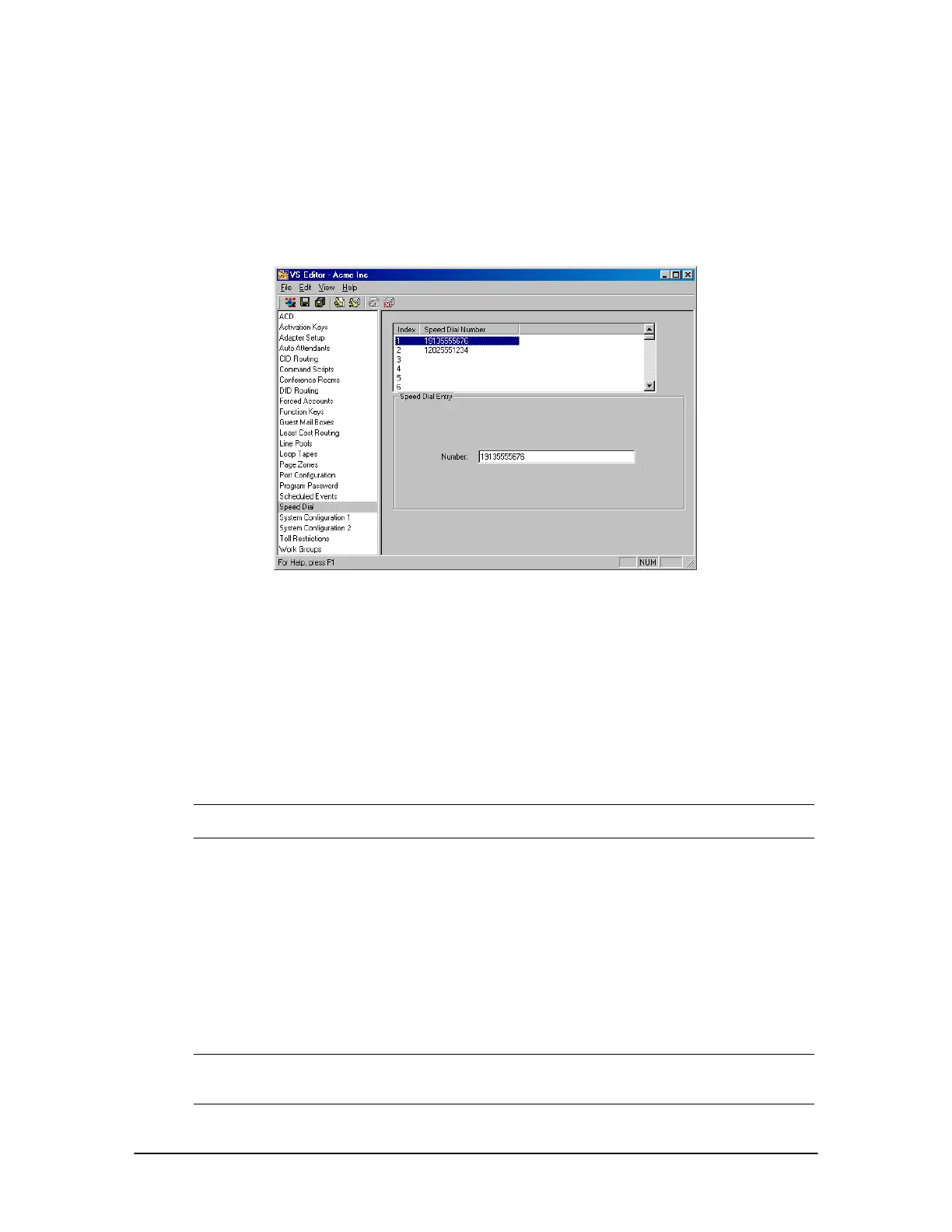
System Speed Dial
pane
To create a System Speed Dial, complete the following steps:
1. Select Speed Dial in the Tree Control Display.
• The Speed Dial pane appears.
2. Select a Speed Dial code number from the list box.
3. In the Number text box, enter the phone number for the Speed Dial code.
Note You do not have to add a 9 to prefix your Speed Dial number. The speed dial numbers are
always dialed using Dial Group 9.
4. Click the Save button in the toolbar.
• The Speed Dial number appears in the list box above.
5. Repeat steps 2-4 for additional Speed Dial number or to edit an existing number.
Dialing System Speed Dials from a Station Option
For VS1 Station Option users, dial *4 and then the Speed Dial code number. DP200 Phone users
have the alternate option of pressing the System Speed Dial Feature button instead of *4.
Note Be certain to inform end-users that single number codes must be preceded by a 0 to
provide a complete two-digit entry. For example, for the speed dial code of 08, the user
would dial *408.



 To Next Page