APPEAR AS Confidential 112/352
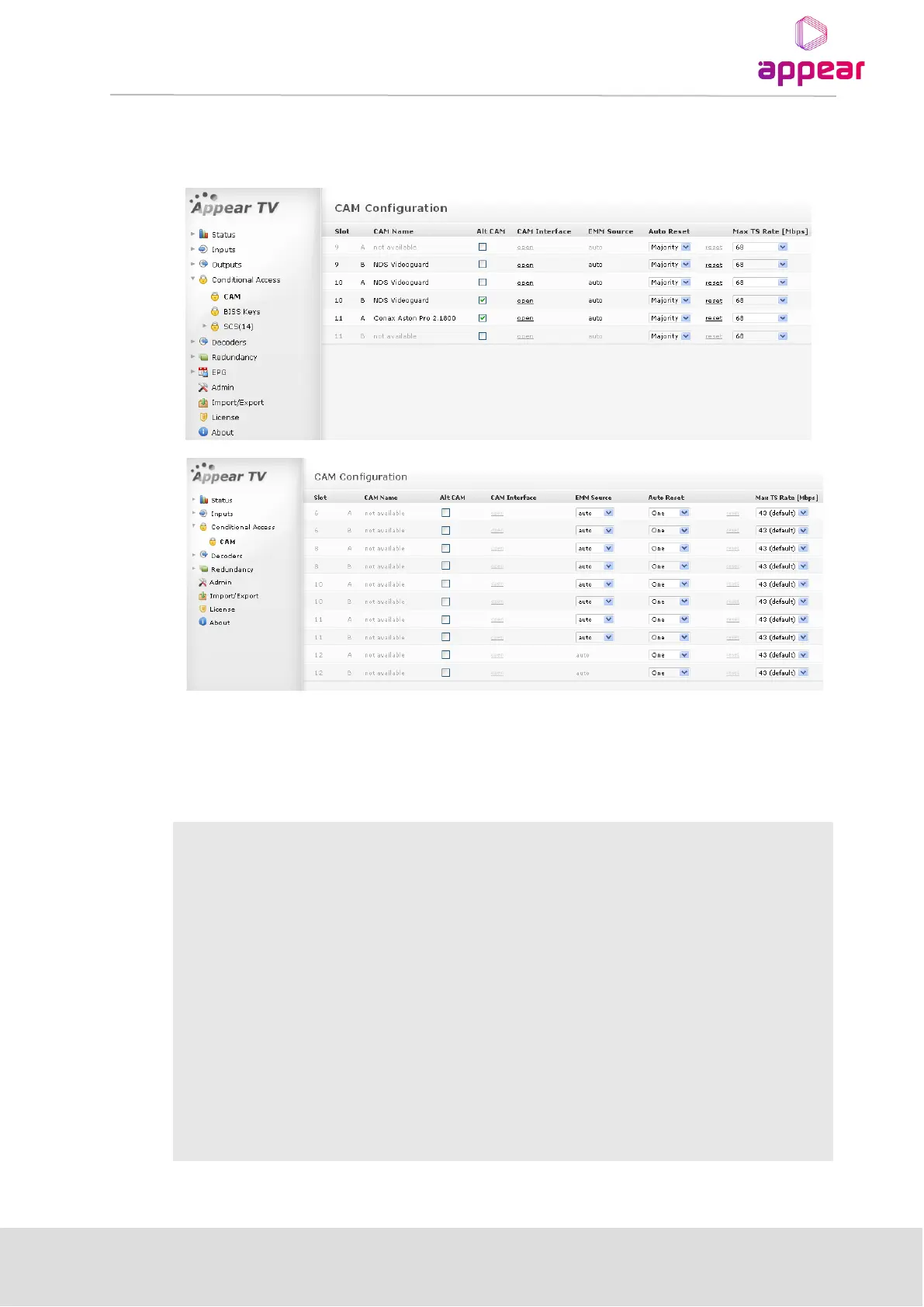
• A list of available CAM modules with its corresponding name,
• The chassis slot where the Decoder or Descrambler module is installed, and
• The CAM slot (each Decoder/Descrambler module has two CAM slots labeled A and B).
If there is no CAM module in the Decoder/Descrambler module, CAM Name will be displayed as not available.
The Alt CAM Mode, CAM Interface, EMM Source, Auto Reset, Reset and Max TS Rate are the configuration
fields available in this page (Figure above).
Slot in which the Descrambler/Decoder is installed
Slot in which the CAM module is installed – either slot A or B
Activate sending of the entire input stream to the CAM without PID filtering -
explained in detail in Section 6.1.4.
Displays the menu defined by the CAM manufacturer – explained in detail in
Section 6.1.5.
Displays the source of the EMM, the default value is auto. When source is set to
auto the EMM will be selected from the same source as the service sent to the
descrambler. For the Quad Decoder, depending on the number of decoder
inputs, it is possible to have more than one EMM source. In this case, a drop
down box will be shown - select the appropriate source.



 To Next Page