APPEAR AS Confidential 213/352
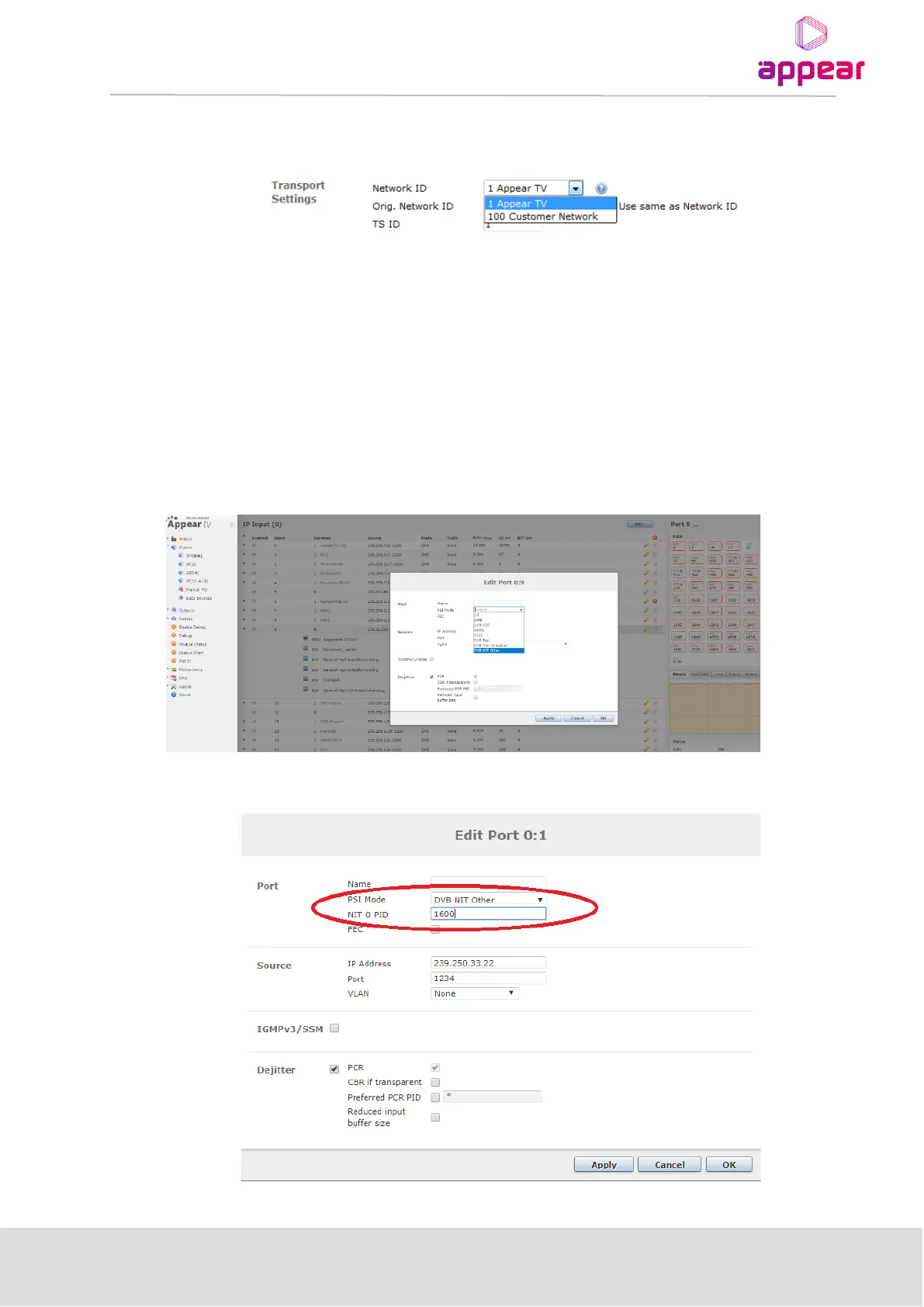
When associating transport streams with PSI networks, the operator is offered a drop down box with the
available selections:
If no PSI networks are defined, it is still possible to easily create SPTS outputs via a simple drag and drop – the
system will automatically associate these with a PSI network within the default PSI domain. The system will also
automatically create a default network within a newly defined domain with network ID 1337.
8.6.2 NIT MAPPING IN PSI NETWORK CONFIGURATION
This feature allows the user to map a NIT Actual table from an input that contains a NIT Other table, instead of
generating a NIT Actual table from scratch in the output. In order to perform NIT Mapping, user have to select
the “DVB NIT Other” in the “PSI Mode” drop-down menu, when editing an existing source by clicking on the edit
icon (typically a pencil) to launch port edit window.
When “NIT Other” is selected, it is required to provide the “NIT O PID”. Please see the image below:



 To Next Page