APPEAR AS Confidential 231/352
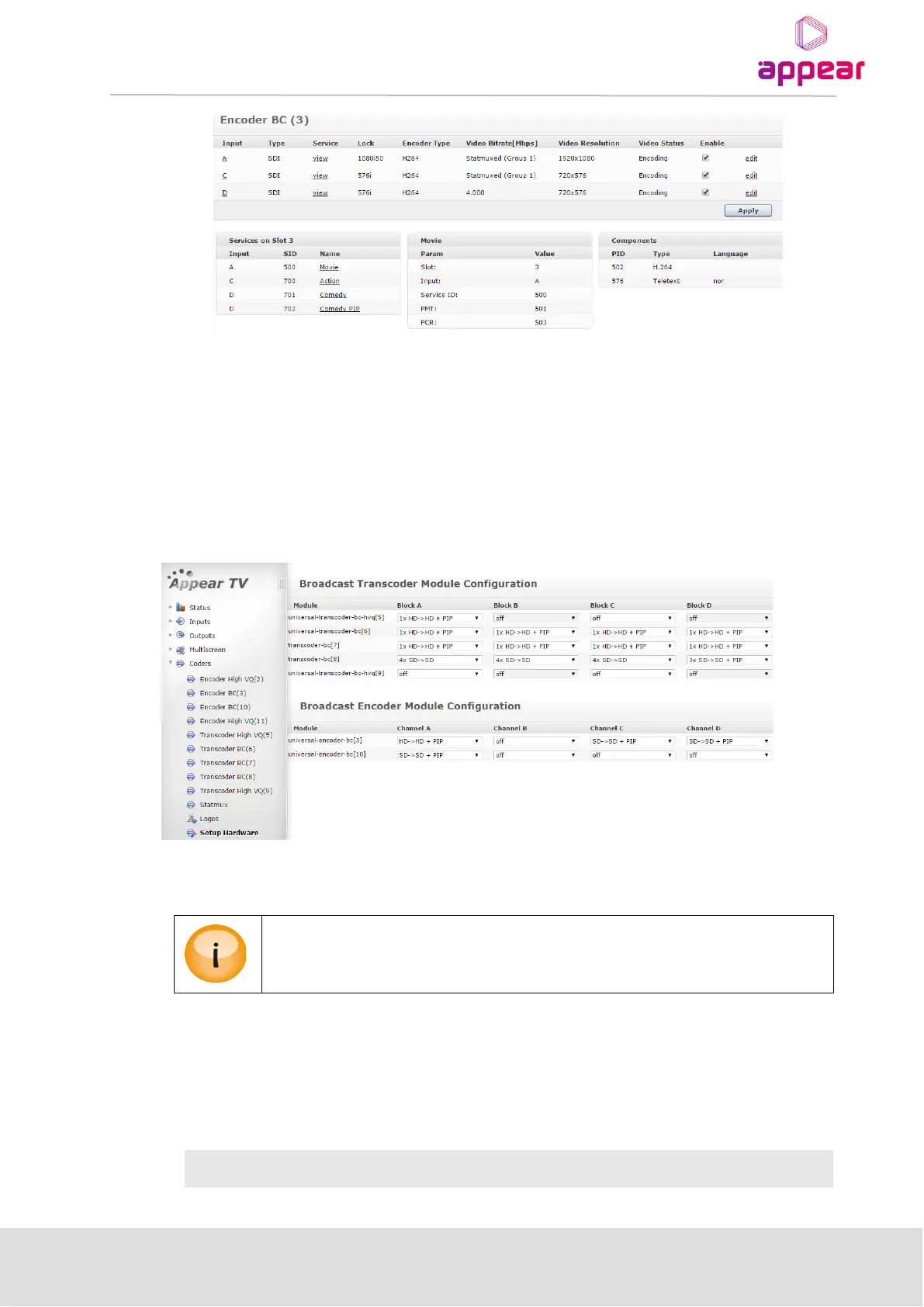
Parameters for the encoder port can be edited by clicking on the ‘edit’ link associated with each port.
In order to activate the port, the ‘Enable’ checkbox must be selected and the setting applied by clicking on the
‘Apply’ button.
9.2.1 HARDWARE CONFIGURATION (EC-400)
Depending on the mode of the hardware, it will be possible to configure the internal transcoder blocks (A, B, C
and D) to different input/output resolutions, eg HD, SD, HD+PIP, SD+PIP. The overview and configuration of this
is on the Setup Hardware page under the Coders tab in the Navigation Pane:
In order to change the mode of the block, select the correct option from the pull-down menu and click the ‘Apply’
button.
Re-configuring a block with existing channels will cause this block to be de-configured and
the services removed from the output configuration.
9.2.2 SOURCE CONFIGURATION
9.2.2.1 SDI Encoder (EC-100, EC-200, EC-400)
Once SDI signals are connected to their respective input ports, the source parameters can be set on the Source
tab on the encoder ‘edit’ dialog. Available parameters are:



 To Next Page