EasyManua.ls Logo

Appear TV DC100X - Audio Transcoder Mode

Default Icon
352 pages
Print Icon
To Next Page IconTo Next Page
To Previous Page IconTo Previous Page
Loading...
APPEAR AS Confidential 264/352
Channel Mode
Output channel format.
Stereo
Mono
Bitrate
Bitrate of compressed audio, available choices depend on Encoder Type and
Mode.
Signalling
Language
Language of the output service to be signaled
Audio / PCR PID
Audio PID for the encoded audio output.
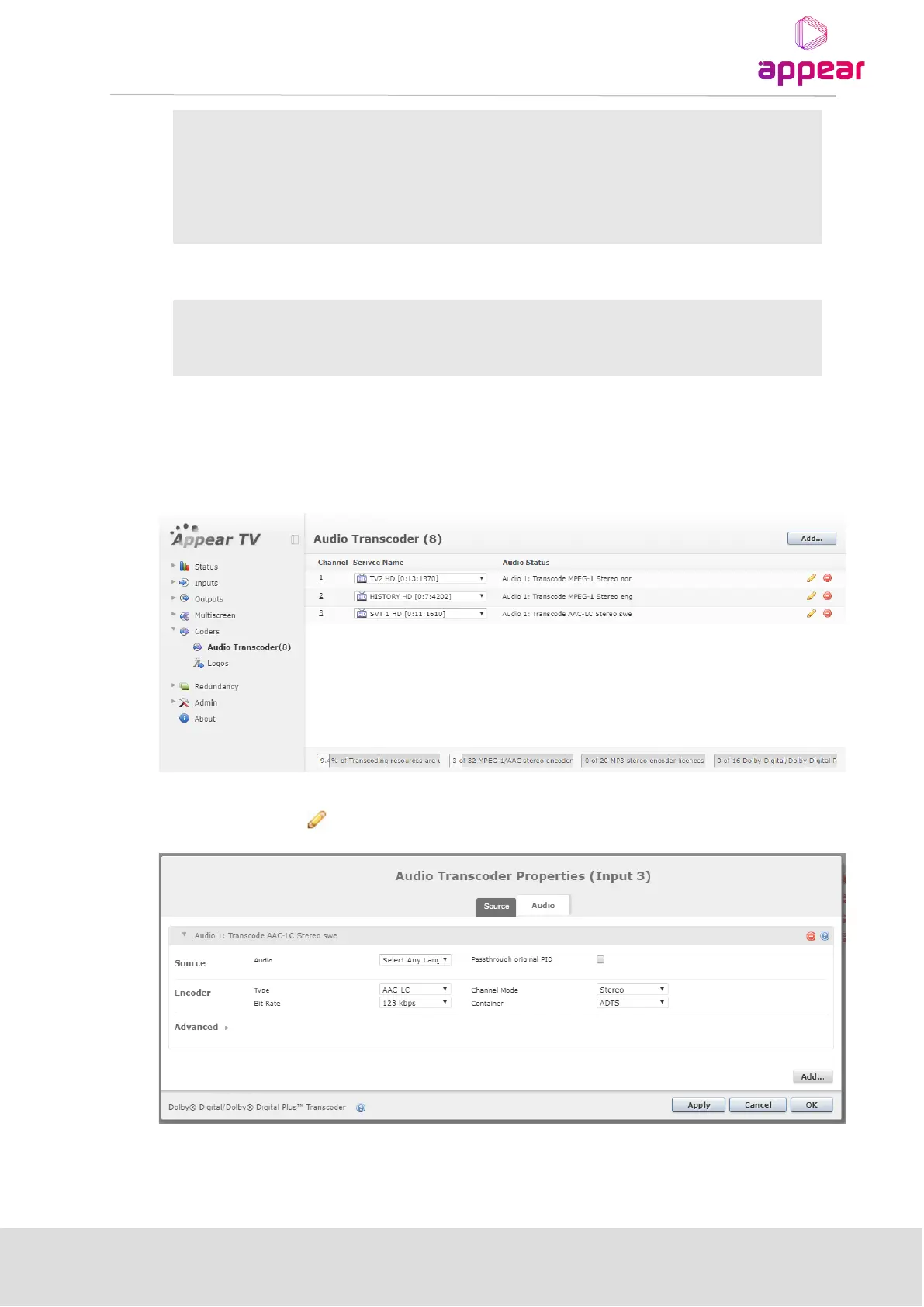
9.7.2 AUDIO TRANSCODER MODE
In Audio Transcoding mode the module is capable of transcoding audio of up to 32 services. New services can be
added by clicking on theAdd’ button.
The input service can be selected from the pull-down box for each service. To edit service transcoding
parameters, click on the icon. This will display the following dialog box:
To add a transcoder option, click the ‘Add’ button and select the language (if needed). Multiple transcoding can
be added per service.

Table of Contents

Related product manuals