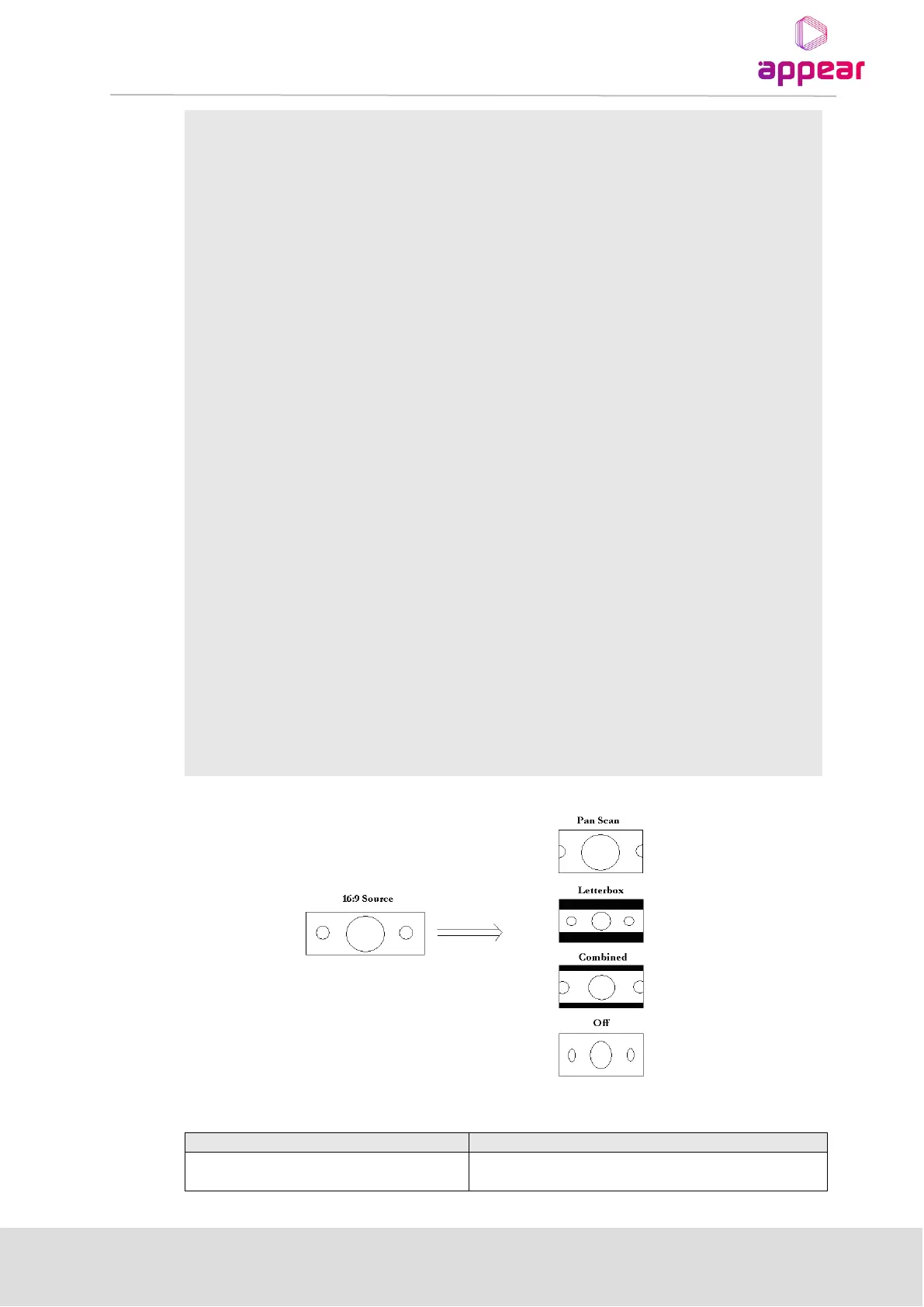
Aspect Ratio Conversion refers to the method of converting the incoming
MPEG stream to suit the video output – valid choices are Pan Scan,
Letterbox (default), Combined, and Off.
AR Conversion provides options regarding the video aspect ratio output of
the decoder when the source is widescreen (16:9).
AR Conversion will be added to the incoming picture if the input format is
different from the output format. For example:
o SD output – if the incoming format is 16:9, then AR Conversion is
applied because the output format is 4:3.
o HD output – if the incoming format is 4:3, the AR Conversion is applied
because the output format is 16:9.
Aspect Ratio Conversion Standard refers to the method in which the
decoder is being told what the incoming picture looks like
– the options are Normal, DTG, and AFD Manual.
The chosen standard affects the AR Conversion and WSS value.
Video signal standard – this parameter is not configurable for the HP RF
Decoders as it is defined by the firmware installed on the Decoder module.



 To Next Page