APPEAR AS Confidential 302/352
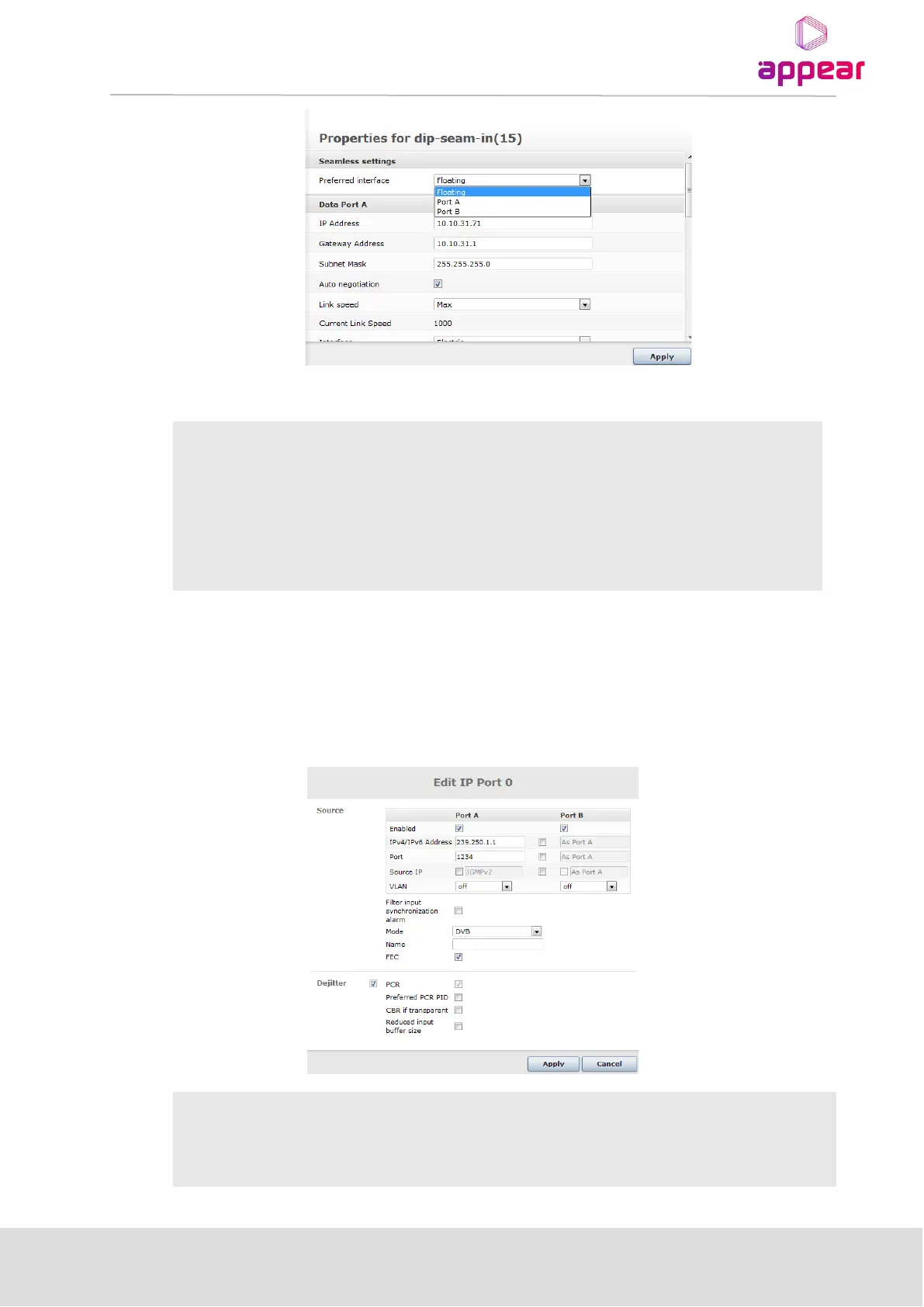
The values here represent the following modes:
Port A is the default port and on a failure, Port B will be used. The redundancy will
not switch to Port A again until Port B fails.
Port A is the default port and on a failure Port B will be used. Once the filaure
condition is cleared on Port A, the source will be switch back to this. (Reverting)
Port B is the default port and on a failure Port A will be used. Once the filaure
condition is cleared on Port B, the source will be switch back to this. (Reverting)
12.1.5.2 Port configuration
When adding a source the default is that the multicast is configured by be received on both input interfaces on
the input card, i.e both Port A and Port B. These defaults may be overwritten by editing the input. The following
seamless specific attributes is shown in figure below.
This option is added to enable the operator to block one path -> hence forcing the input
to be taken from the other port
The source IP should be defined.



 To Next Page