737 Flight Crew Operations Manual
Automatic Flight -
Controls and Indicators
Boeing Proprietary. Copyright © Boeing. May be subject to export restrictions under EAR. See title page for details.
D6-27370-866-EGP 4.10.15
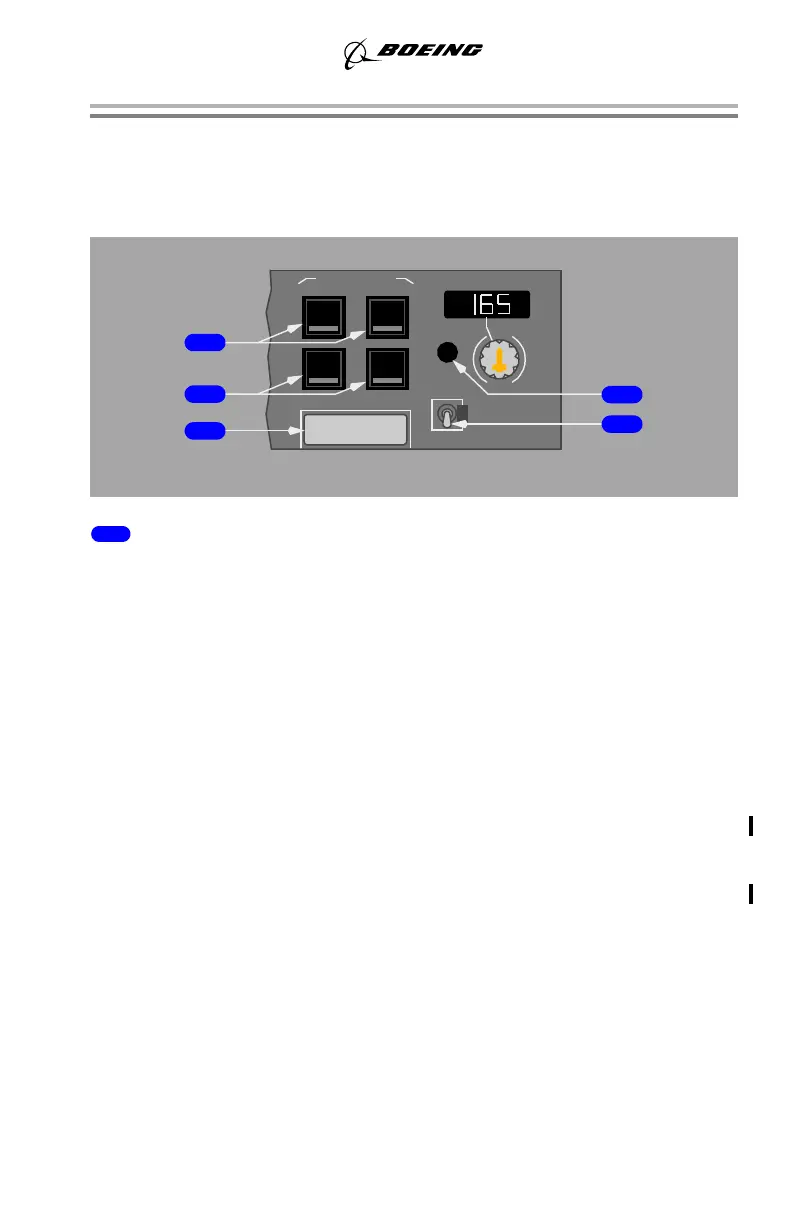
Autopilot / Flight Director
Pushing a CMD or CWS switch engages related A/P in CMD or CWS and
illuminates switch lights. A/P can operate in CMD, CWS, or a combination of
CMD and CWS.
1 Command Engage (CMD ENGAGE) Switch (A or B):
Push –
• engages A/P
• enables all command modes
• displays CMD in A/P status display
• pushing an engage switch for second A/P, while not in approach mode,
engages second A/P and disengages first A/P
• enables CWS operation
• CWS engages if:
• pitch or roll mode not selected
• pitch or roll mode deselected
YK981 - YQ456
• pitch or roll mode manually overridden with control column or wheel
force
YK981 - YQ456
Note: After localizer or glideslope capture, during a single channel autopilot
approach, reversion to CWS will occur when the pilot manually applies
overriding pitch and /or roll control forces. Approach mode will be reset
(engaged and armed modes blank).
• CWS engaged displays:
• CWS P and/or CWS R in A/P status display
• blank in pitch and/or roll mode FMA
• when approaching a selected altitude in CWS P, the pitch mode engages
in ALT ACQ and ALT HOLD when reaching selected altitude
CWS CWS
CMD CMD
DISENGAGE
A/P ENGAGE COURSE
MA
OFF
F/D
AB
ON
September 15, 2016



 To Next Page