737 Flight Crew Operations Manual
Flight Instruments, Displays -
PFD/ND – System Description
Boeing Proprietary. Copyright © Boeing. May be subject to export restrictions under EAR. See title page for details.
10.21.4 D6-27370-866-EGP
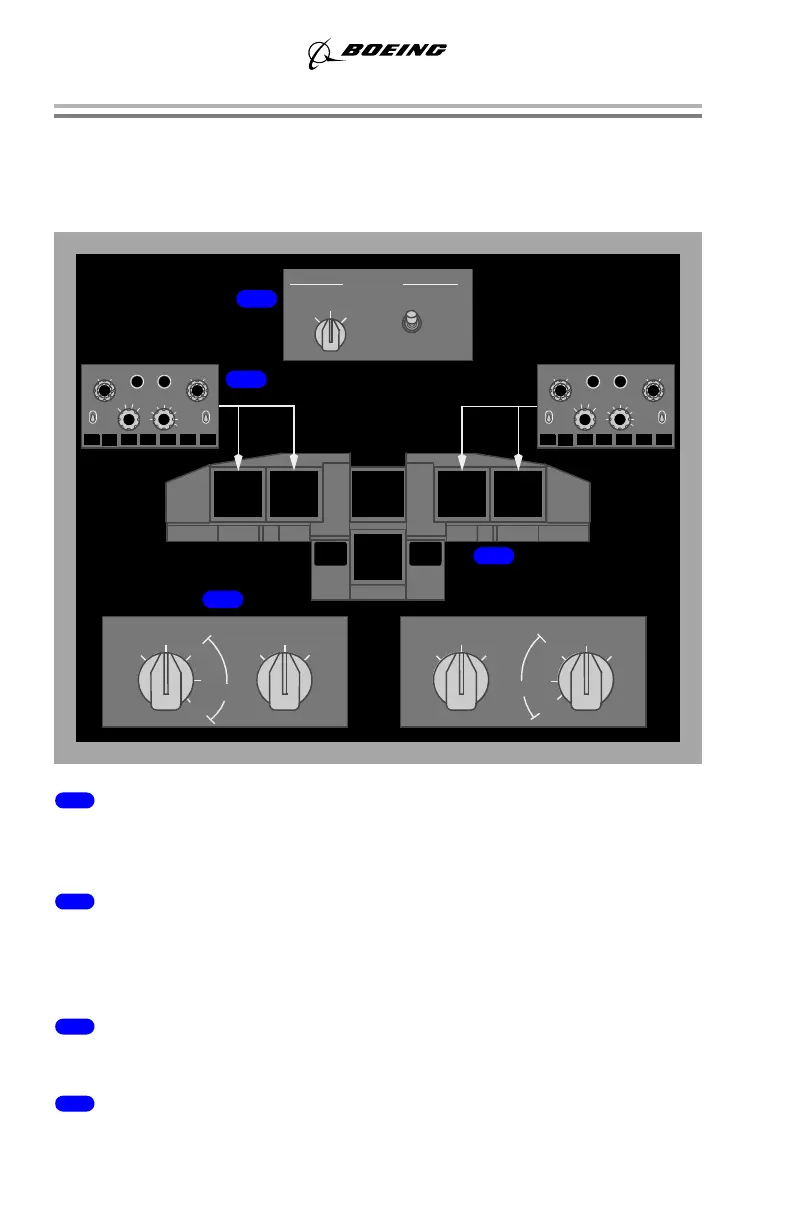
Display Selection and Control Examples
The following examples show display selections.
Normal Display Configuration
1 DISPLAYS Source Panel
The display SOURCE select switch is in AUTO and the CONTROL PANEL
select switch is in NORMAL.
2 EFIS Control Panel
The left EFIS control panel controls the Captain outboard and inboard display
units. The right EFIS control panel controls the First Officer outboard and inboard
display units.
3 Display Select Panel
All selectors are in NORMAL.
4 Display Units
The pilots’ outboard and inboard DUs show the normal PFD/ND displays.
5
10
20
40
80
160
320
640
VOR 1 VOR 2
MINS
RADIO BARO
FPV MTRS
BARO
IN HPA
ADF 2ADF 1
OFF
APP
VOR
MAP
PLN
WXR STA WPT ARPT DATA POS
OFF
RST
CTR
TFC
TERR
STD
OUTBD
CAPT CAPT
INBD
ENGINE
F/O
INBD
F/O
OUTBD
NORM
ENG
PRI
LOWER DU
PFD
PFD
NORM
INBD
ENG
PRI
MAIN PANEL DUs
PFD
OUTBD
PFD
NORM
INBD
ENG
PRI
MAIN PANEL DUs
NORM
ENG
PRI
LOWER DU
NORMAL
ON 1
BOTH
BOTH
ON 2
ALL
ON 2
ALL
ON 1
AUTO
SOURCE
DISPLAYS
CONTROL PANEL
1
2
3
4
OUTBD
5
10
20
40
80
160
320
640
VOR 1 VOR 2
MINS
RADIO BARO
FPV MTRS
BARO
IN HPA
ADF 2ADF 1
OFF
APP
VOR
MAP
PLN
WXR STA WPT ARPT DATA POS
OFF
RST
CTR
TFC
TERR
MFD
MFD
STD
ND
ND
September 28, 2006



 To Next Page