Using Müse
97
PN: 905K520652 v2.8
To delete a patient record:
1. From the Patient Records panel, select the patient record to delete
2. Click Delete
The patient record is deleted and is no longer available to display in the TouchPro
software.
Individual patient records can also be previewed, renamed or exported by selecting the record and
clicking Rename, Export or Preview.
Vocalization List
The manikin has the ability to voice custom sounds. Custom sounds are managed from the
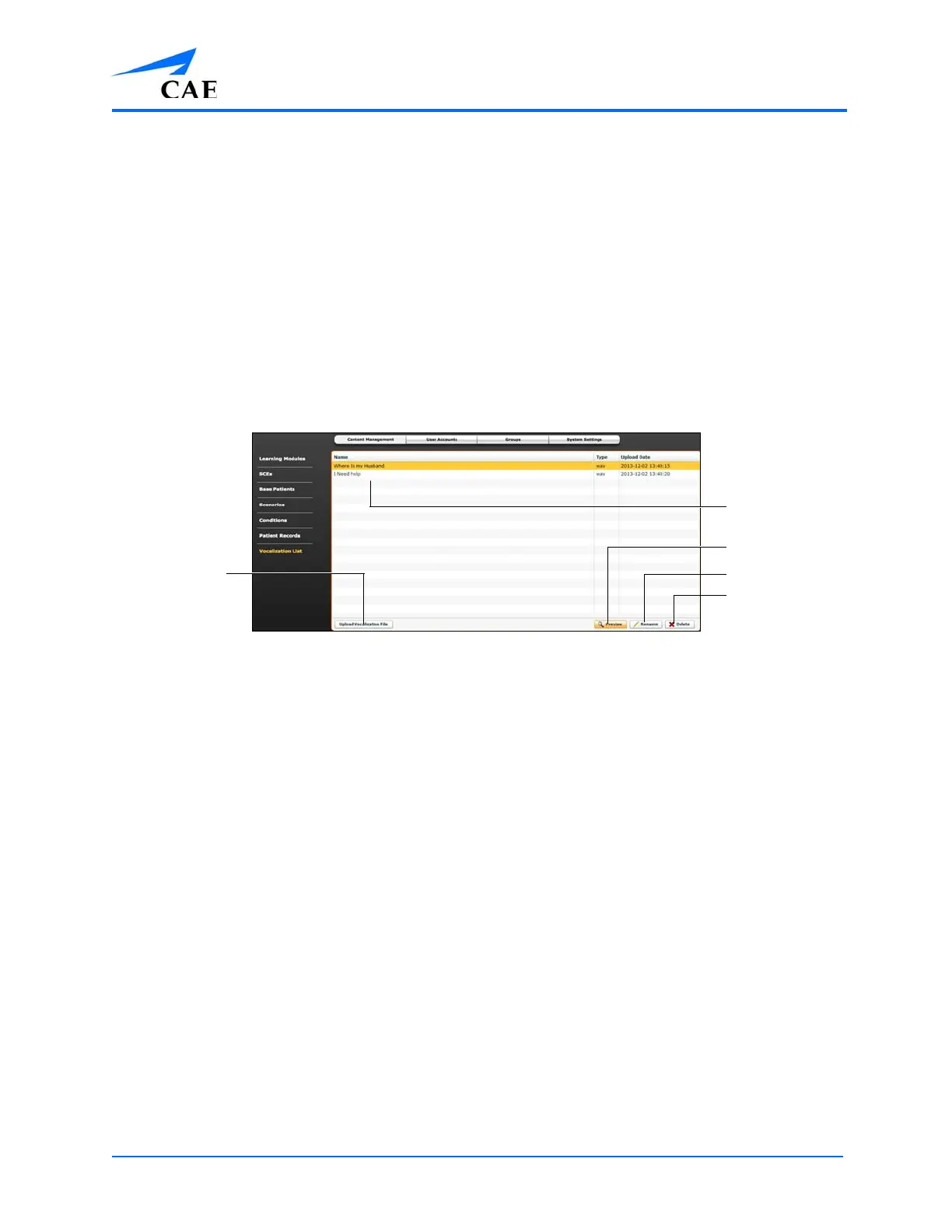
Vocalization List panel on the Content Management tab of the System Administration screen.
The Vocalization List Panel
The following vocalization file types can be uploaded to Müse:
• WAV
A single vocalization file cannot exceed 1MB.
To upload a vocalization file:
1. From Vocalization List panel, click Upload Vocalization File
2. Select the desired file and click Open or OK
Müse can store at least 2GB of patient record and vocalization files, depending on the disk space
available. To ensure adequate space, please delete files when they are no longer needed.
To delete a vocalization file:
1. From the Vocalization List panel, select the vocalization to delete
2. Click Delete
Individual vocalization files can also be previewed or renamed by selecting the vocalization and
clicking Rename or Preview.
Upload
Vocalization
File
Preview
Rename
Delete
Vocalization files



 To Next Page