Chapter Heading
235
PN: 905K520652 v2.8
Advanced Controls Tool
Advanced Controls Tool
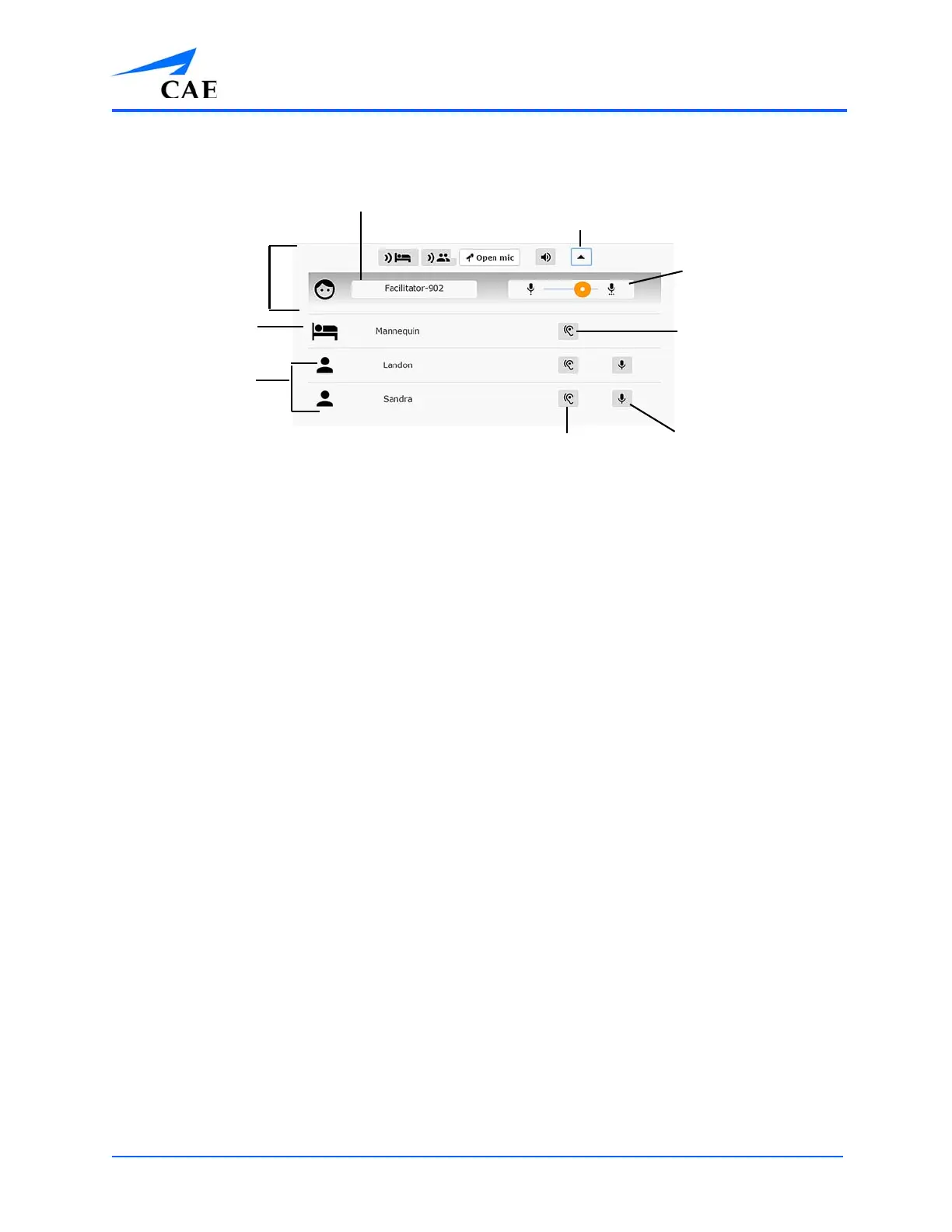
• Call Sign Name: Is automatically attributed (e.g. Facilitator-902). Your call sign name can
be edited by clicking it and typing a new one.
• Advanced Controls Button: Clicking the Advanced Controls button on the supplemental
toolbar opens the Advanced Controls tool. Clicking it a second time collapses the
Advanced Controls tool.
• Adjust Mic Volume Slider: Allows your mic volume (i.e. gain) to be adjusted. This is
applicable to both speaking as the manikin and speaking to participants.
• Mute Incoming Manikin Communication Button: Mutes all communications from the
mic located in the manikin. Clicking it a second time unmutes communications from the
manikin.
Participant Controls:
º Prevent Participant From Hearing You Button: Prevents that participant from
hearing you. Clicking it a second time allows them to hear you again
º Mute Incoming Participant Communication Button: Mutes communications
from that specific participant. Clicking it a second time allows you to hear them
again.
The Call Sign Name
The Advanced Controls
Tool button
The Adjust Mic
Volume button
The Mute Incoming
Manikin
Communications
button
The Prevent
Participant from
Hearing You button
The Mute Incoming Participant
Communications button
The Participant
Controls section
The Manikin
Controls section
The Your Controls
section



 To Next Page