Autopilot Operation
SkyView HDX Pilot’s User Guide – Revision B 8-11
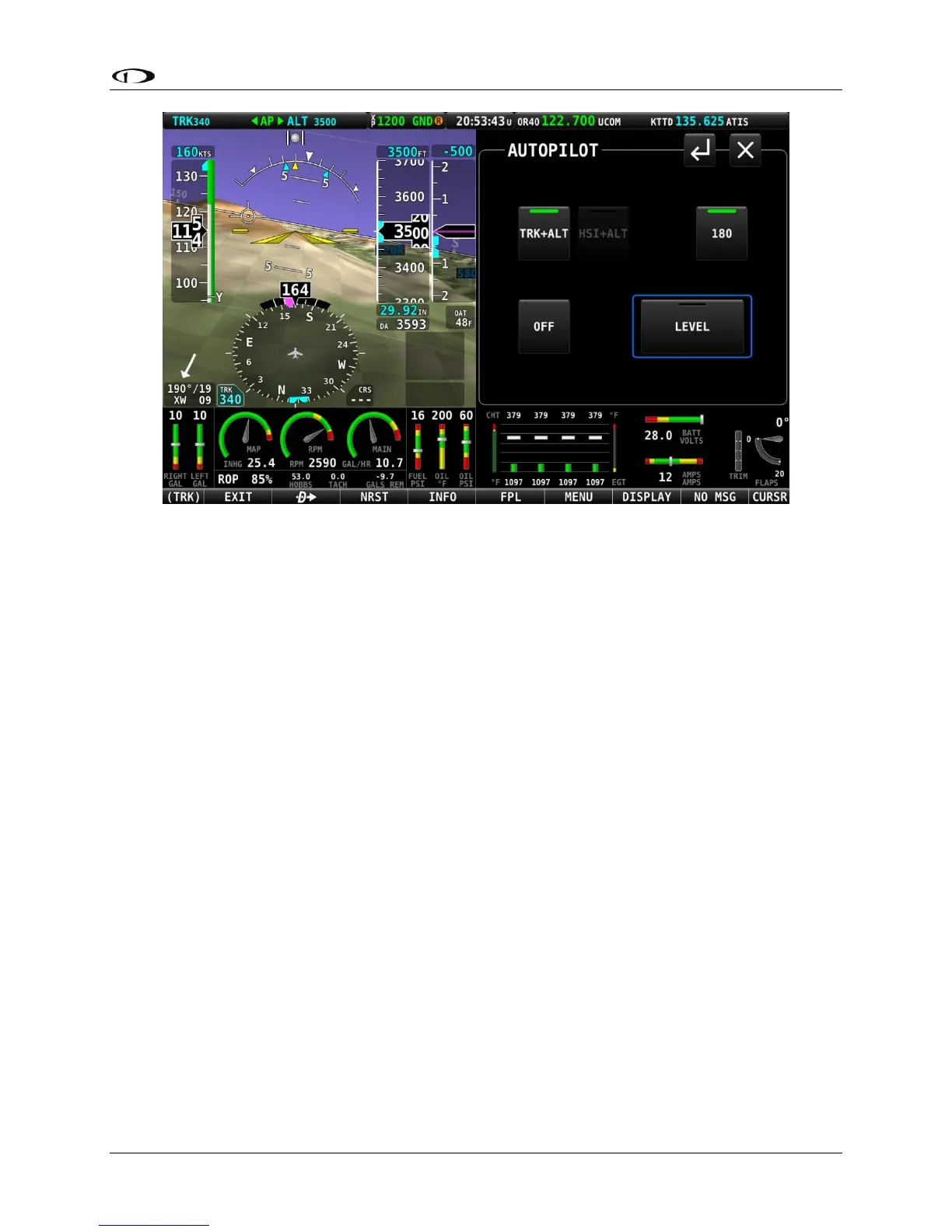
Figure 219 – 180° mode is engaged; turn is not yet complete
As the turn nears completion, the 180° button’s green bar will turn off, and the autopilot will
continue in the TRK+ALT mode.
To disengage the autopilot press either the OFF button or TRK+ALT button.
OFF
Press the OFF button to disengage both servos from any mode.
LEVEL
Press the LEVEL button to engage the autopilot in Level mode. This button is wider than the
other autopilot control buttons and is prominently surrounded by a blue box even when the
LEVEL mode is not engaged.
The objective of the LEVEL mode is to promptly get the aircraft to a bank angle of zero with zero
vertical speed. In this mode, the autopilot will attempt a recovery from usual attitude using the
same methodology a pilot is trained to execute, that is, adjust bank angle towards zero, then
adjust pitch attitude to achieve vertical speed of zero. This mode will be enunciated as
STRAIGHT for roll axis and LEVEL for pitch axis on the Top Bar.





 To Next Page