313
Item Description
Mid-call Signal
• Remote process—If the session timer mechanism is
initiated by the calling party, and the called party also
supports this mechanism, you can select this option to
enable the called party to process the session update
information. Otherwise, the session timer mechanism only
works between the calling party and the SIP trunk device.
The interval for sending session update requests is
negotiated by endpoints. For more information, see RFC
4028.
• Local process—The SIP trunk device processes the update
messages rather than transparently pass them to the peer
end.
By default, the
Local
option is selected.
Configuring a call route for inbound calls
Select Voice Management > Call Route from the navigation tree, and click Add to access the call
route configuration page. Specify the call route type as SIP.
For more information about call route, see "Local number and call route" and "Basic settings".
SIP trunk configuration examples
Configuring a SIP server group with only one member server
Network requirements
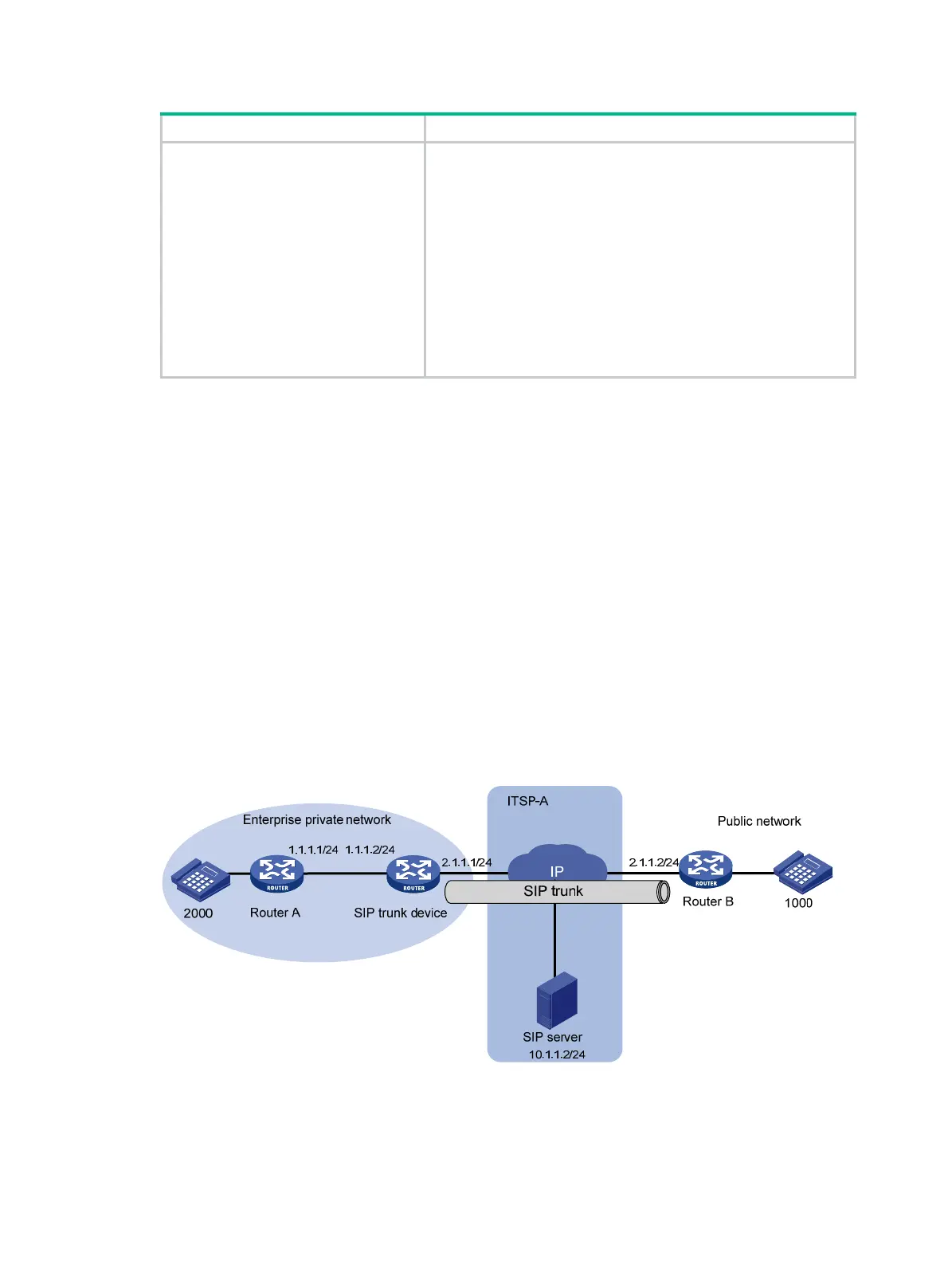
The enterprise private network has a SIP trunk device. Router A is a private network device, and
Router B is a public network device. Configure a SIP server group with only one member server so
that all calls between the private network and public network are made through the SIP trunk device.
Figure 703 Network diagram
Configuring Router A
# Configure a local call number.
1. Select Voice Management > Local Number from the navigation tree and click Add.


 To Next Page
 Loading...