2N8/2N7-2
1-2-118
*: After completing the settings, click [Submit] to save the settings.
*1: When Direct SMTP is used, this must always be set.
*2: When Internet FAX is used, this must always be set.
*: For details, refer to the FAX Operation Guide.
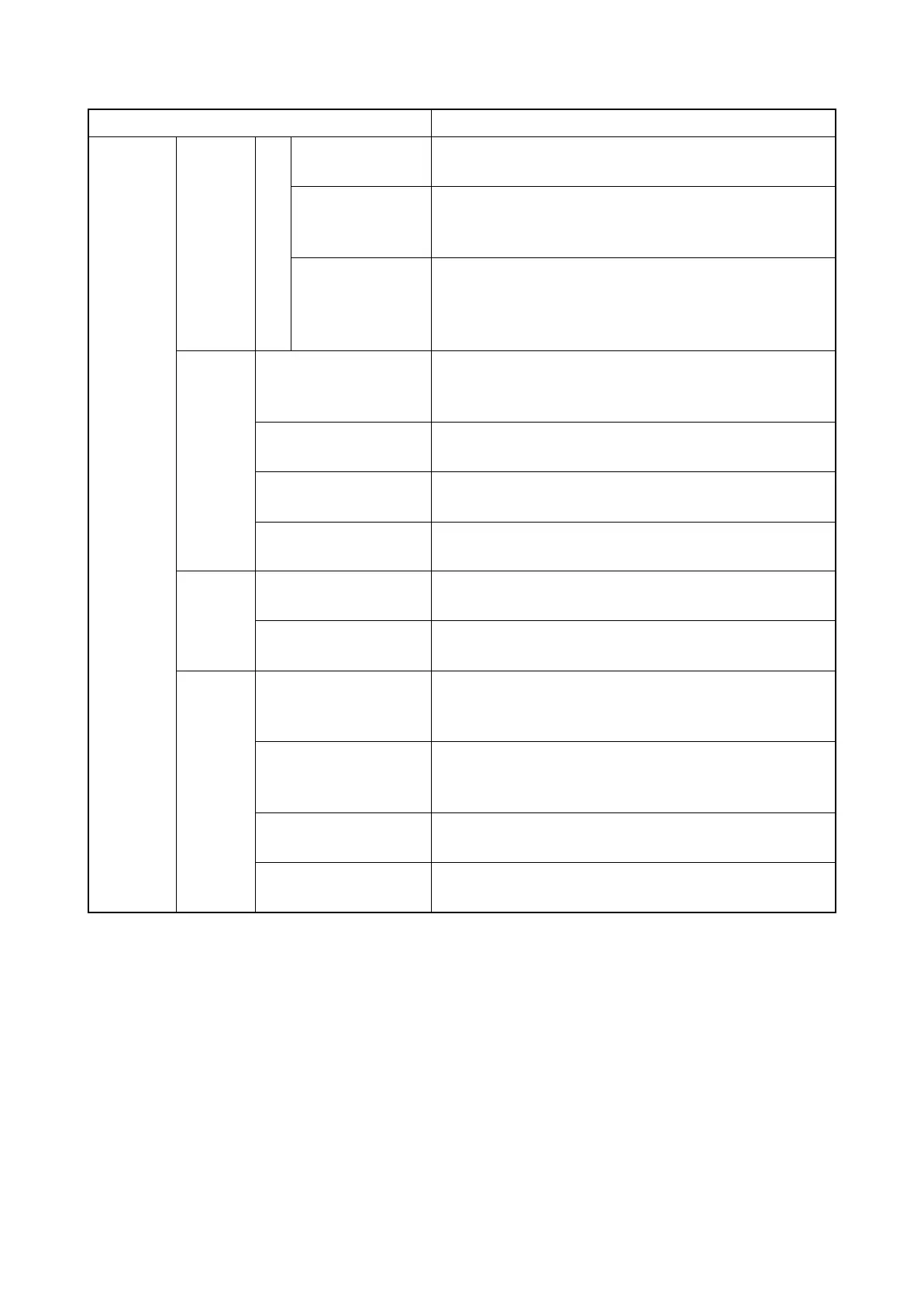
i-FAX
Settings
POP3 Test Runs a test to determine whether the settings specified in
this page are correct.
E-mail Size Limit Enter the maximum size for E-mails that can be received
in kilobytes. You can set up to 32,767 kilobytes. If 0 is
entered, the setting does not limit the maximum size.
Cover Page
Specify whether the E-mail messages are also printed.
Select [On] to print faxes with a cover page attached. If
the E-mail message includes text, the text is printed on
the cover page.
Transmis
sion
Transmission Type Allows to choose a method of sending from [Specify for
Each Destination], [Via server - On], and [Via server - Off
(Direct SMTP)].
Direct SMTP Sender
Address
*1
Displays the sender address used for E-mails sent by
Direct SMTP from this machine.
Direct SMTP Port
Number
Enter the port number used by Direct SMTP. Normally, 25
is used.
Direct SMTP Timeout Sets the timeout time in seconds during which this device
retries to connect to the SMTP server.
Recep-
tion
Direct SMTP Port
Number
Enter the port number used by Direct SMTP. Normally, 25
is used.
Direct SMTP Timeout Sets the timeout time in seconds during which this device
retries to connect to the SMTP server.
E-mail
Send
Settings
E-mail Size Limit Enter the maximum size of E-mail that can be sent in
Kilobytes. When the value is 0, the limitation for E-mail
size is disabled.
Sender Address
*2
Displays the sender address used for E-mails sent from
this machine. Set in [E-mail Address] in POP3 User
Settings.
Signature Displays the signature to be inserted in the end of the
Email body. Set on the [E-mail Settings] page.
Function Default The default settings can be changed in [Common/Job
Default Settings] page.
Item Description







 To Next Page