1Introduction
28
MX400
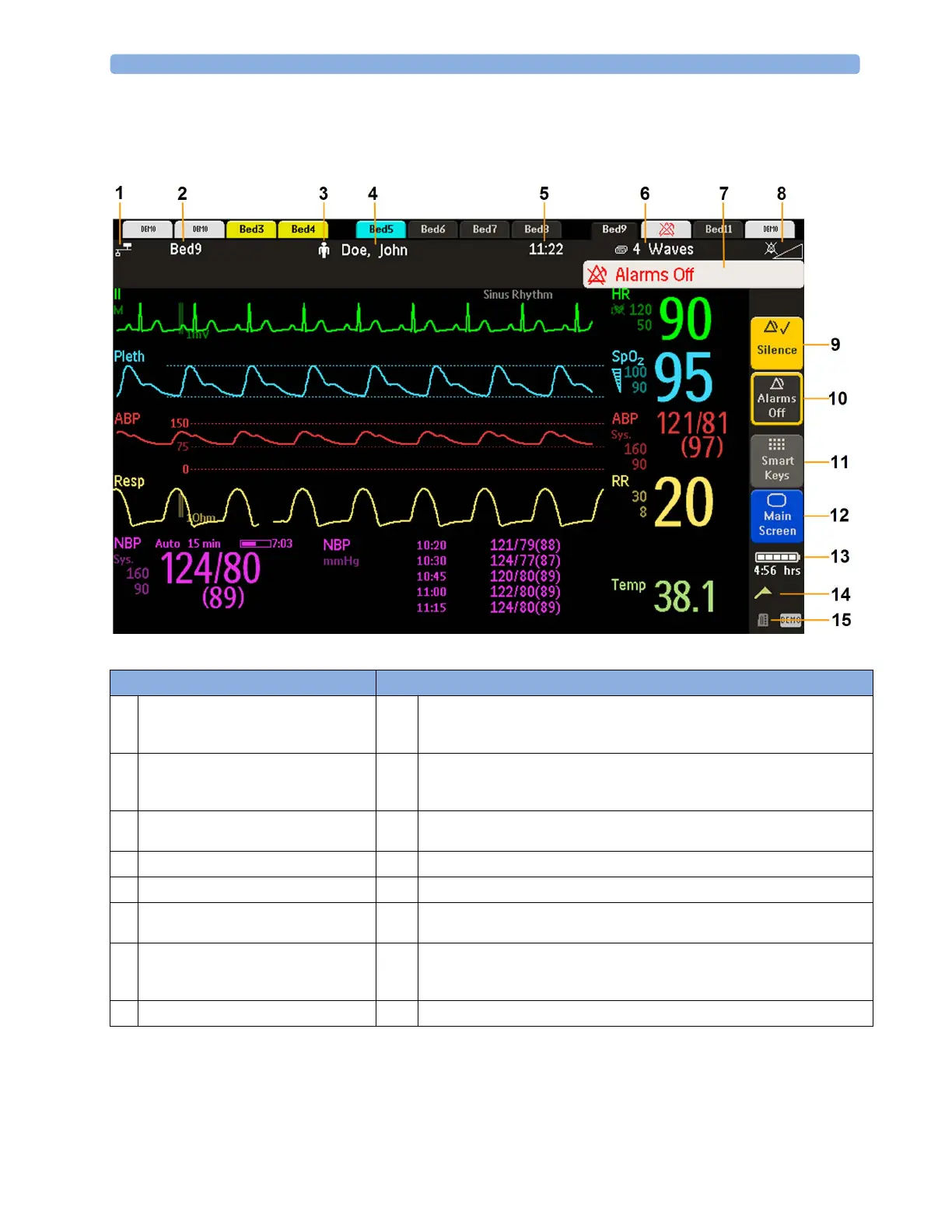
On the MX400, the permanent keys and the key to access the SmartKeys are on the right of the screen.
Monitor information line Other screen elements
1
network connection indicator
(documented in Troubleshooting in the
Service Guide)
9
Silence - acknowledges all active alarms by switching off audible alarm indicators
and lamps permanently or temporarily, if alarm reminder (ReAlarm) is configured
on.
2
bed label - gives access to Equipment
window
10
Pause Alarms or Alarms Off - stops alarms being announced for a set time or
switches them off. Select again to immediately switch alarms on again. Can be
configured not to appear here.
3
patient category symbol
11
SmartKeys -displays a block of SmartKeys. These change according to your
monitor's configuration
4
patient name
12
close all open menus and windows and return to main screen
5
date and time
13
battery indicator with remaining battery time
6
current screen name/enter Change Screen
menu
14
status messages indicator - clicking this area displays any pending status messages
7
alarm status area - shows active alarm
messages or Alarms Off symbol when
alarms are switched off
15
measurement selection symbol - opens Measurement Selection window to resolve
label conflicts
8
alarms off/alarm volume indicator



 To Next Page